# HeyForm Help Center
> HeyForm is an open-source form builder for conversational forms, surveys, quizzes, and polls. This documentation covers building and sharing forms, integrations, self-hosting, configuration, and the REST API.
---
# Introduction
Source: https://docs.heyform.net/introduction
Get the most out of HeyForm with our detailed help center guides and practices.
HeyForm is created as a cost-effective alternative to Typeform and offers an improved user experience compared to Google Forms.
With HeyForm, anyone can easily create engaging conversational forms for surveys, questionnaires, quizzes, and polls—no coding skills required.
{data-zoomable preload}
## Getting Started
Creating a HeyForm is simple and straightforward. Here are some quick methods:
::card-group
::card
---
title: Quickstart
icon: i-heroicons-pencil-square
to: /quickstart
---
Start building awesome forms in under 5 minutes.
::
::card
---
title: Templates
icon: i-heroicons-photo
to: https://heyform.net/templates
target: _blank
---
Choose a template from the gallery and make it your own.
::
::
## Make it yours
Tailor your form to align with your brand, giving it a distinctive and professional appearance.
::card-group
::card
---
title: Custom Domain
icon: lucide:globe
to: /features/custom-domain
---
Customize your HeyForm links and metadata with your own (sub)domain.
::
::card
---
title: Custom CSS
icon: vaadin:css
to: /features/custom-css
---
Custom CSS lets you style your form beyond the default design options.
::
::
## AI Agent
Give AI assistants and coding agents up-to-date context about HeyForm with these plain-text files.
- [`/llms.txt`](https://docs.heyform.net/llms.txt){target="_blank"}: an index of every page with a short description.
- [`/llms-full.txt`](https://docs.heyform.net/llms-full.txt){target="_blank"}: the full documentation in a single file.
---
# Create a form
Source: https://docs.heyform.net/quickstart/create-a-form
Start building awesome forms in under 5 minutes
Before we get down to create a form, it's important to understand two key concepts:
- **Workspace**: Think of this as a shared virtual office where your team collaborates. Whether you're a company, a school, or a group, you can create a Workspace that represents the collective environment where everyone works together.
- **Project**: Within a Workspace, a Project is like a dedicated workbench where members focus on specific tasks or themes. It’s where you manage everything related to a particular area, such as form creation, audience management, and integrations.
For example, if you’re a product manager at a SaaS startup, you might create a Workspace called "XYZ". Within this Workspace, you could set up a Project specifically for "Product Management," where you handle forms related to market research and idea validation.
Alternatively, if you’re a high school math teacher, you could create a Workspace with your school’s name. Inside this Workspace, you might establish a Project dedicated to "Math", where you can easily create quiz forms for final exams.
## Create your first workspace
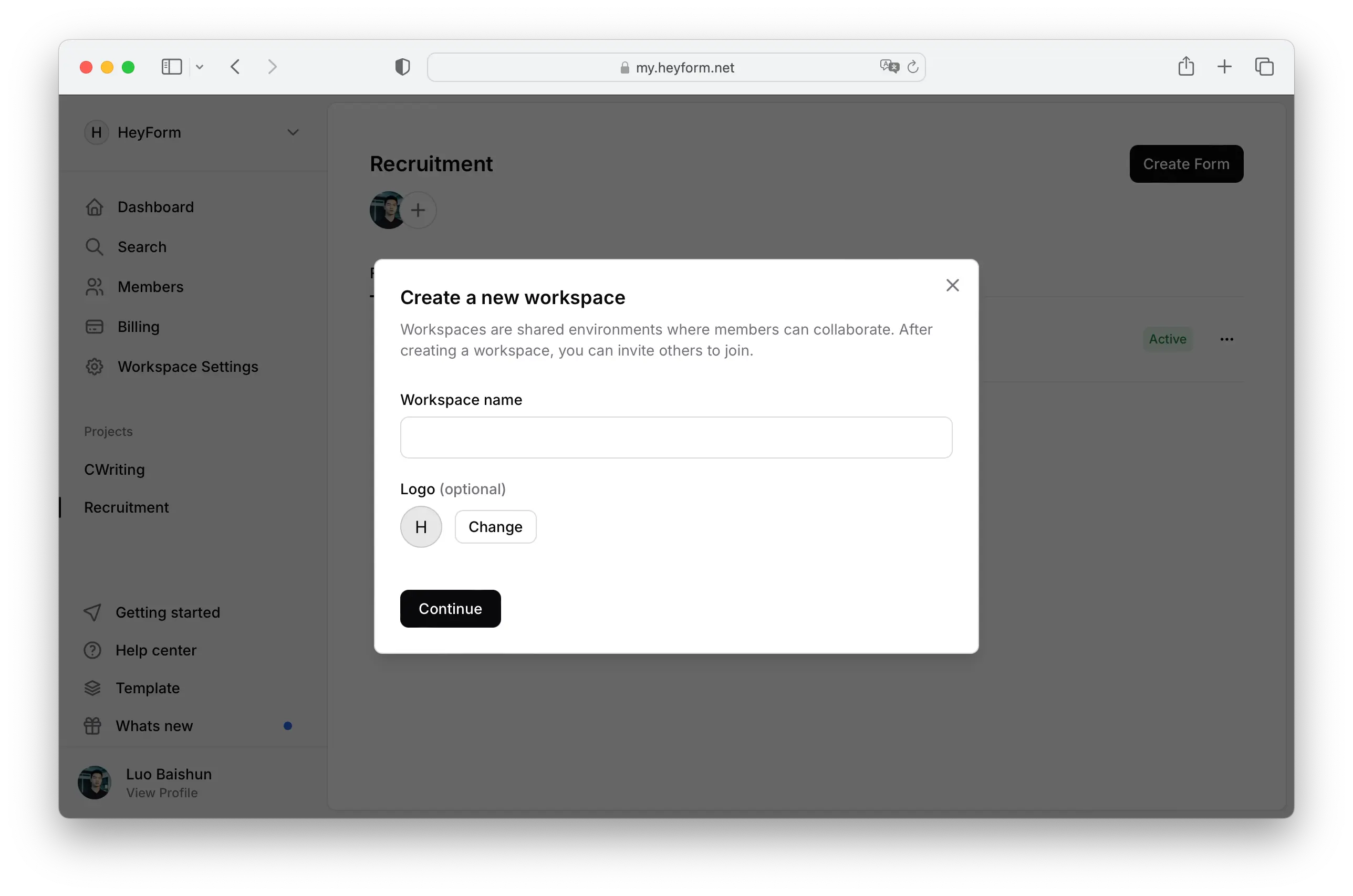
Once you've created a HeyForm account, you'll need to set up a new workspace to organize all your projects.
The name field is mandatory, while adding a logo is optional. If you don’t upload a logo, the system will use the first letter of your workspace name as a default.
 ## Create your first project
Once you've set up your workspace, the next step is to create a project where all your forms will be organized.
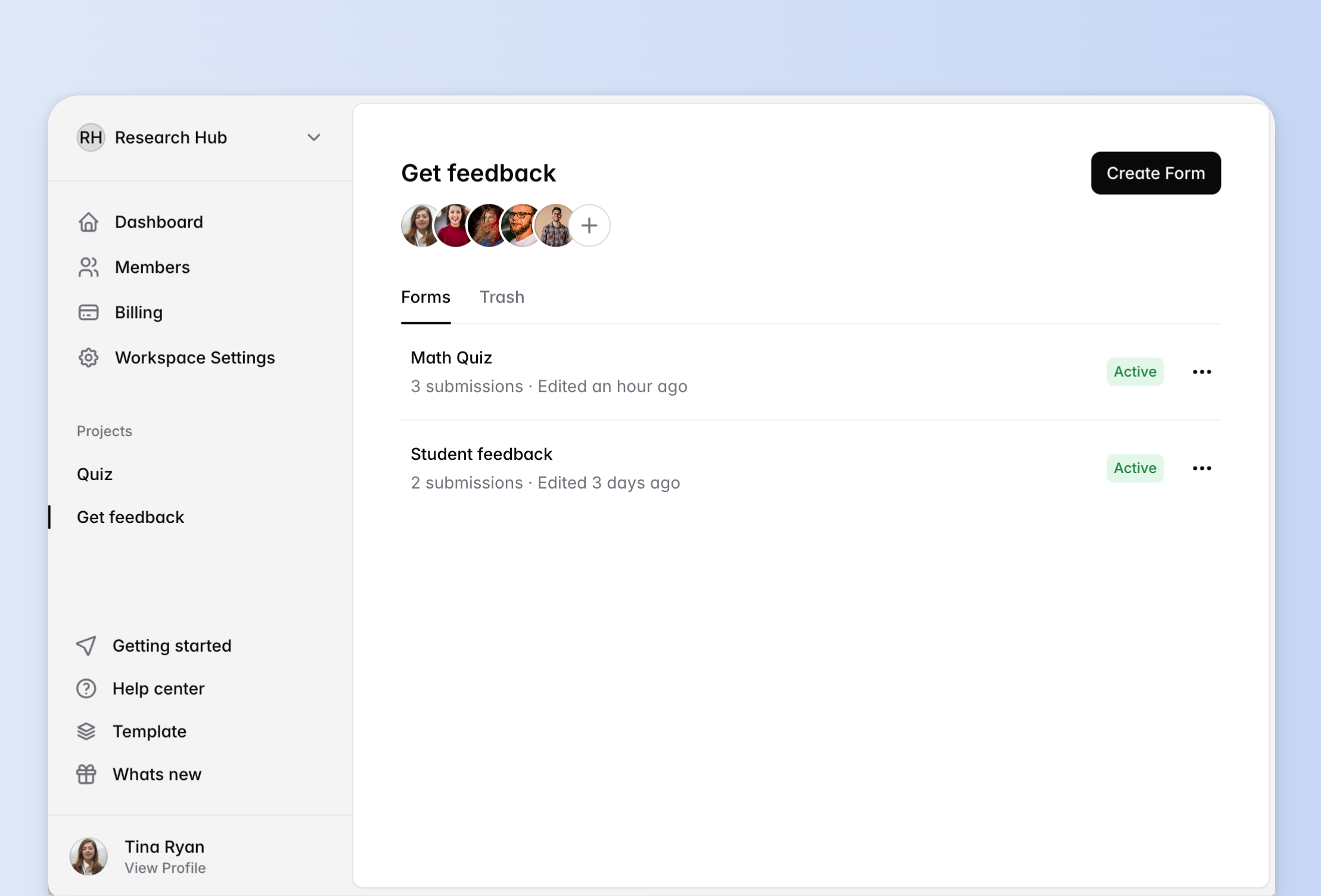
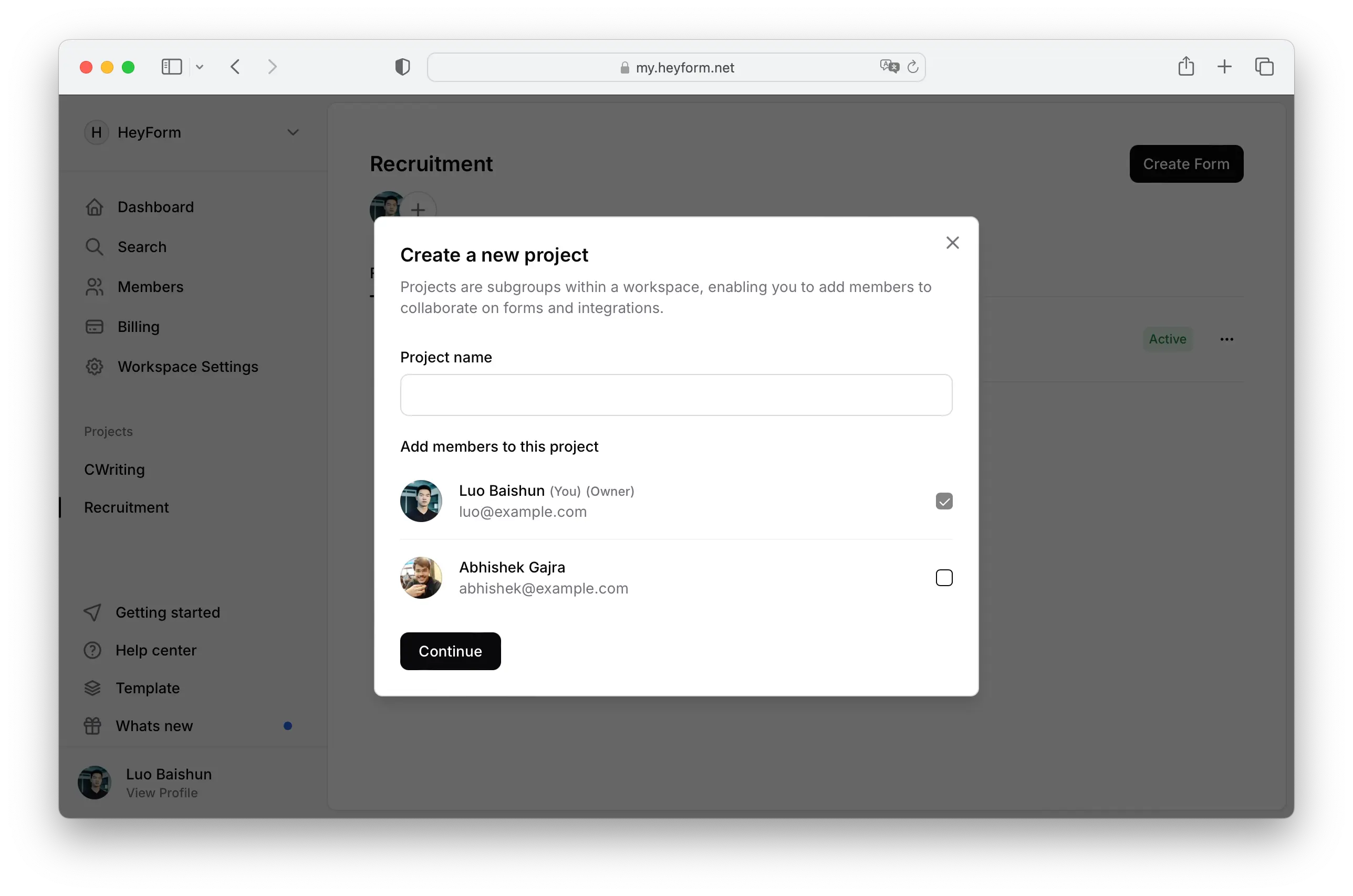 Once you are in, you can see all your projects listed in the left sidebar. You can click on the project name to view all the forms associated with it.
 ## Create your first form
HeyForm offers three quick ways to create forms:
- Using AI
- From [templates](https://heyform.net/templates)
- Starting from scratch
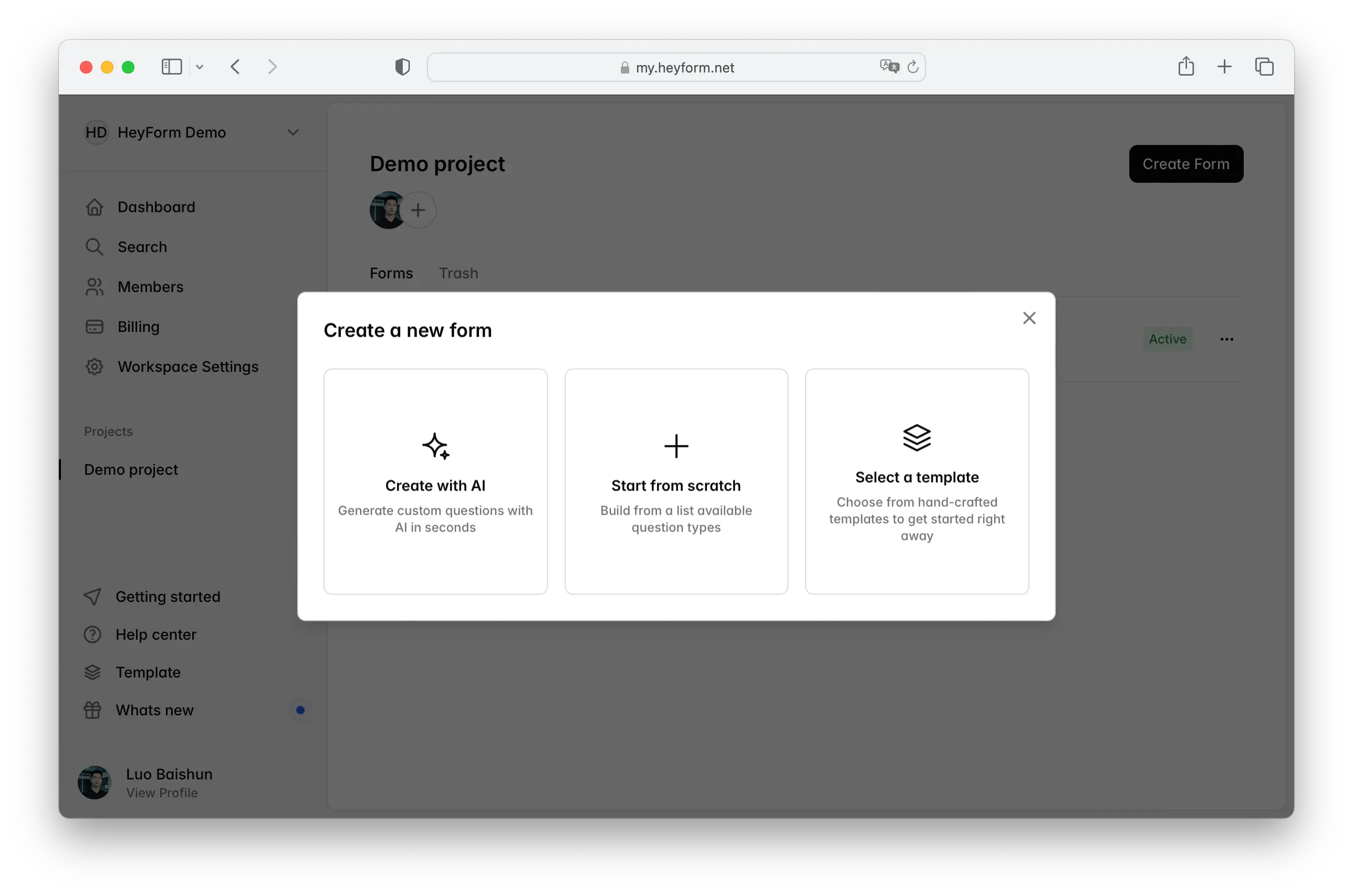 No matter which option you choose, you'll get a user-friendly form builder, similar to designing PowerPoint slides, where each question is displayed as a slider.
:gif{src="/images/create-form.gif" alt="Create a new form"}
### Move and duplicate a question
Move a question by dragging and dropping it to a new position in your form. Click on the right icon to expand the menu, and choose ‘Duplicate’ to duplicate a question.
### Options Panel
The right sidebar, known as the Options Panel, allows you to customize your questions with various settings:
- **Required or Optional**: Choose whether a question is mandatory or not.
- **Insert Image**: Add an image to enhance your question.
- **Character Limit**: Set minimum and maximum character or choice limits.
- **Form Design**: Personalize the design of your form.
- [**Conditional Logic**](https://docs.heyform.net/features/conditional-logic): Implement rules to hide, show, or jump to specific questions based on responses.
## Publish your first form
As you create your form, all changes—whether adding new questions, rearranging them, or adjusting settings—are automatically saved as a draft on the HeyForm server.
When you're ready to make the form publicly accessible online, simply click the 'Publish' button located at the top right corner.
Once published, you can [share your form on social media](https://docs.heyform.net/features/share). HeyForm will generate an attractive preview image for each form to enhance its appeal.
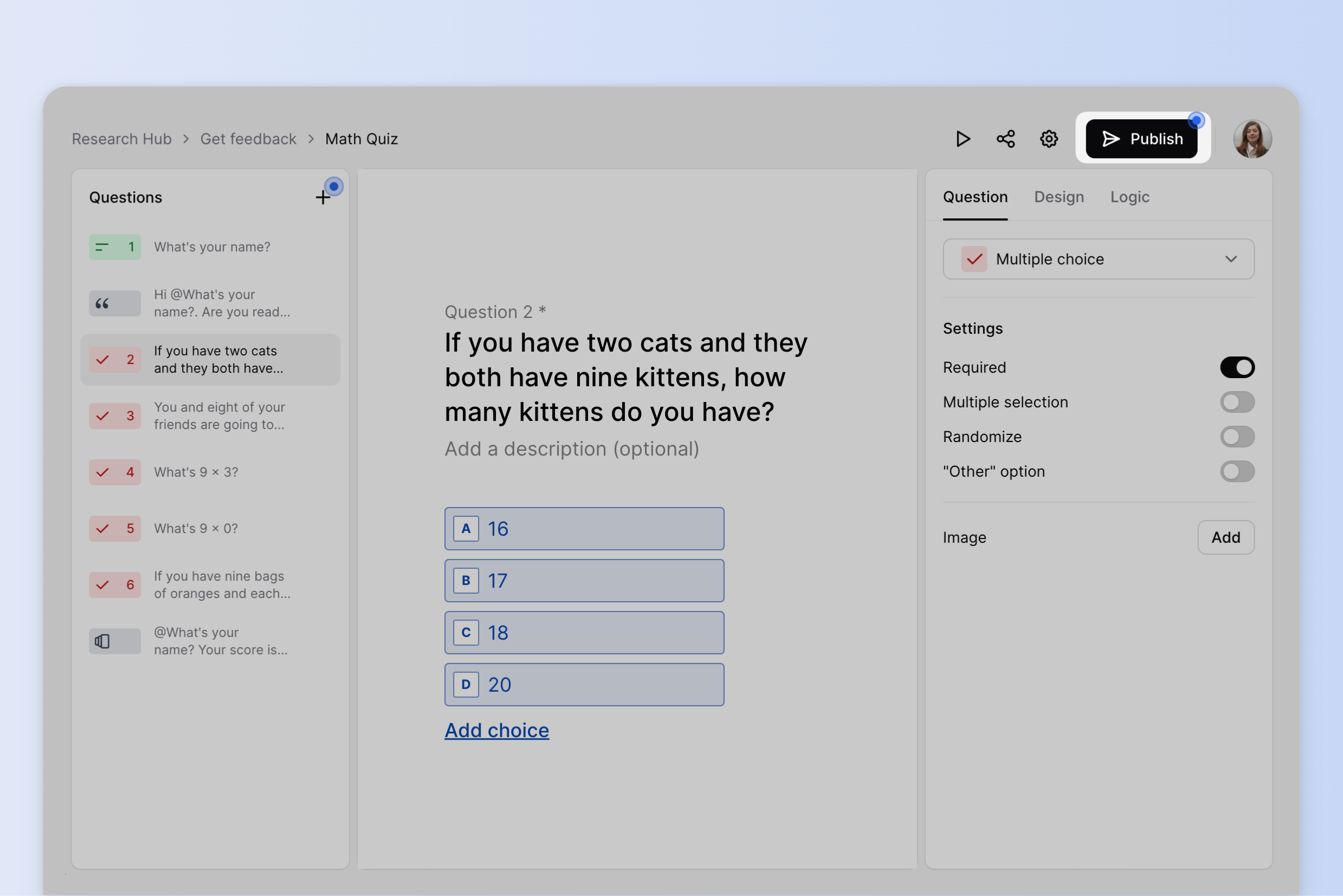 ---
# Rename a form
Source: https://docs.heyform.net/quickstart/how-to-rename-forms
Instructions on how to rename a form in HeyForm.
Go to your HeyForm dashboard, choose a form and click the three dots to select
Rename.
 Once you click
Rename, a popup will appear to rename the form.
---
# Delete a form
Source: https://docs.heyform.net/quickstart/how-to-delete-forms
Instructions on how to delete a form in HeyForm.
Sometimes, you may want to delete your forms if you no longer need them or if they were created by mistake. On HeyForm, you can easily move your forms to the trash or delete them permanently.
Go to your HeyForm dashboard, choose a form and click the three dots to select Delete.
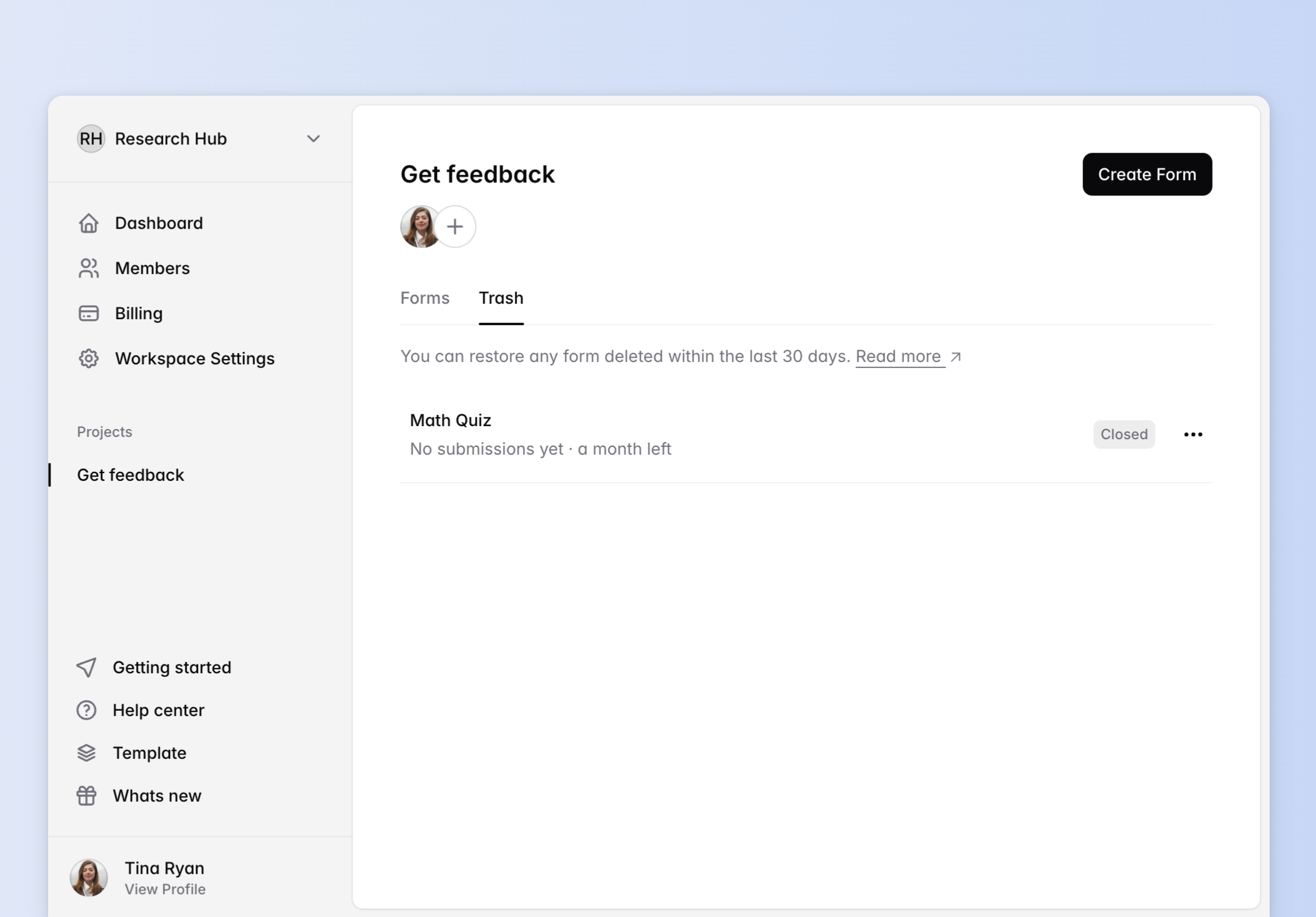
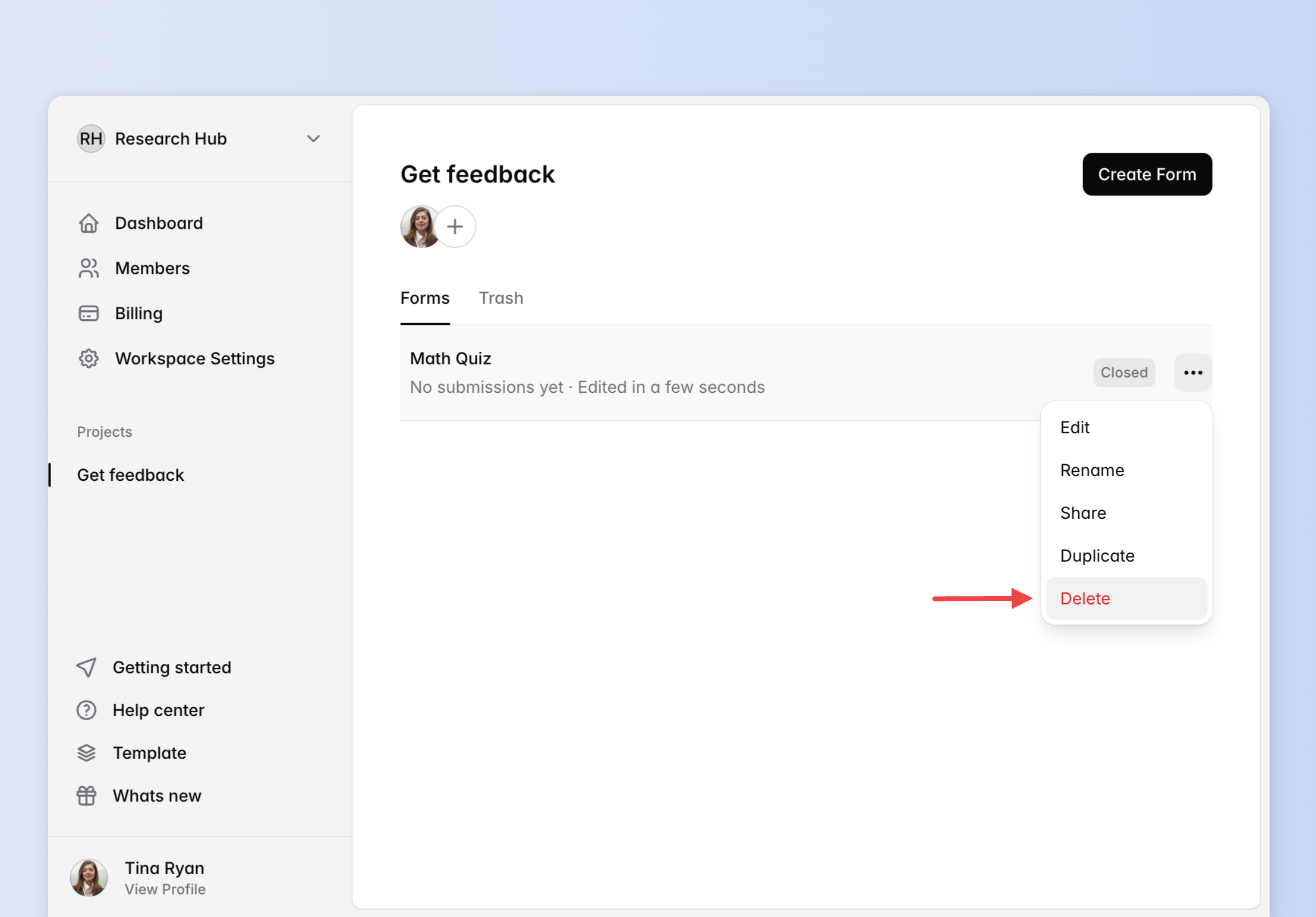 Once you click
Delete, your form will be sent to the trash:
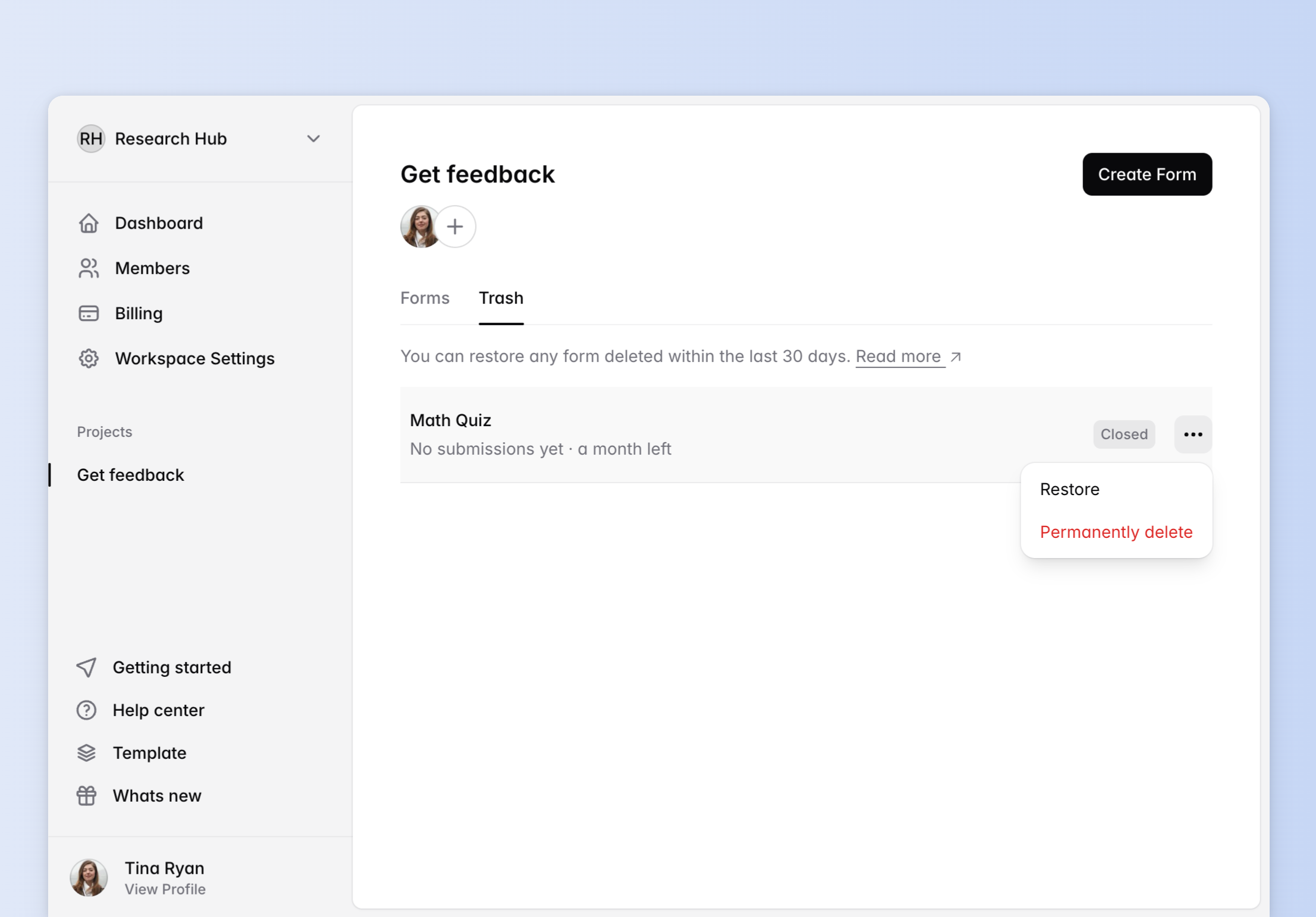
 You can restore your forms from the trash in 30 days or delete them permanently without waiting:
 ::alert{type="danger" icon="lucide:triangle-alert"}
All forms in the trash will be deleted permanently in 30 days!
::
---
# Analytics
Source: https://docs.heyform.net/features/analytics
Instructions on how to use analytics in HeyForm.
Go to `Form` > `Analytics`, you can see the general analytics information of this form.
## Analytics Overview
- **Views:** How many people have seen this form
- **Submissions:** How many people have submitted this form
- **Complete Rate:** Ratio of Views vs Submissions Submitted
- **Average Duration:** Average time it took your visitors to fill out and submit the form
{data-zoomable preload}
## Report
::alert{type="note" icon="lucide:triangle-alert"}
This feature is available in the [Basic plan](https://heyform.net/pricing) and above.
::
With report you can see all the answers and statistics of each question.
{data-zoomable preload}
---
# Submissions
Source: https://docs.heyform.net/features/submissions
Instructions on how to manage your submissions in HeyForm.
Go to `Form` > `Submissions`, you can see all the answers and statistics of each question.
{data-zoomable preload}
## How to view the submission details?
Click any submission to view the "Submission Details" in the popup modal.
{data-zoomable preload}
## How to move or delete submissions?
Click the "Checkbox" in the row, and click the "Move" or "Delete" button in the toolbar.
{data-zoomable preload}
## How to find the "Spam" submissions?
Click the "Inbox > Spam" button to switch to the "Spam" submission list.
{data-zoomable preload}
---
# Sharing forms
Source: https://docs.heyform.net/features/share
Instructions on how to share your HeyForms.
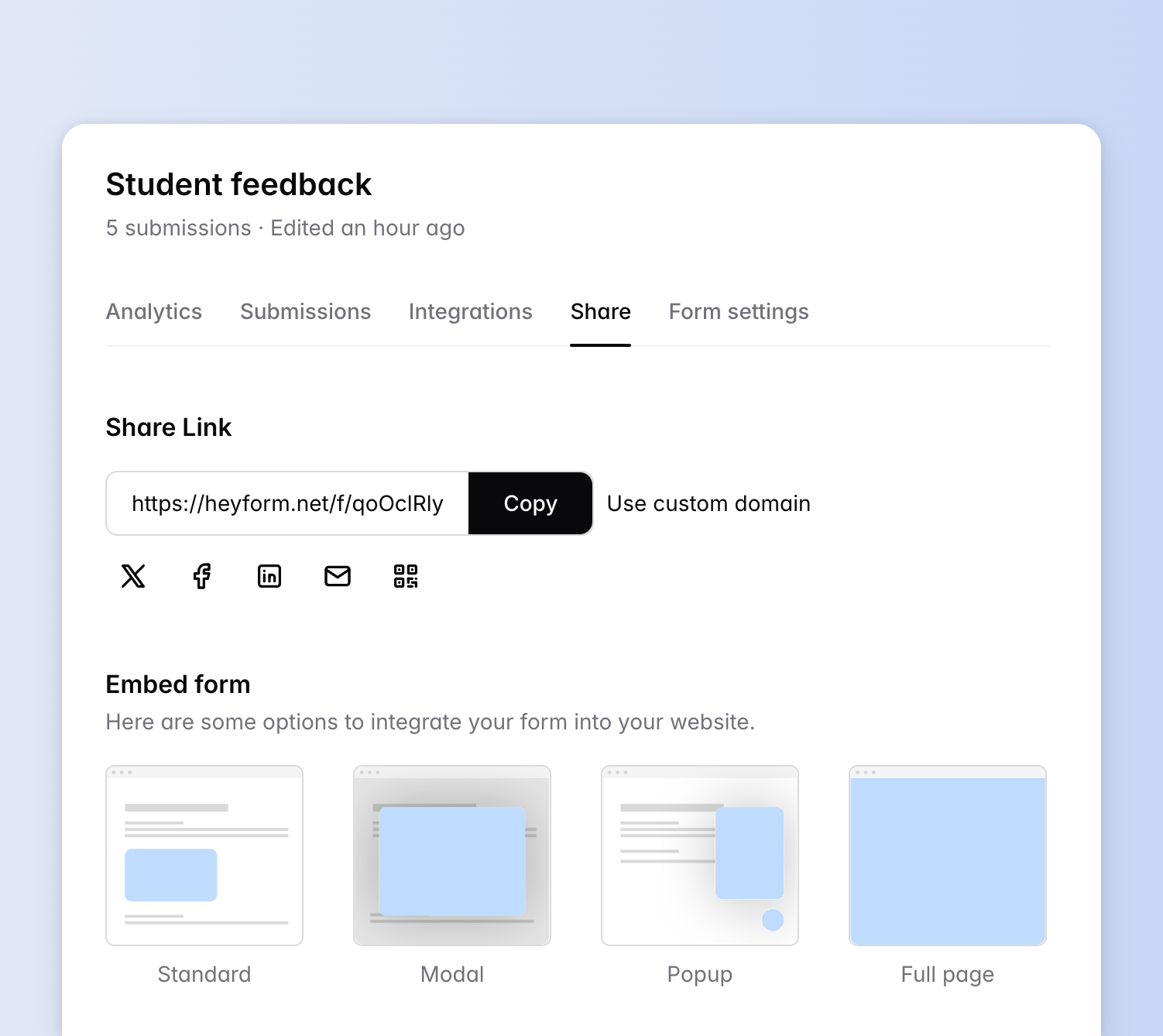
The Share page is where to come when you've finished creating your form and are ready to show it to the public.
HeyForm provides you with many ways to share your forms and make it easier to collect data from people.
HeyForm provides you with many ways to share your forms and make it easier to collect data from people.
{data-zoomable preload}
## Sharing with social media and email
Clicking the social media and email buttons lets you immediately share it on Facebook, LinkedIn, Twitter, or via email.
## Sharing form as a public URL
You can share the URL of your form by clicking on the "Copy" button, anyone who clicks this link will be able to see and use your form.
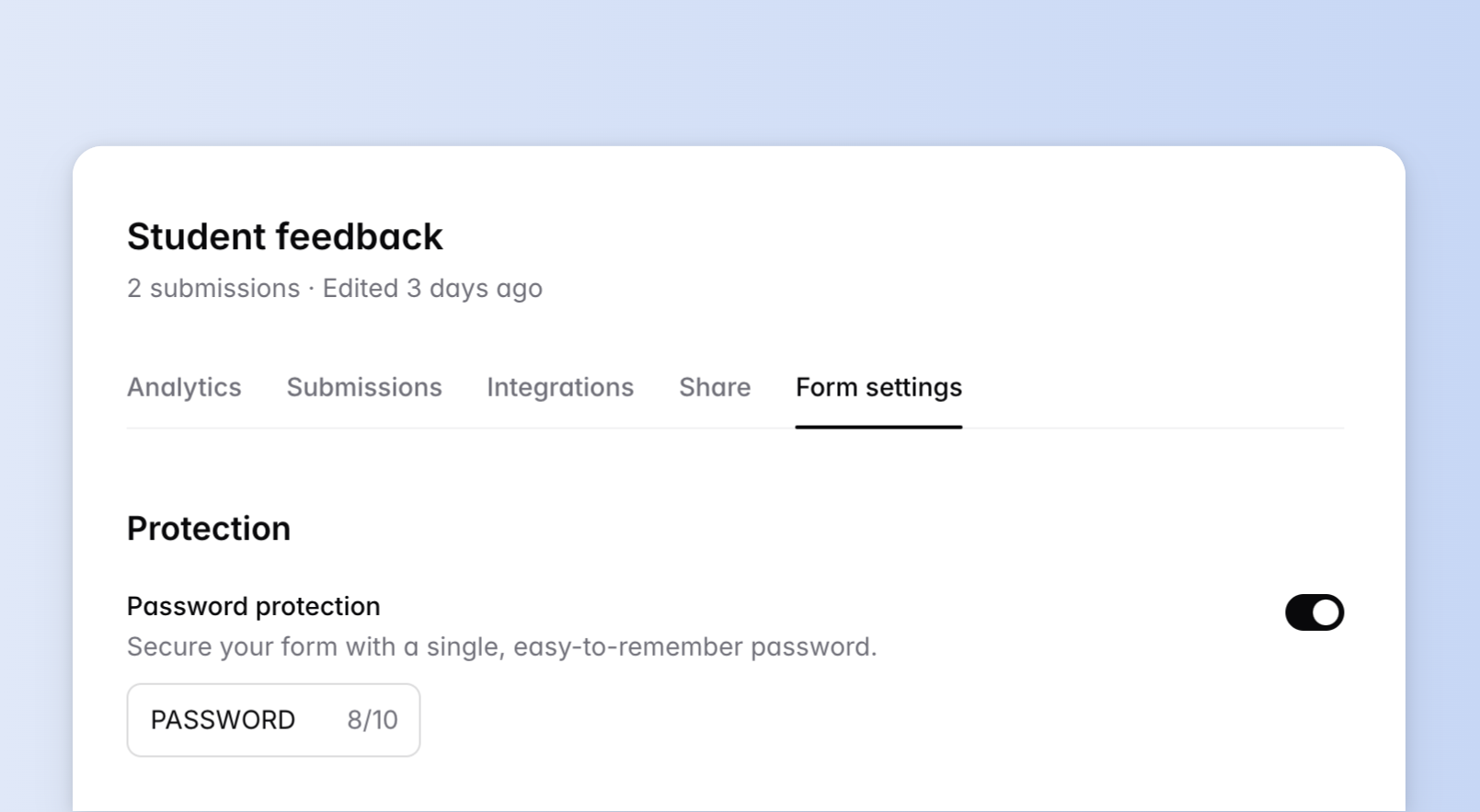
If you **don't want everyone to see your form**, you can set up a password here. You can also refresh the password by clicking on the Refresh icon.
People will be asked to enter the correct password to see the form when clicking on the link you shared.
{data-zoomable preload}
## Sharing with QR Code
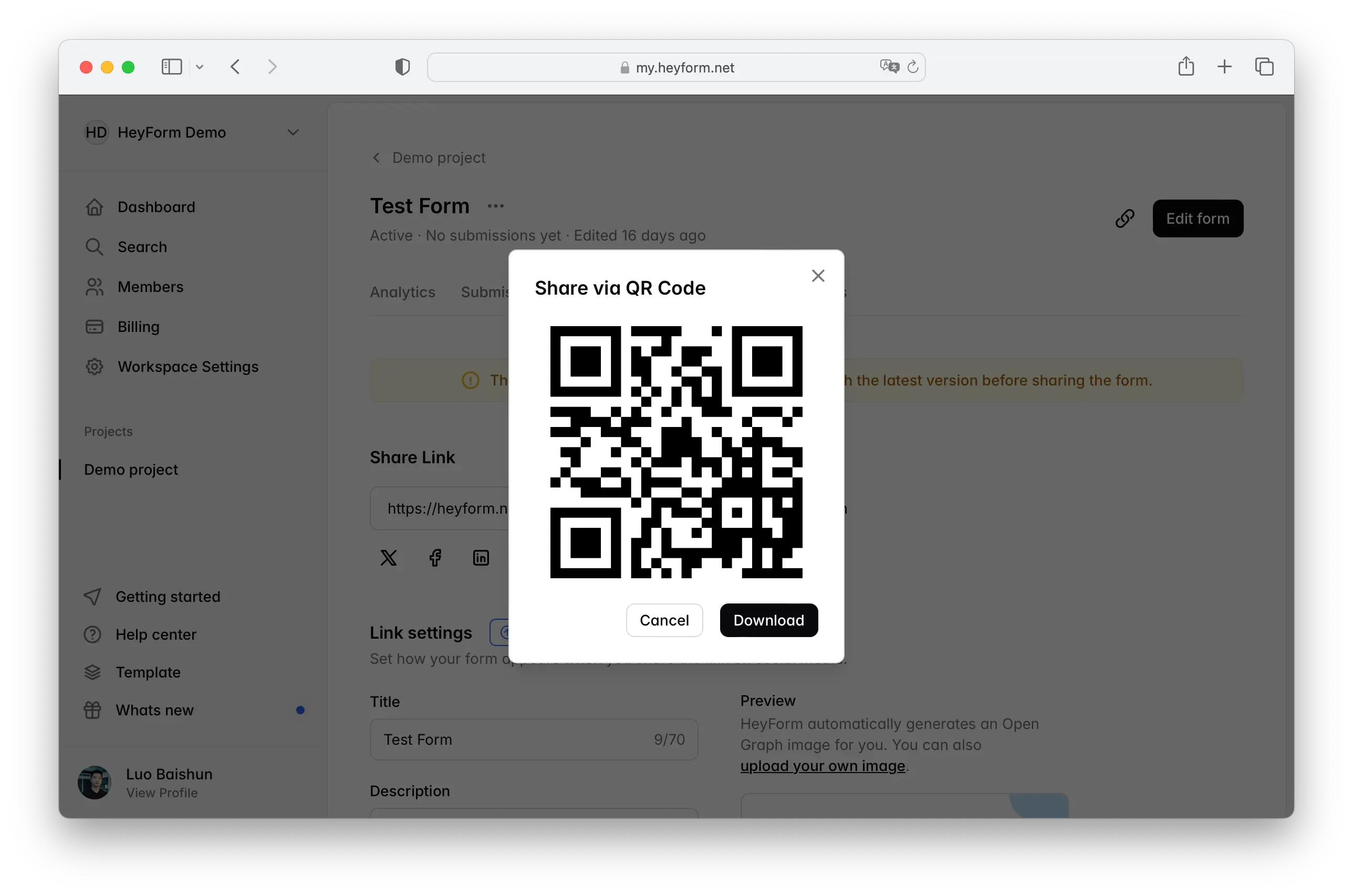
You can click the QR Code button to generate one. People can scan it with their mobile devices to see and use the form.
{data-zoomable preload}
## Embed to your website
[Read more about embed forms in this help article.](https://docs.heyform.net/features/embed-your-form)
---
# Collaboration
Source: https://docs.heyform.net/features/collaboration
Instructions on how to collaborate with your team in HeyForm.
::alert{type="note" icon="lucide:triangle-alert"}
Collaboration is available in the [Basic plan](https://heyform.net/pricing) and above.
::
HeyForm allows teams to work together by letting you invite your team members to shared workspaces. You can share your forms and results securely without exchanging private login credentials.
### How to invite team members
To add new members to your workspaces, navigate to your HeyForm dashboard and click on `Members`.
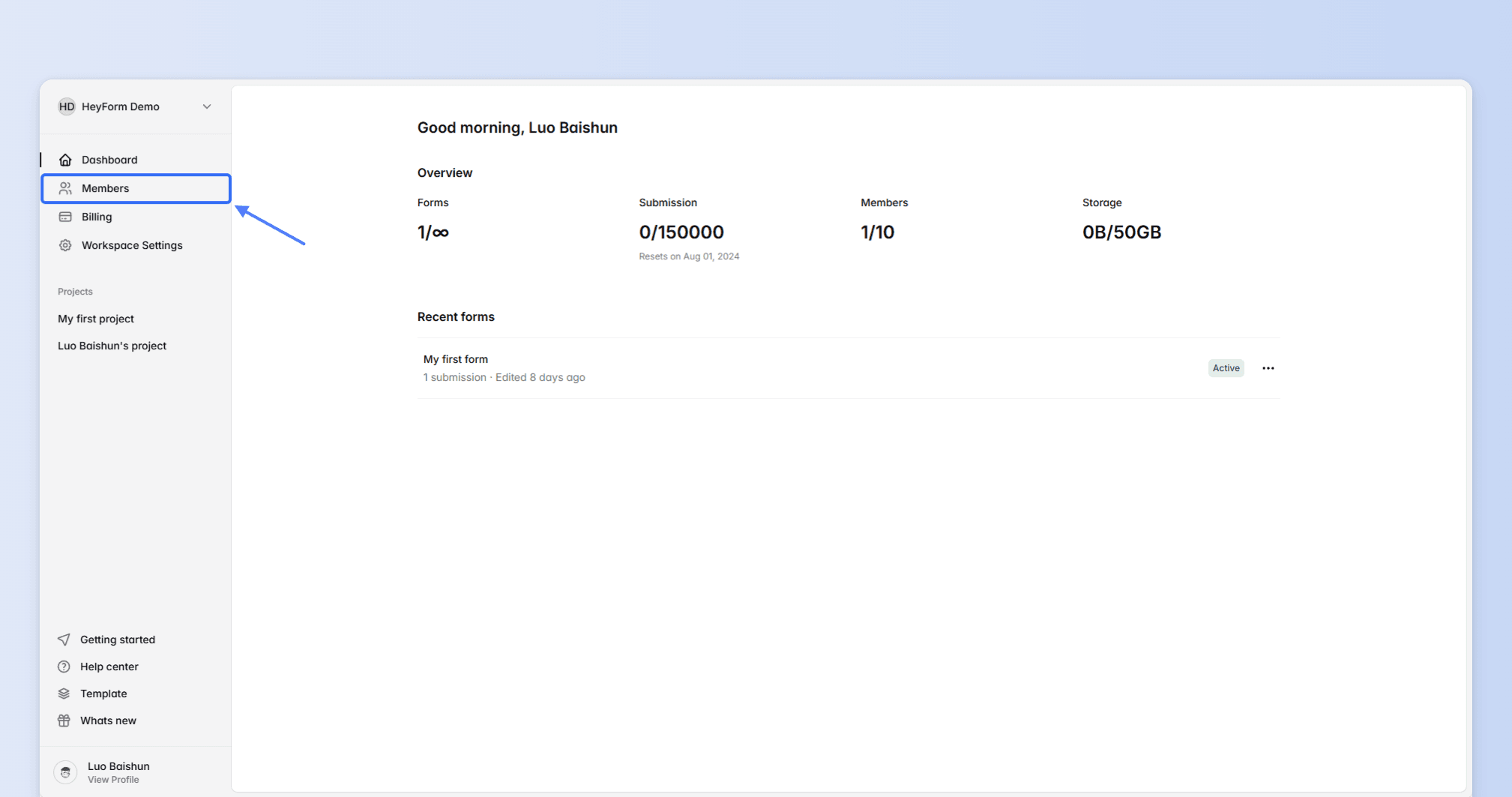
Team members are invited at the workspace level. Click on `Invite member` button and enter your teammate's email to proceed.
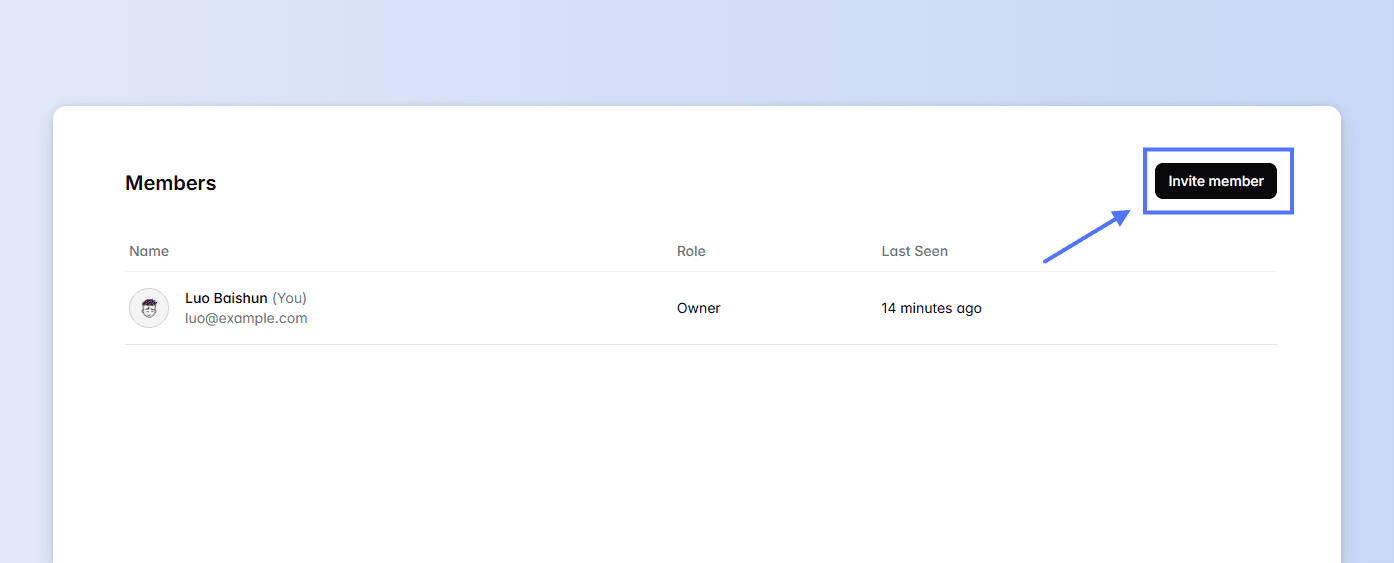
You may invite multiple teammates by clicking `add more` link.
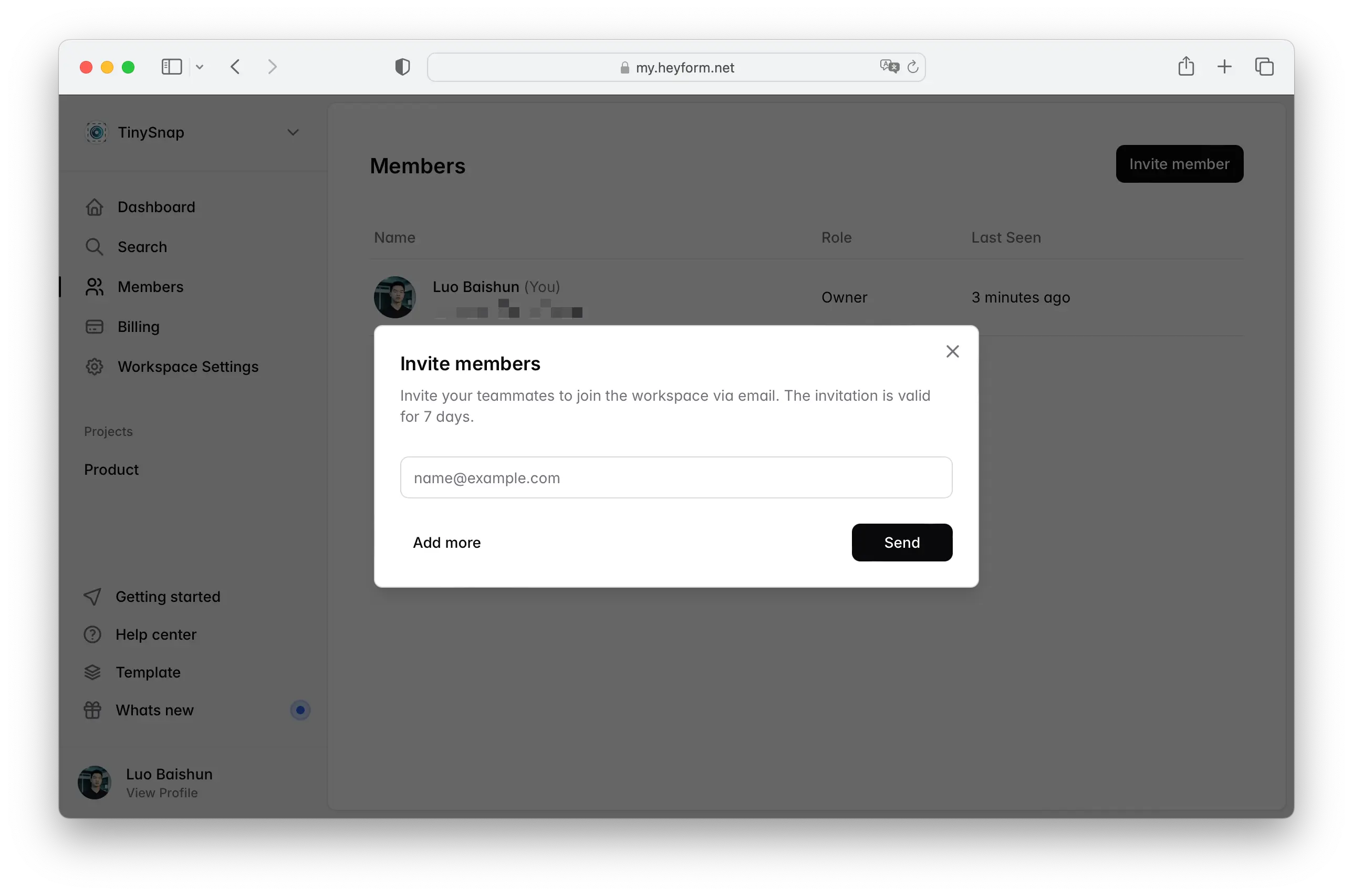
Click the `Send` button. The invited team members will receive an email with an invitation to join HeyForm.
### How to manage access permissions
On your HeyForm dashboard, click `Members` in the sidebar to view an overview of workspace members.
From this page, you can also remove members or transfer ownership.
::alert{type="warning"}
Removing a member from a workspace will **not** deleting forms by the member. Only workspace owner can delete members.
::
---
# Custom Domain
Source: https://docs.heyform.net/features/custom-domain
Want memorable form URLs that match your brand? Customize your HeyForm links and metadata with your own (sub)domain.
::alert{type="note" icon="lucide:triangle-alert"}
Custom Domain is available in the [Premium plan](https://heyform.net/pricing) and above.
::
Assume your company’s website is `acme.com`, and you want to use the subdomain `forms.acme.com` to share your HeyForms. With [**HeyForm Premium**](https://heyform.net/pricing), you can connect this subdomain to your HeyForm workspace.
Follow the steps below to connect your (sub)domain and start creating branded forms.
### 1. Connect a custom domain
Go to `Workspace Settings` in your sidebar and Enable `Custom domain`.

You can add either:
- a domain (e.g. acme.com)
- a subdomain (e.g. form.acme.com)
### 2. Add DNS records to your domain provider
After entering your domain, click on `Continue` button. You'll see the DNS records that need to be added to your domain provider's settings, such as Cloudflare, Namecheap, or GoDaddy.

Wait for the DNS records to be verified. This process can take anywhere from a few seconds to a few hours, depending on how long your DNS takes to propagate.
When your domain points to our servers, HeyForm will automatically generate an **SSL Certificate**.
---
# Custom CSS
Source: https://docs.heyform.net/features/custom-css
Custom CSS lets you style your form beyond the default design options.
::alert{type="note" icon="lucide:triangle-alert"}
Custom CSS is available in the [Premium plan](https://heyform.net/pricing) and above.
::
### How to inject custom CSS
Open the design options in the form builder and inject custom CSS into the field.
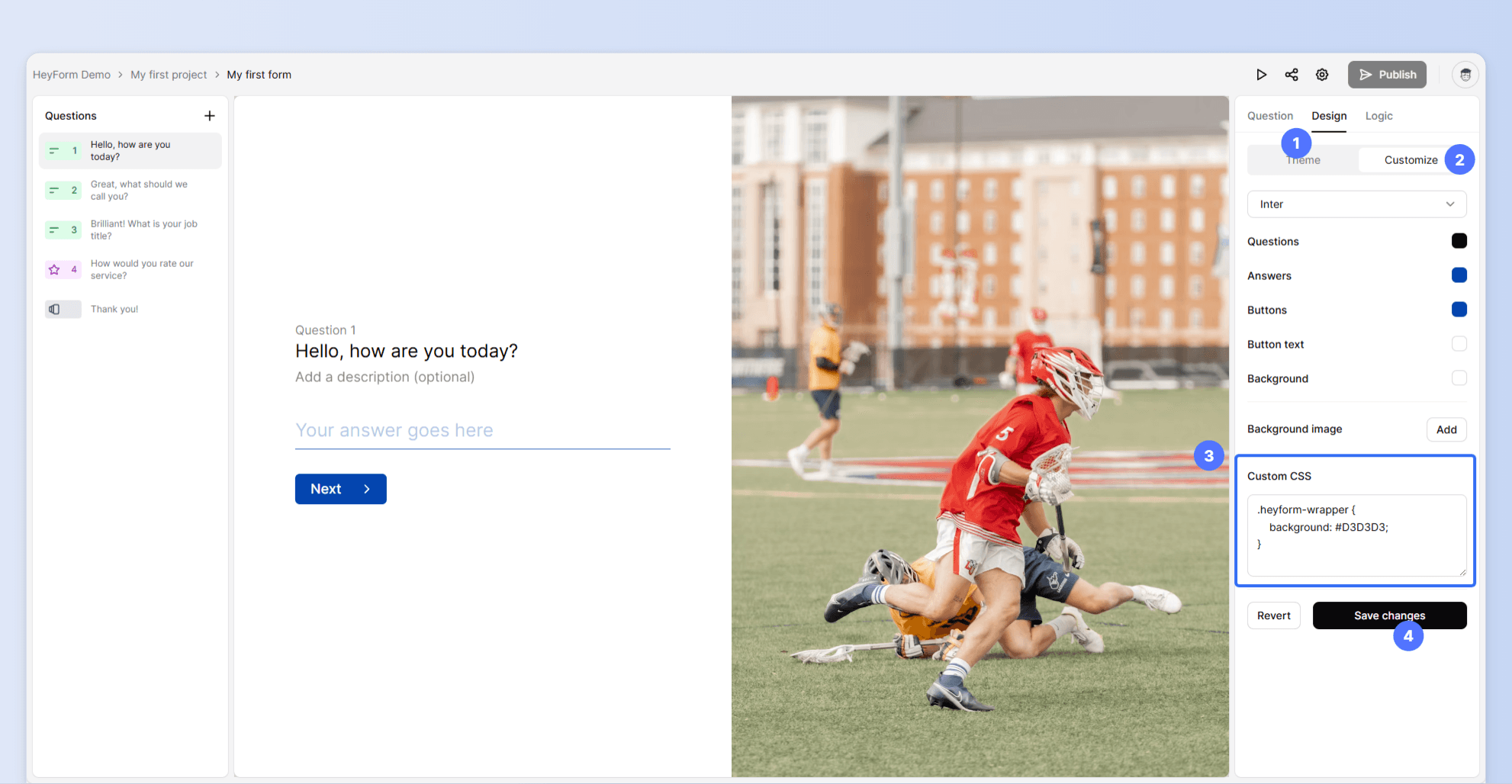
::callout{type="danger" icon="lucide:info"}
Custom CSS requires coding skills and may be beyond our support scope despite our best efforts.
::
---
# Form Settings
Source: https://docs.heyform.net/features/form-settings
Instructions on how to use form settings in HeyForm.
When you want to modify the form public access, time limit, IP limit and other settings, click the "Form settings" button of the page.
## General
### Progress bar
You can easily let respondents know how close they are to completing your form.
:gif{src="/images/settings-progress-bar.gif" alt="Progress bar"}
### View all questions
You can enable it to allow respondents to go through all the questions.
:gif{src="/images/settings-question-list.gif" alt="View all questions"}
### Navigation arrows
You can enable it to let respondents navigate between questions.
:gif{src="/images/settings-navigation.gif" alt="Navigation arrows"}
## Form public access
### Close form
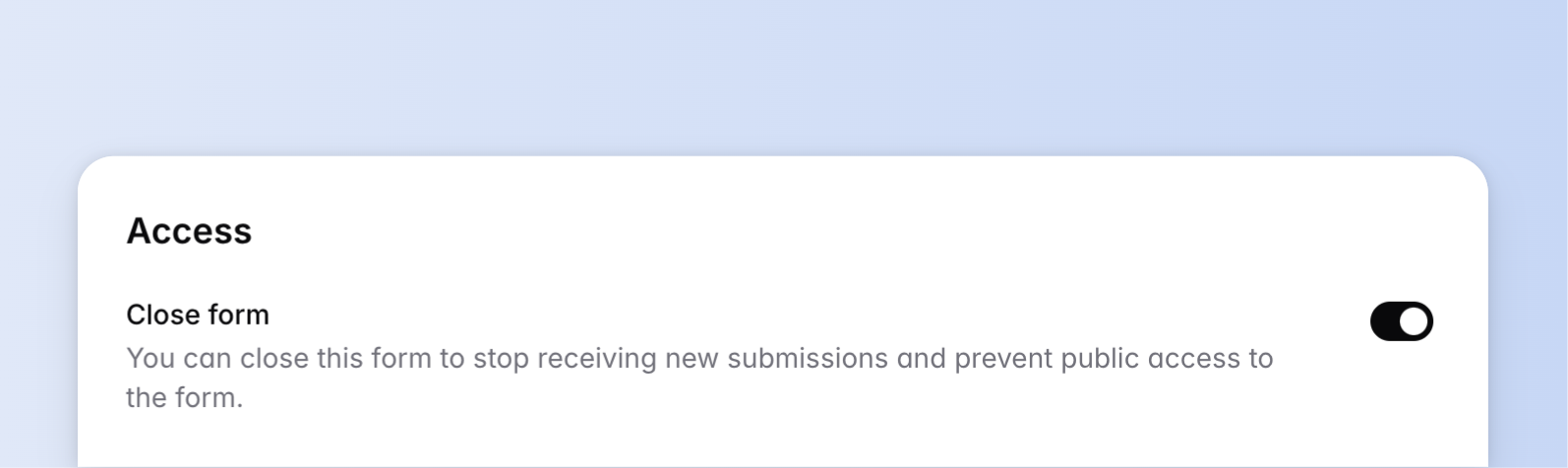
When you switch on this setting, the form status will be **inactive**. At this time, the form can't be accessed and submitted by people.
{data-zoomable preload}
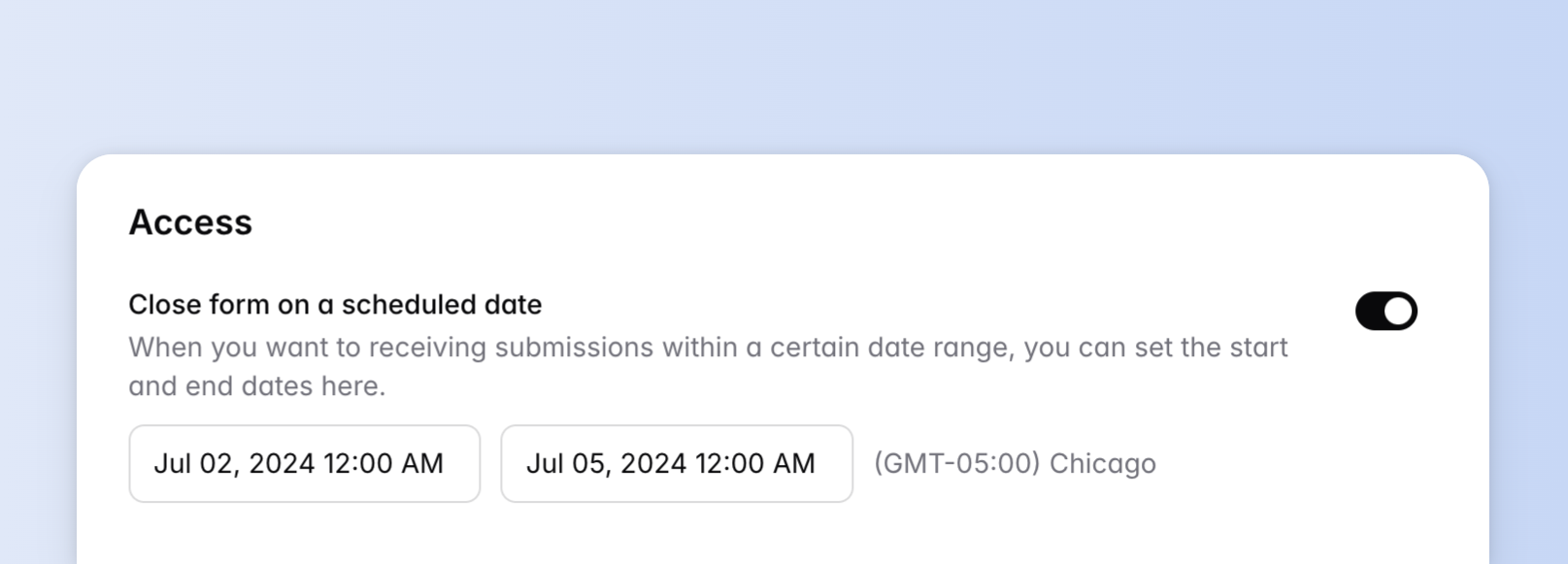
### Expiration date
The form can only be accessed and submitted in a specific date range when you set up this setting.
{data-zoomable preload}
### Countdown (time limit)
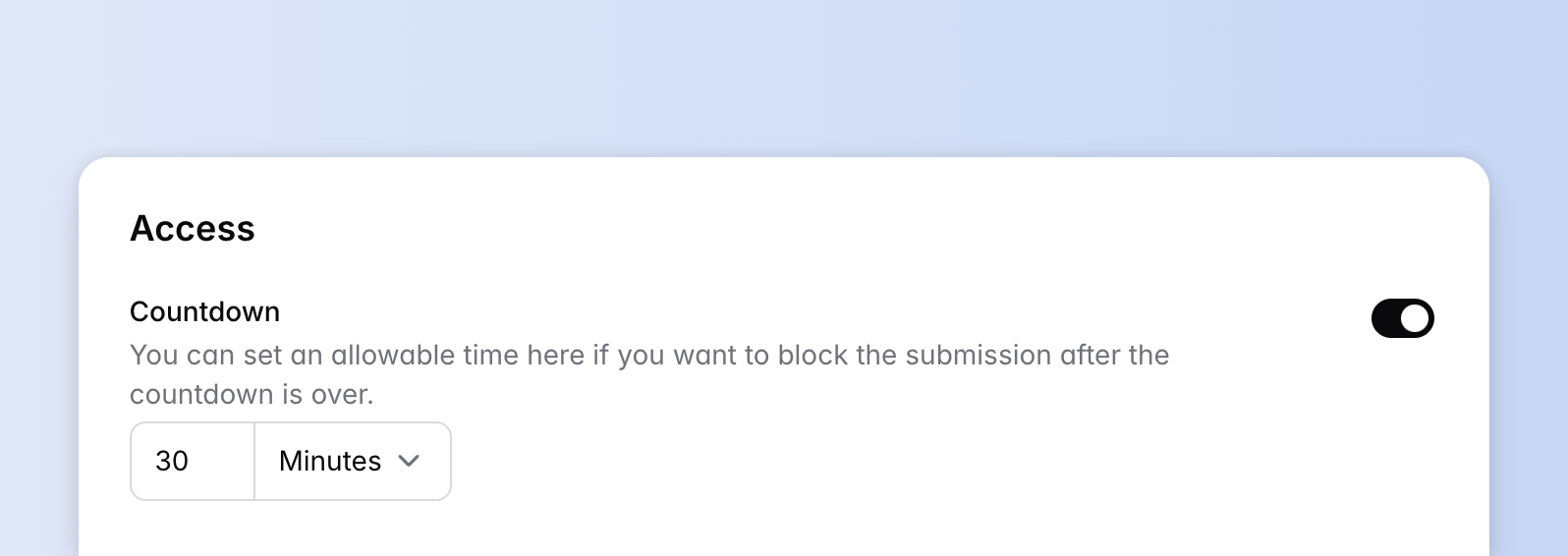
If you want to limit the time for people to submit the form, you can set a time here, which is usually used in exam scenarios.
{data-zoomable preload}
HeyForm provides three-timing units: "hour", "minute" and "second". The form will count down when the respondent opens the web browser.
Once time is up, the form will be closed and can't be submitted. If the respondent wants to submit again, he can only refresh the web browser and re-submit it.
:gif{src="/images/settings-countdown.gif" alt="Countdown"}
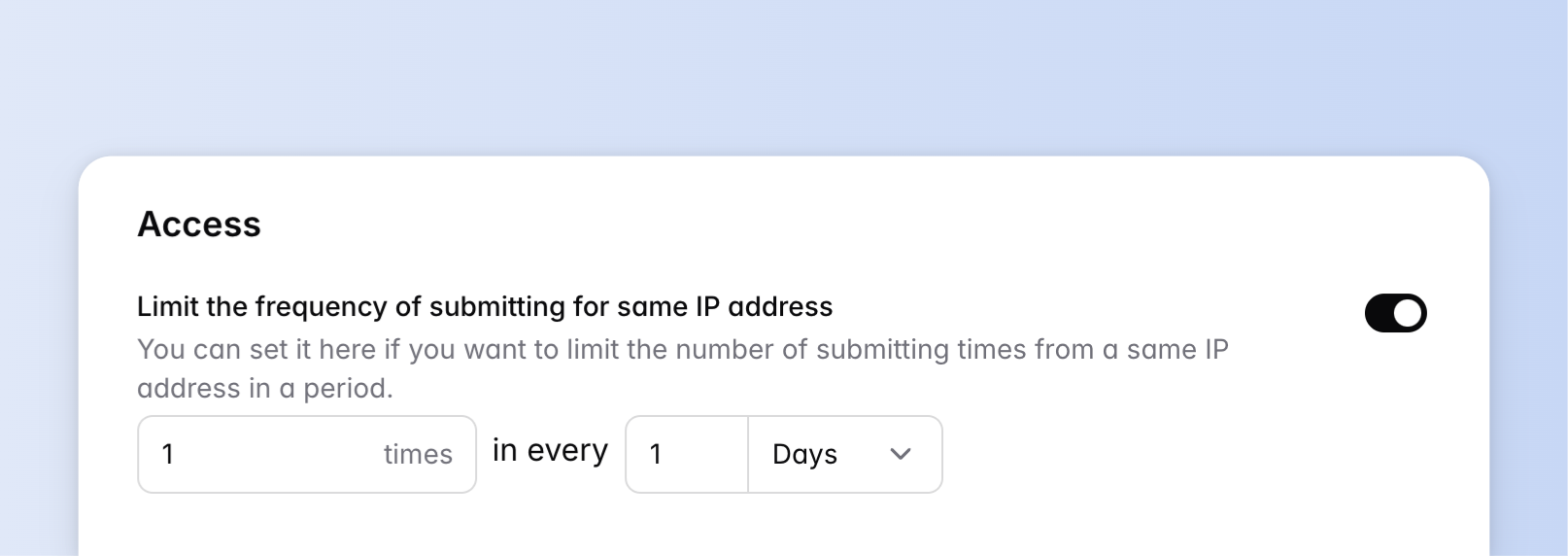
### IP address limit
When you don't want the same IP address to submit too many times in a short period, you can set this setting. HeyForm provides two ways for this:
- The same IP address is only allowed to submit the form once
- The same IP address can submit up to several times in a certain period
{data-zoomable preload}
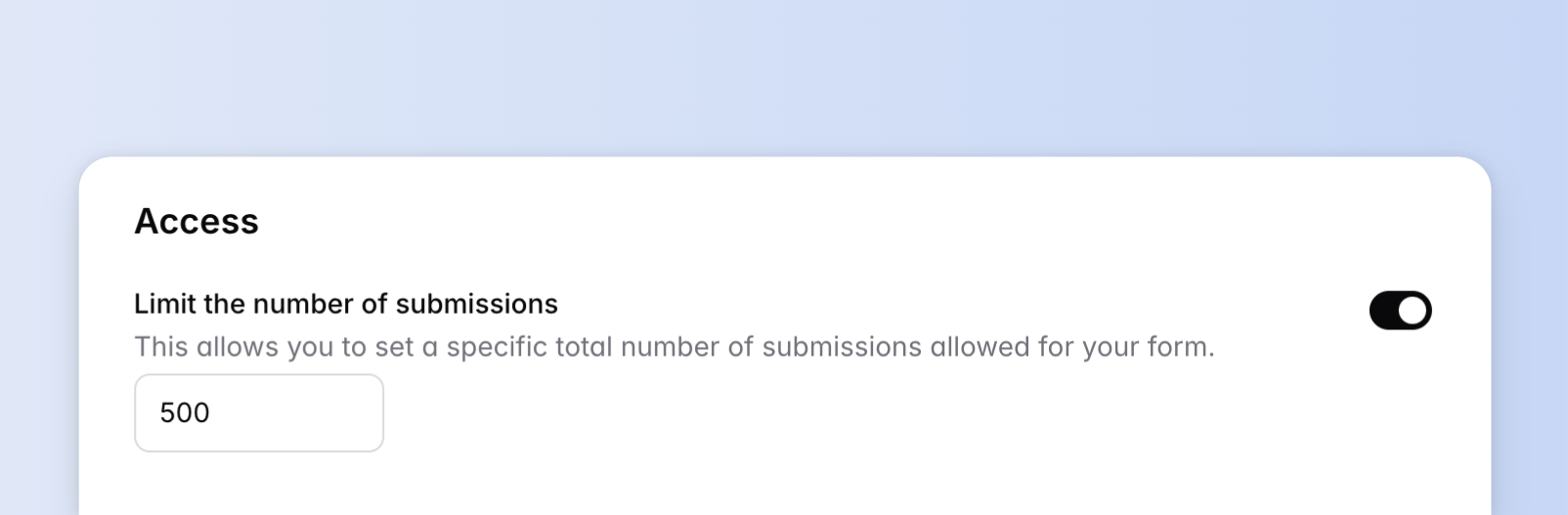
### Maximum submission limit
This option will limit the number of submissions. If the number of submissions exceeds the maximum number you have set, the form **will not be allowed to submit** anymore.
{data-zoomable preload}
## Multi-Language
Save time and reach a wider audience by creating a single form with multiple language options. No need to worry about translations, as [OpenAI GPT](https://openai.com/) will handle all the hard work for you.
We currently support 7 languages:
- English
- German
- French
- Japanese
- Polish
- Chinese (Simplified)
- Chinese (Taiwan)
### Primary language
When a user's language isn't supported or lacks available translations, all form elements such as questions, default buttons and validation errors will display in the primary language.
### Translations
::alert{type="note" icon="lucide:triangle-alert"}
This feature is available in the [Premium plan](https://heyform.net/pricing) and above.
::
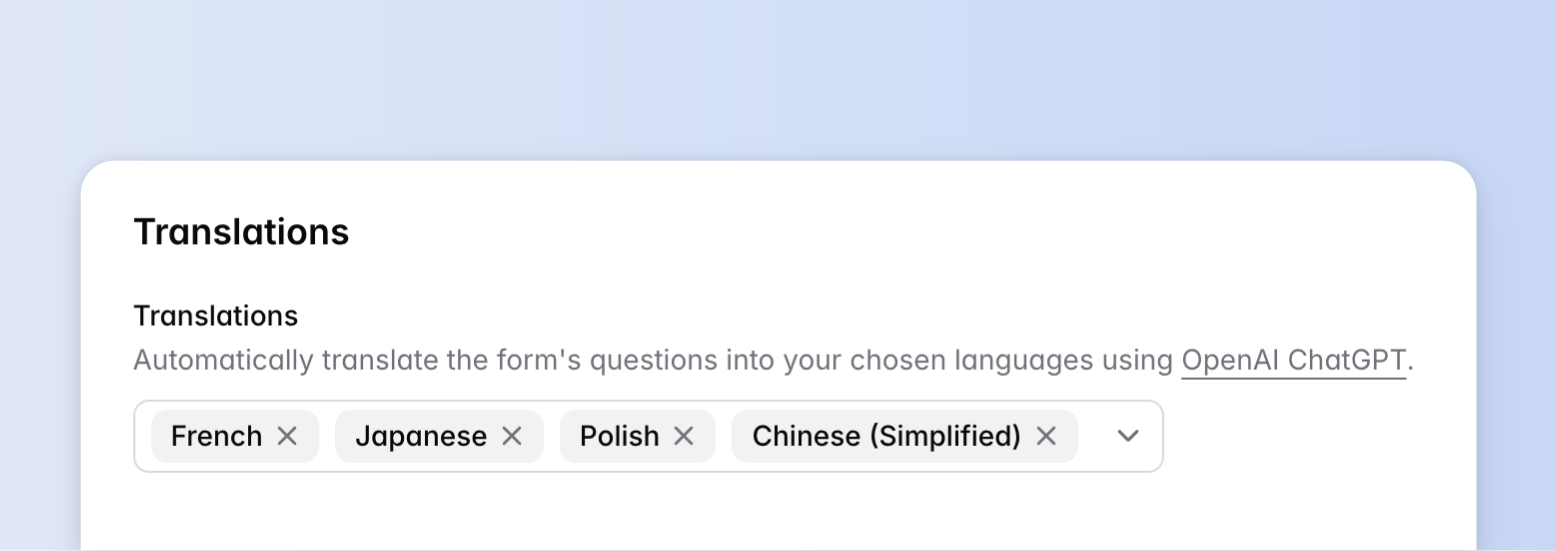{data-zoomable preload}
## Protection
### Password protection
Secure your form with a single, easy-to-remember password.
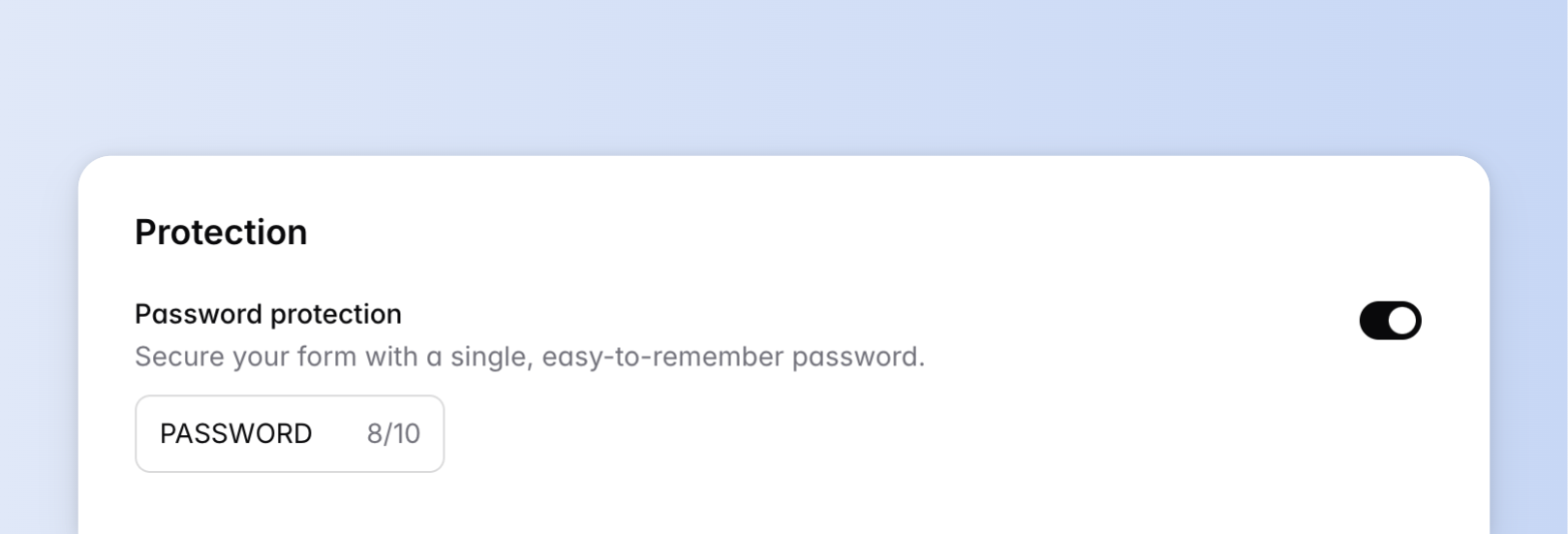{data-zoomable preload}
### Bots Prevention
Prevent bot submissions by enabling the captcha.
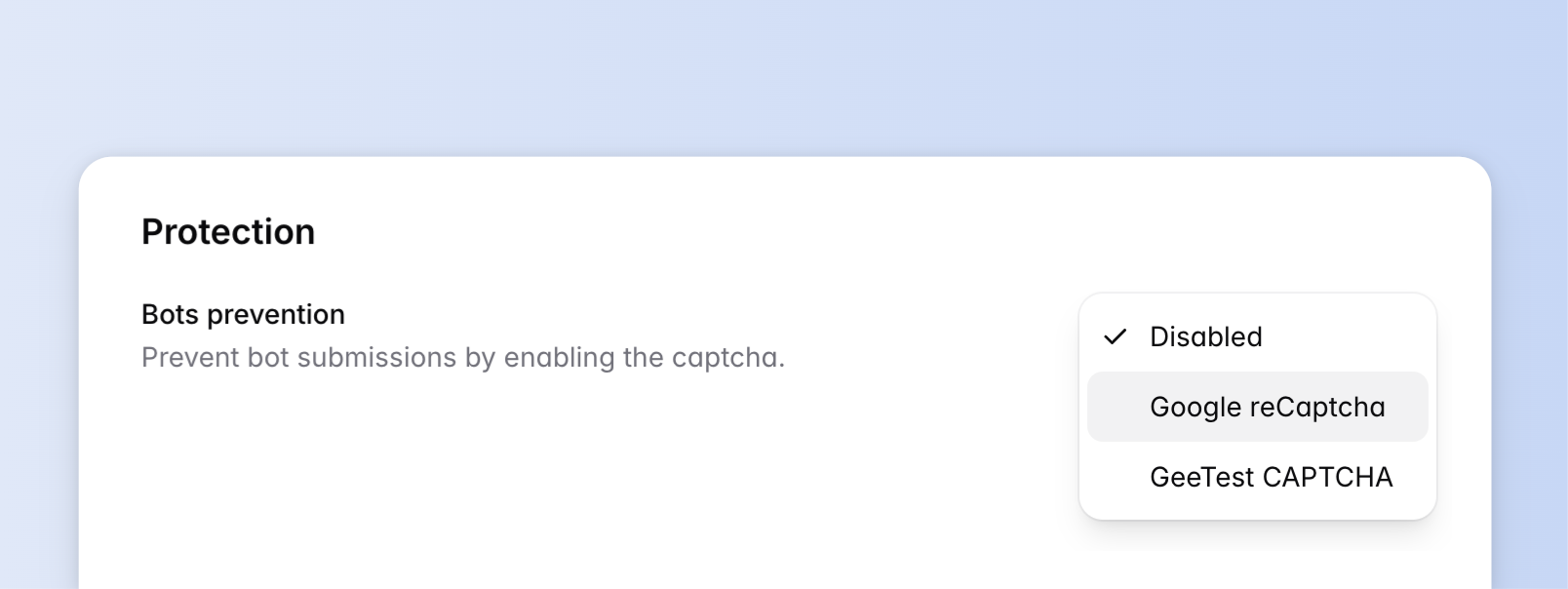{data-zoomable preload}
### Anti-Spam
Enable to prevent spam submissions.
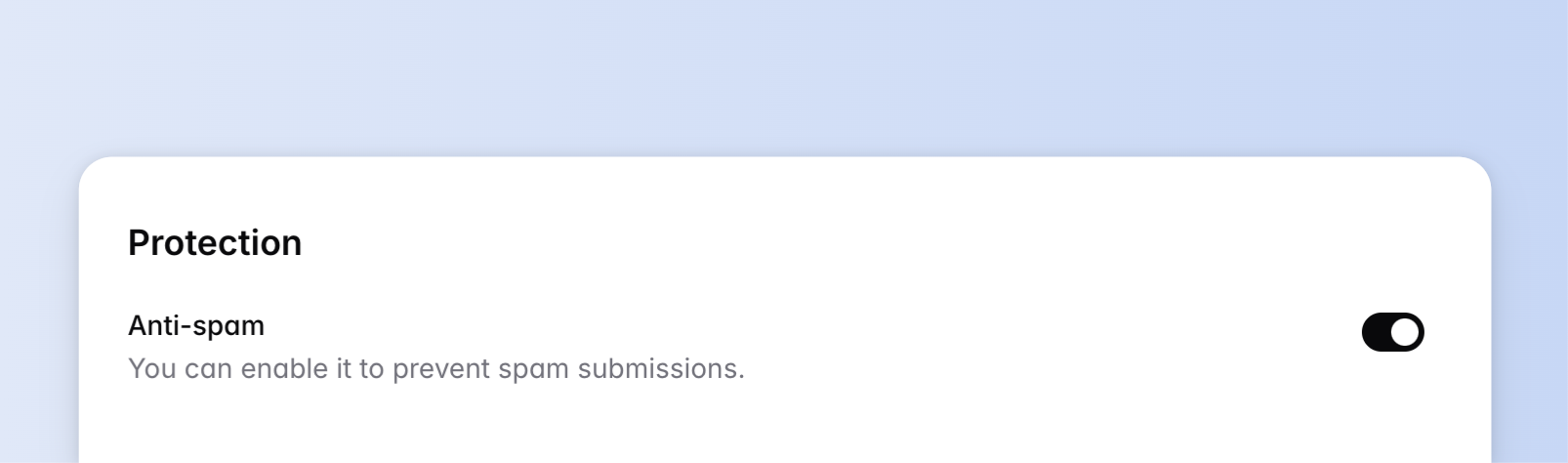{data-zoomable preload}
---
# Embed your form
Source: https://docs.heyform.net/features/embed-your-form
Instructions on how to embed your form in HeyForm.
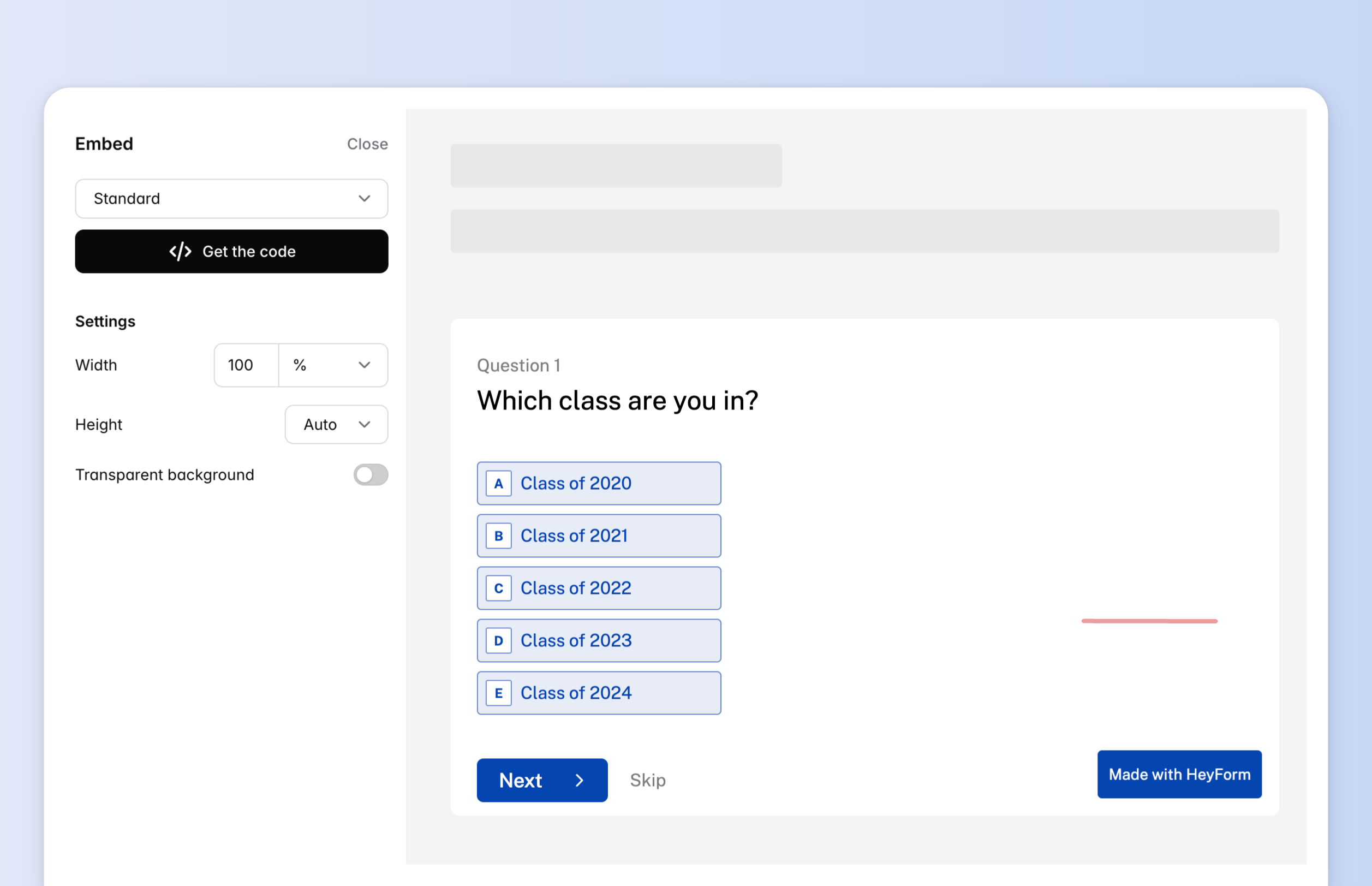
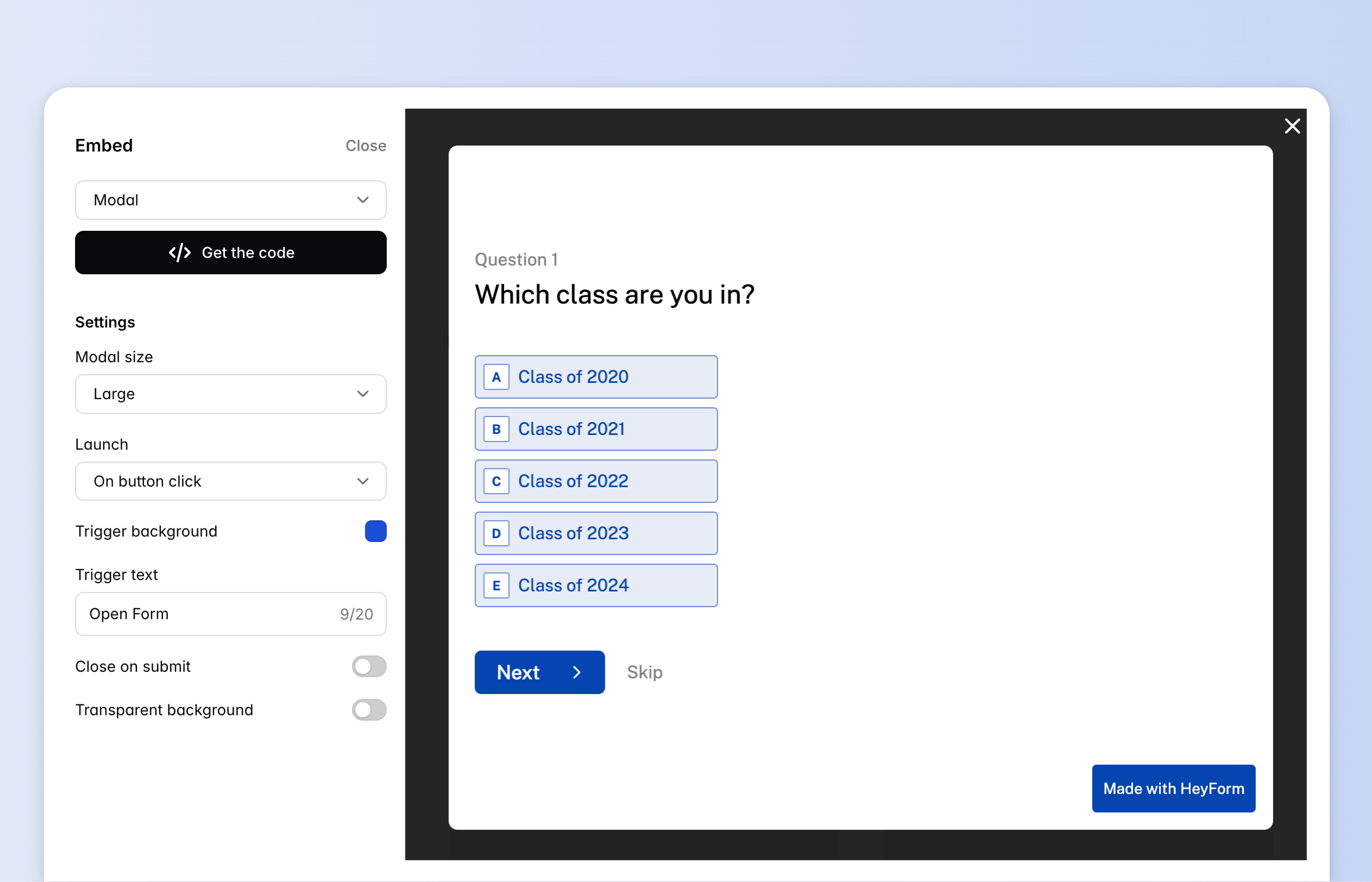
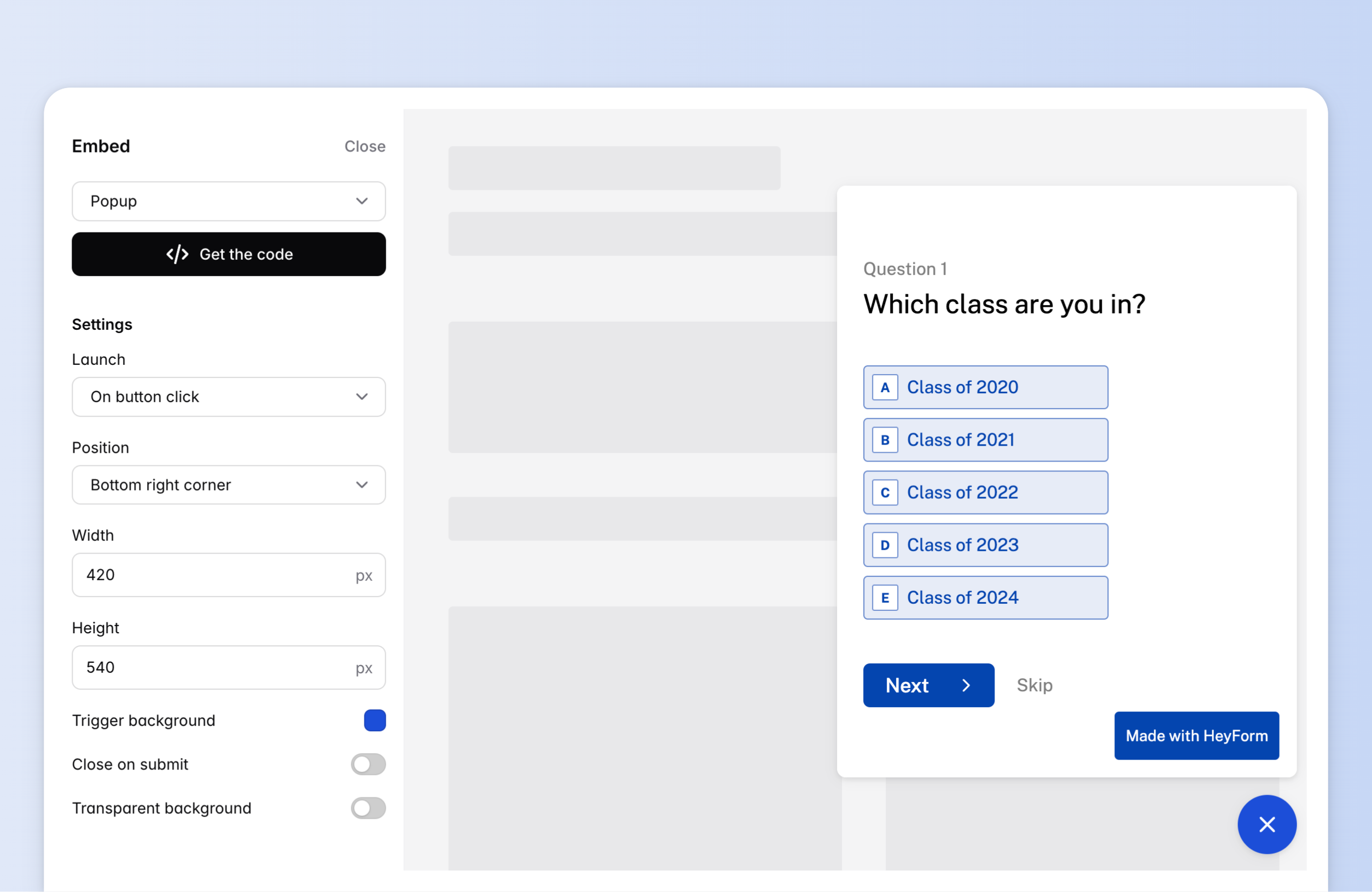
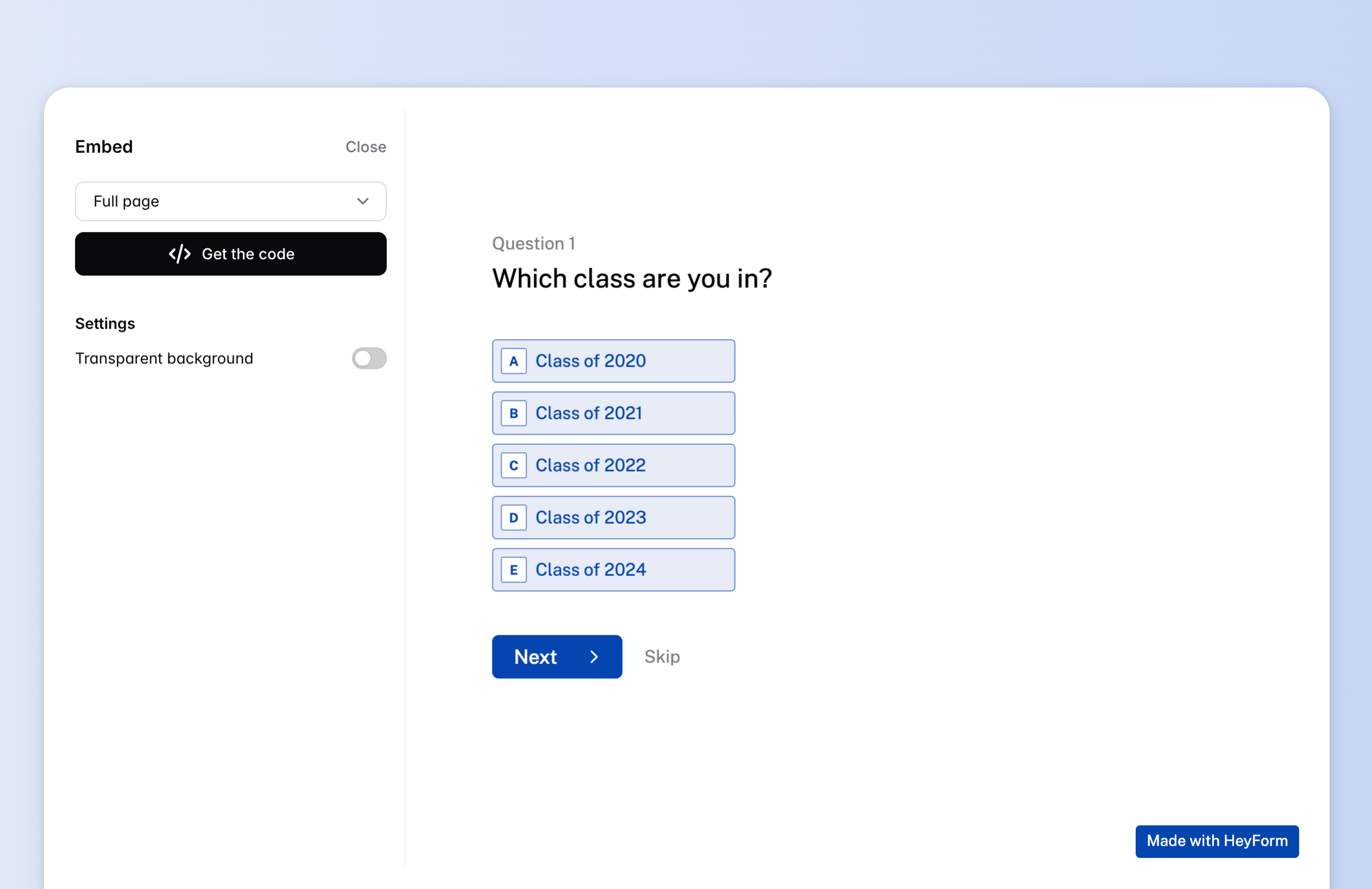
Easily embed a HeyForm on any webpage and seamlessly customize it to match your style. Choose from four different types of embeds:
- Standard: embed form as part of your web page
- Modal: embed form as a modal on your web page
- Popup: popup form in the side corner of your web page
- Full page: embed form as a full-page
## How embedding works
- Go to Form "Share" page
- Select your preferred embed type
- A preview modal will open with embed settings. You can setup the settings to fit your desired look.
- Click the "Get the code" button, copy the embed code and paste to your website.
:gif{src="/images/embed.gif" alt="How embedding works"}
## Standard
{data-zoomable preload}
### Settings
- **Width:** adjust the width of the form in pixels or percentage.
- **Height**: adjust the height of the form in pixels, percentage, or adaptively.
- **Transparent background:** enhance the appearance of your form by removing the default background and seamlessly integrating it into your website.
## Modal
{data-zoomable preload}
### Settings
- **Modal size**: set size of the modal which includes three sizes: small, medium, and large.
- **Launch**: this option lets you choose when your modal form appears on your site.
- **On button click:** the form will appear when a visitor clicks a button on your website.
- **On page load:** the form will appear immediately when the page opens.
- **After elapsed time:** the form will appear after a specified number of seconds.
- **On exit intent:** the form will appear when the visitor moves their cursor to the top bar of the browser window (not supported on mobile).
- **After scrolling:** the form will appear when the visitor has scrolled a specified % down the page.
- **Trigger background:** set the background color of the trigger button.
- **Close on submit**: after a respondent submits the popup form, you can configure the number of seconds before the popup closes automatically.
- **Transparent background:** enhance the appearance of your form by removing the default background and seamlessly integrating it into your website.
## Popup
{data-zoomable preload}
### Settings
- **Launch**: this option lets you choose when your modal form appears on your site.
- **On button click:** the form will appear when a visitor clicks a button on your website.
- **On page load:** the form will appear immediately when the page opens.
- **After elapsed time:** the form will appear after a specified number of seconds.
- **On exit intent:** the form will appear when the visitor moves their cursor to the top bar of the browser window (not supported on mobile).
- **After scrolling:** the form will appear when the visitor has scrolled a specified % down the page.
- **Position: c**hoose whether to display your popup in the bottom right corner or bottom left corner of your website
- **Width:** adjust the width of the form in pixel.
- **Height**: adjust the height of the form in pixels.
- **Close on submit**: after a respondent submits the popup form, you can configure the number of seconds before the popup closes automatically.
- **Transparent background:** enhance the appearance of your form by removing the default background and seamlessly integrating it into your website.
## Full-page
{data-zoomable preload}
### Settings
- **Transparent background:** enhance the appearance of your form by removing the default background and seamlessly integrating it into your website.
## Embed with React
```js
import { useEffect } from "react"
function App() {
function loadScript() {
const script = document.createElement('script')
script.src = 'https://www.unpkg.com/@heyform-inc/embed@latest/dist/index.umd.js'
document.body.appendChild(script)
}
function handleOpenModal() {
window.HeyForm.openModal('dCN9pF7UModal')
}
useEffect(() => {
loadScript()
}, [])
return (
)
}
```
---
# Conditional logic
Source: https://docs.heyform.net/features/conditional-logic
Conditional logic allows you to create dynamic form paths, guiding respondents to relevant pages based on their answers.
::alert{type="success" icon="lucide:gift"}
Conditional logic is available for **free to all HeyForm users**.
::
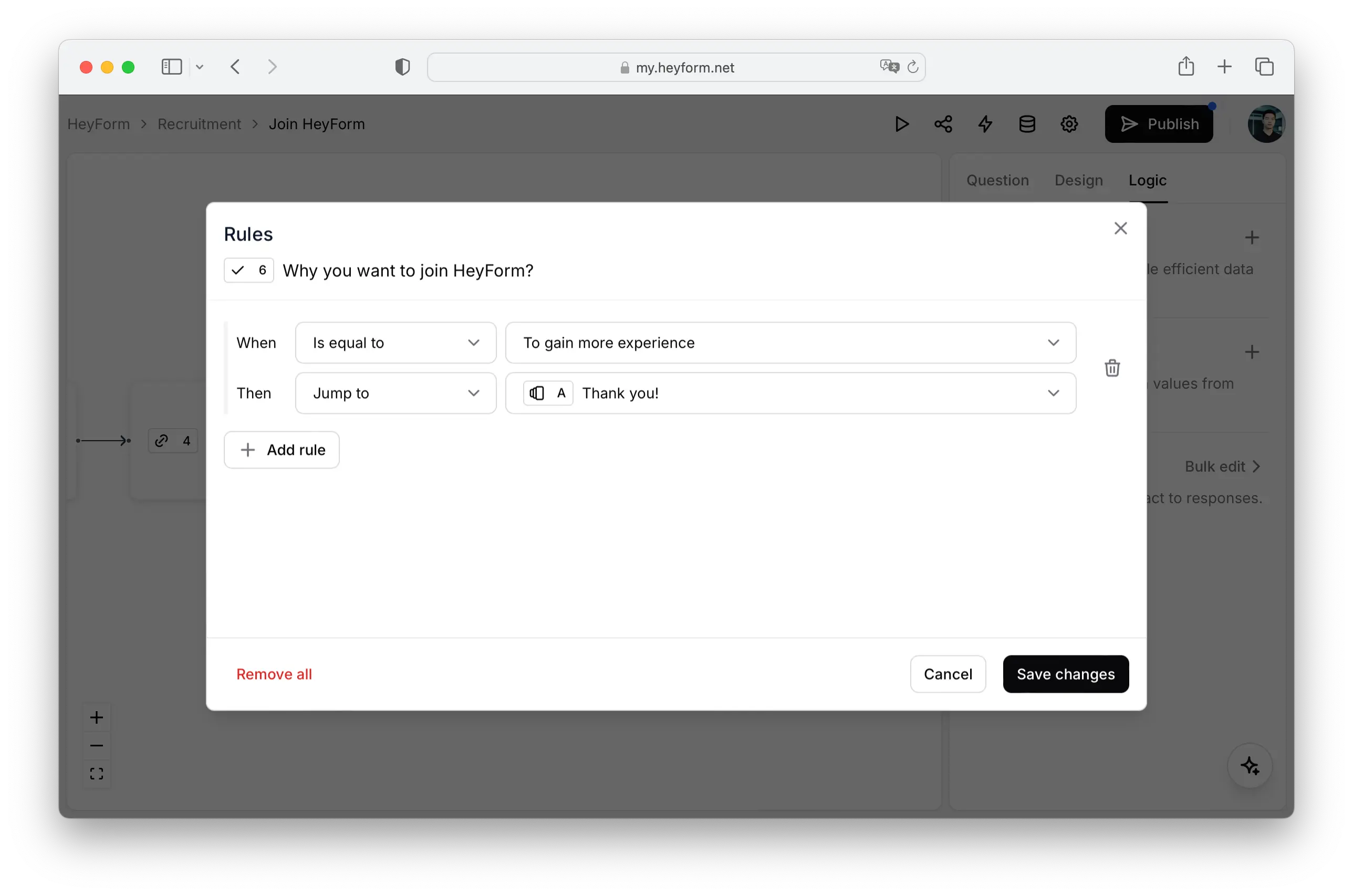
### Conditional logic examples
Conditional logic is a powerful tool for crafting personalized form experiences based on user input. Here are a few examples:
- Directing users to a specific End Screen based on their quiz scores.
- Highlighting the most selected category in a personality quiz.
- Showing or hiding sections in a waiting list or online check-in form according to user responses.
### How to create logic
Open the logic options in the form builder and find the question you want to configure.
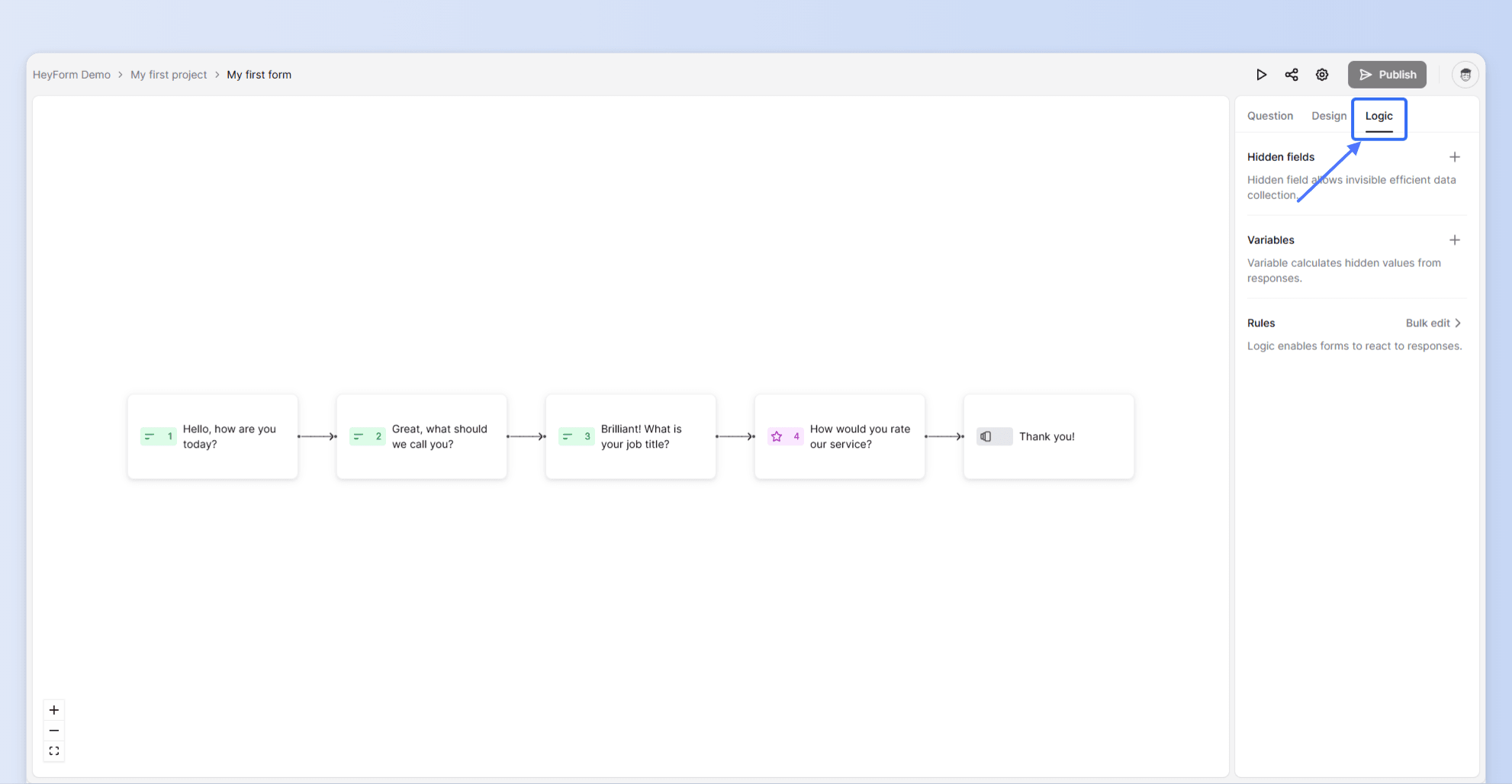
Click the question to see a popup modal as shown below:
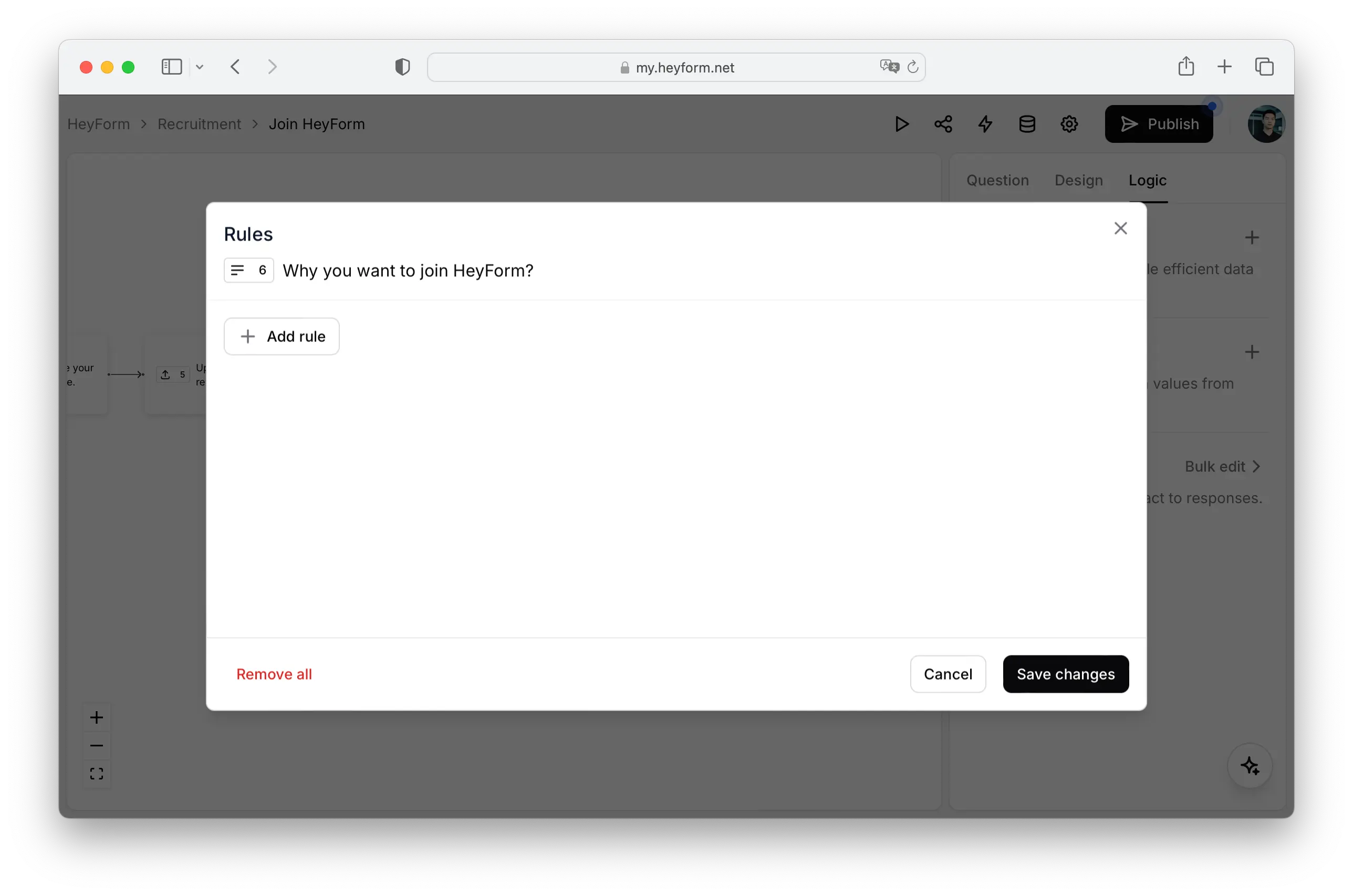
Click `Add rule` button to add a logic rule to the question.
---
# Hidden fields
Source: https://docs.heyform.net/features/hidden-fields
Instructions on how to use hidden fields in HeyForm.
{data-zoomable preload}
Hidden fields enable you to track subjects under investigation. They remain invisible to anyone filling out the form, yet allow for the efficient collection and utilization of data.
Some examples may include:
- Monitor the origin of your respondent's traffic (social media, website triggers, or other sources)
- Forward UTM parameters to effectively track marketing campaigns.
- Pass details about your respondents, such as names or email addresses, to your responses.
- Mention information in your form, like the name of your respondent.
## Create a hidden field
- Go to "Edit form" page
- Click "Logic" in the right sidebar
- Click "+" button beside the "Hidden Fields"
- Input the Hidden Field's name
- Click the "Add hidden field" button
:gif{src="/images/create-hidden-field.gif" alt="Create a hidden field"}
When you're prepared to distribute the form, incorporate the parameters and their respective values into your URL prior to sharing the link. This can be done in two ways:
- Manually: Append the variable to your form's URL before disseminating your form.
- Automated: Employ a CRM system (like Salesforce) or an email automation tool (such as Mailchimp) to pre-fill your data. This ensures your respondents automatically receive a personalized URL containing the appropriate data.
::alert{type="info" icon="lucide:info"}
To incorporate the first hidden field into your URL, it should commence with a question mark (`?`). When you need to add multiple fields, they should be separated by an ampersand (`&`).
For instance, if you're aiming to include the traffic source as Product Hunt, your URL would be structured as follows:
https://heyform.net/f/A8KEBhvD?name=Jim&ref=producthunt
::
## Hidden fields in submissions
You can find the hidden fields and answers on the Submissions page after respondents submit your form.
{data-zoomable preload}
---
# Airtable
Source: https://docs.heyform.net/integrations/airtable
Integrate your HeyForm with Airtable.
Airtable is a spreadsheet-database hybrid, with the features of a database but applied to a spreadsheet. Users can create a database, set up column types, add records, link tables to one another, and collaborate with teammates in real-time.
Integrating Heyform with Airtable lets you automatically sync form submissions with the Airtable database. You can seamlessly organize incoming data and collaborate with your team instantly.
## Airtable Integration
Follow these steps to automatically sync form responses with Airtable Database.
### 1. Authentication with Airtable
Authorize HeyForm with your Airtable Account to send responses to your Airtable. Click on "Login with Airtable" and choose the Airtable Account you want integrate with HeyForm.
 ### 2. Select the desired Airtable Table
- Select the Base you want to connect with.
- Select the Table from your Base you want to send responses to.
 ### 3. Map HeyForm fields with Airtable table columns
- Map each question field in HeyForm to the corresponding column in the selected Airtable table. It's crucial to type the Airtable field names exactly as they appear in your table.
- You can map any number of fields by clicking on the "Add field" button.
- Please note that, if you change a field on Airtable table, please update the corresponding changes in the Airtable integration page. Otherwise the integration won't work as expected.
Once you are done with mapping the corresponding fields you can click "Connect with Airtable" to activate the integration.
 ---
# Email
Source: https://docs.heyform.net/integrations/email
Integrate your HeyForm with Email
With the email integration feature for HeyForm, you can synchronize an existing email account with HeyForm. This way you get the best possible insight into your sales process:
- You never miss a conversation with a potential customer.
- You see in real time when a potential customer opens, clicks, and replies to an email message.
- You save time by automating personalized emails.
### Email Notification
To receive email notifications for every HeyForm completion, simply click on the Form which you have created and go to the "Form > Integrations" page.
Click on "Connect" button, enter your email address and save it by clicking the "Connect with Email Notification" button.
 ---
# Facebook Pixel
Source: https://docs.heyform.net/integrations/facebook-pixel
Integrate your HeyForm with Facebook Pixel
The Facebook pixel lets you trace visitor activity on your website. It works by loading a small library of functions that you can use whenever a site visitor performs an action that you want to track.
Integrating Facebook Pixel with Heyform helps you track the behavior of your website visitors so that you know their interests and be able to improve your campaign. It has a list of common events to choose from, allowing you to track the events you prefer.
## Integrate Facebook Pixel
Follow this step to track the behavior of your HeyForm and receive useful insights on the form.
### Enter Pixel ID
Copy and paste the Pixel ID from your Facebook Pixel Account. You can follow this [link](https://www.facebook.com/business/help/952192354843755?id=1205376682832142) to find your Pixel ID.
 Once you enter your Pixel ID you can click "Connect with Facebook Pixel" to activate this integration.
---
# Google Analytics
Source: https://docs.heyform.net/integrations/google-analytics
Integrate your HeyForm with Google Analytics.
Google Analytics is a web analytics service offered by Google that is used to track website activity such as session duration, pages per session, bounce rate etc. of individuals using the site, along with information on the source of the traffic.
By integrating Google Analytics withHeyForm, receive useful insights such as a view of the demographics of those who respond to your surveys, form user activity, duration of visit, volume of impressions, and much more!
## Integrate Google Analytics
Follow this step to receive useful analytics on your HeyForm.
### Enter your Tracking Code
Copy and paste the tracking code from your Google Analytics Account. You can follow this [link](https://support.google.com/analytics/answer/1008080?hl=en#zippy=%2Cin-this-article) to find your tracking code.
 Once you enter your tracking code you can click "Connect with Google Analytics" to activate this integration.
---
# Google Drive
Source: https://docs.heyform.net/integrations/google-drive
Integrate your HeyForm with Google Drive.
Google Drive is a cloud-based file storage and synchronization service that allows you to save files online and access them anywhere from any smartphone, tablet, or computer. Google Drive also makes it easy for others to edit and collaborate.
Through Google Drive integration with HeyForm, when someone fills out your form, the uploaded files and data will be transferred to your Google Drive folder right away. Quickly collect, save, and share uploaded documents, images, and other media.
## Google Drive Integration
Follow this 2 step process to automatically transfer file uploads to your preferred Google drive.
### 1. Authorize with Google Account
Authorize with the Google Account to send file uploads to Google Drive. Click on "Login with Google Drive" and choose the Google Account you want to integrate with HeyForm.
 ### 2. Select the desired Google Drive
- Select the Google Drive you want to connect HeyForm with. You can select your own Google Drive or Google Shared Drives which you are connected with.
- Select the desired folder from the selected Google Drive you want to send the file uploads to.
 Once the desired Google Drive folder is selected you can click "Connect with Google Drive" to automatically send file uploads directly to the Google Drive folder.
---
# Google Sheets
Source: https://docs.heyform.net/integrations/google-sheets
Integrate your HeyForm with Google Sheets
Google sheet is a web-based spreadsheet application, that helps you to create, edit and collaborate spreadsheets wherever you are. Google Sheet makes it easy to review and analyze data.
Integrating Google Sheets with Heyform lets you send responses automatically to the desired google sheet as soon as someone completes your HeyForm. You can then make your data pop with colorful charts and conditional formatting to create graphs, transforming raw data into digestible insights that will brighten up any meeting.
## Google Sheets Integration
Follow these 3 step process to send your HeyForm responses automatically to your Google Sheet in real time.
### 1. Authorize your Google Account
Authorize HeyForm with your Google Account to send responses to your Google Sheets. Click on "Login with Google Sheets" and choose the Google Account you want integrate with HeyForm.
 ### 2. Choose your Google Sheet
- Select the Google drive you want to connect with, as all the google sheets you have created is linked with with your Google drive. You can select your own Google Drive or Google Shared Drives which you are connected with.
- Select the spread sheet from your Google drive you want to send responses to.
- After selecting the spreadsheets, select the WorkSheet within the spread sheet you want to send the responses to.
 ### 3. Map HeyForm fields with Google Sheet columns
- Map each question field in HeyForm to the corresponding column in the selected Google Sheet.
- You can map any number of fields by clicking on the "Add field" button.
- Please note that, if you change a field on Google Sheets, please update the corresponding changes in the Google Sheets integration page. Otherwise, the integration won't work as expected.
 Once you are done with mapping the corresponding fields you can click "Connect with Google Sheets" to activate the integration.
If you do not have a google sheet, Then go to your Google Sheets account, create a new sheet with necessary details, and then integrate with HeyForm.
---
# HubSpot
Source: https://docs.heyform.net/integrations/hubspot
Integrate your HeyForm with HubSpot
HubSpot’s CRM platform has all the tools and integrations you need for marketing, sales, content management, and customer service.
With HubSpot integration, you can automatically send the data collected through Heyform forms to your HubSpot CRM dashboard. This integration adds a new contact or updates an existing one as soon as a form is submitted.
## Integrate HubSpot
Follow this 2 step process to capture new leads and automatically send the info directly into HubSpot CRM Dashboard
### 1. Authorize with HubSpot
Allow HeyForm to access your HubSpot data by clicking on "Login with HubSpot". You will be redirected to HubSpot webpage where you will have to choose your HubSpot account and allow access.
 ### 2. Mapping HubSpot fields with HeyForm fields
Map the "Full Name" field and the "Email Address" field with the corresponding HeyForm fields.
The "Phone Number" field and "Job title" fields are optional fields. You can map these fields with the corresponding fields HeyForm fields if you need the data.
 Once you are done with mapping the corresponding fields you can click "Connect with HubSpot" to activate the integration.
---
# Lark Suite
Source: https://docs.heyform.net/integrations/lark-suite
Integrate your HeyForm with Lark Suite
Lark Suite is a new kind of office software that is transforming collaboration in the workplace. Lark effectively combines messaging, video conferencing, appointment management, and online collaboration documents into a single platform. Use HeyForm to connect with your Lark account to get notifications whenever someone completes a HeyForm. Lark assists you to bring all your team members to collaborate more efficiently.
## Lark Suite Integration
Integrating Lark Suite requires a quick 2-step process that enables you to check your clients' submissions through your Lark dashboard using a custom bot in just a few minutes.
### 1. Add Custom Bot
1. To add a custom bot, you have to click on your existing Lark group or create a new Lark group and click on settings.
2. Once you click on the settings simply go to the "BOTs" tab and click on the "Add Bot" button.
3. Finally, click on "Custom Bot" Add button to finish the step process. Once you finish this, you will get a URL that has to be placed on the HeyForm Lark integration tool.
:gif{src="/images/integration/lark.gif" alt="Add Custom Bot"}
### 2. Paste the URL to HeyForm
1. As mentioned above, copy the URL that you have generated after finishing the step process. Simply click on your existing form that you want to land your submission to your newly created Lark group.
2. Click on "Integrations" tab and configure Lark Suite integration. Paste the URL that you have generated from the first step and click on the 'Connect with Lark Suite' button to finish the whole process.
 You will now start receiving the form submissions in your Lark group.
 ---
# Mailchimp
Source: https://docs.heyform.net/integrations/mailchimp
Integrate your HeyForm with Mailchimp
Mailchimp is an automated marketing platform and email marketing service. You can manage all your contacts, separate them from the right audience, and make your advertising journey easier.
Combine Heyform with Mailchimp to increase subscriber engagement with eye-catching emails, auto-update contacts with each submission and manage campaigns by targeting different subscriber segments.
## Mailchimp Integration
Follow this 3 step process to automatically sync your contacts with Mailchimp upon form submission.
### 1. Authorize with Mailchimp account
Authorize HeyForm with Mailchimp to send contacts to your Mailchimp account. Click on "Login with Mailchimp" and log in to the Mailchimp account you want integrate with HeyForm.
 ### 2. Select audience group that the form is required to populate
After authorization select one of the audience group list already created in your Mailchimp account to which the contacts received through submissions is to be send.
 ### 3. Map the contact fields with form fields
Map the preferred question fields in HeyForm to the contact fields.
 Once you are done with mapping the corresponding fields you can click "Connect with Mailchimp" to activate the integration.
---
# Slack
Source: https://docs.heyform.net/integrations/slack
Integrate your HeyForm with Slack
Slack is primarily used for communication in teams, as the service can be perfectly integrated into the workflow. Slack does not reinvent the wheel, but it combines many practical features from other services in one package and is extremely compatible with external programs. This mix proves to be very useful and should pave the way for further growth. With Slack you will get notified for every HeyForm completion. Slack also brings all your team members' communication and collaboration into one place, in which you will have better team productivity and efficiency.
## Slack Integration
Integrating with Slack is even easier than before, so just follow this 2 step process to enable posting messages using incoming webhooks in just a few minutes:
### 1. Authorize your Slack Account
Authorize HeyForm with your Slack Account to send responses to your Slack channel. Click on "Login with Slack".
 ### 2. Choose your Workspace
- Select the Slack workspace you want to connect with, as all the channels you have created is linked with with your Slack workspace.
- After selecting the Slack workspace, click the "Allow" button to continue.
 ### 3. Choose your channel
Now choose a channel for forwarding the form submissions.
 You will now start receiving the form submissions in your Slack channel.
 ---
# Telegram
Source: https://docs.heyform.net/integrations/telegram
Integrate your HeyForm with Telegram
Telegram is a free messenger service developed by brothers Pavel and Nikolai Durov. Telegram offers a wide range of functions. Besides the obligatory messenger chat function, users can also send large amounts of data in the form of audio and video messages, make voice calls, create channels, and use bots. With HeyForm, you can integrate with Telegram to get notifications for each HeyForm completion.
Integrating with Telegram is a piece of cake, so just follow this 3 step process to enable posting messages using the Telegram Bot in just a few minutes:
### 1. Add @HeyForm_bot to your Telegram group
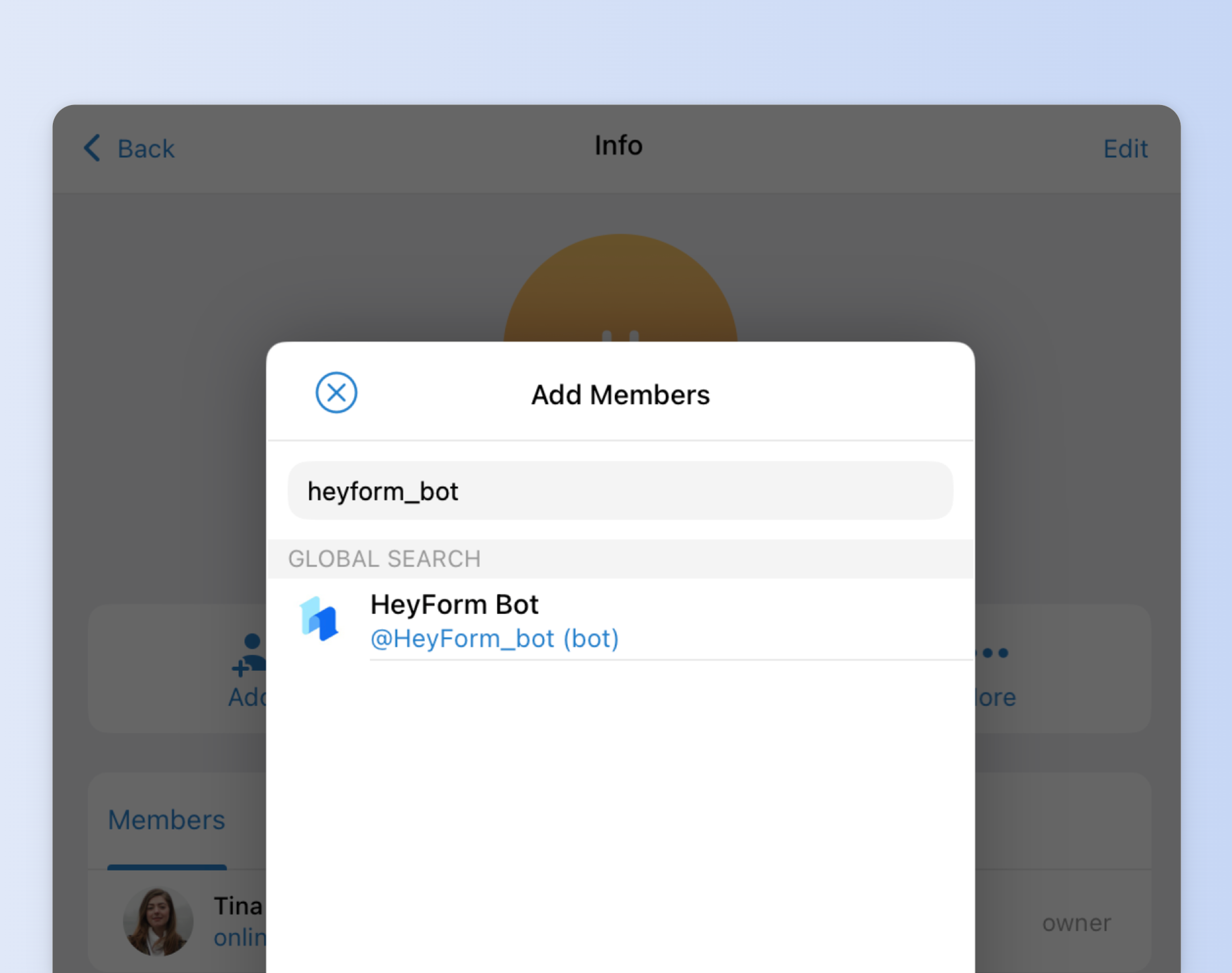
Create or select your existing Telegram group where you want to receive notifications on and click the **Add Members** button.
Now search for `@HeyForm_bot` and select the `@HeyForm_bot` tag. Now, click on float button on the bottom right-hand corner and click on "Add" to end the procedure.
 ### 2. Get Telegram Group's Chat ID
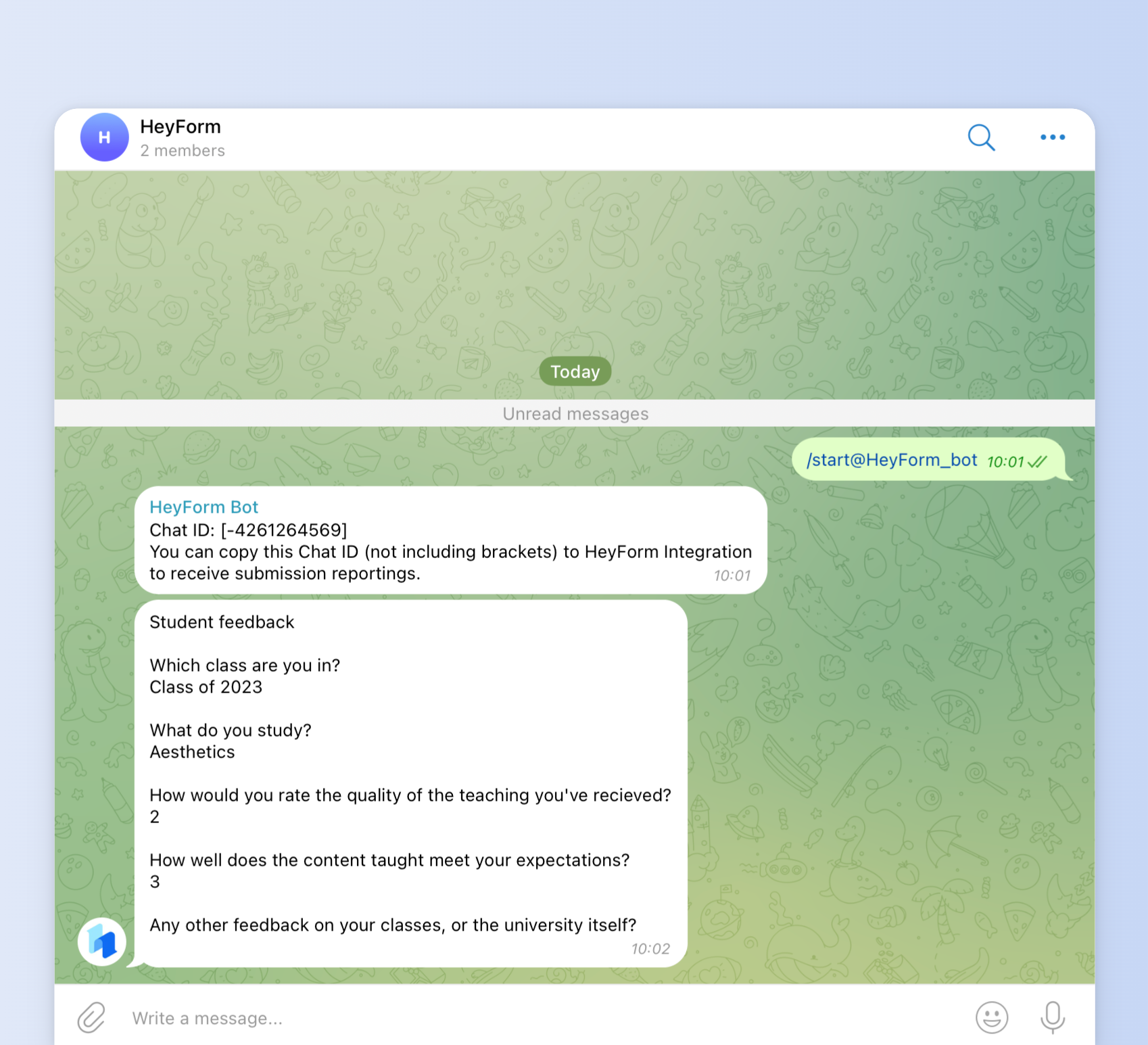
Type this command `/start@HeyForm_bot` in the group that you have added `@HeyForm_bot` in, and you will receive a message with a Chat ID that'll look something like this:
:gif{src="/images/integration/telegram.gif" alt="Get Telegram Group's Chat ID"}
### 3. Paste the Chat ID to HeyForm
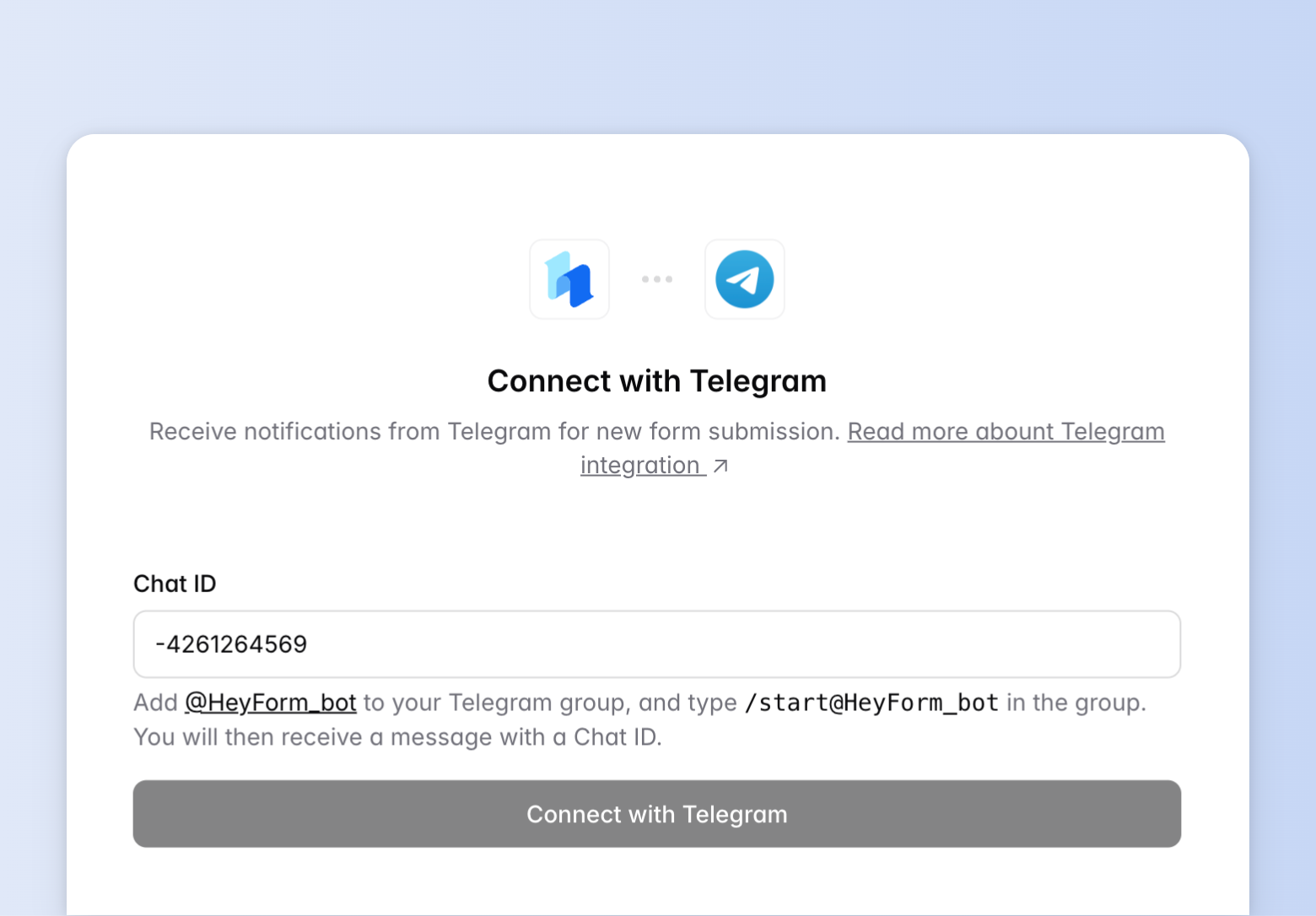
Copy that "Chat ID". Then, click your newly created form and open the "Integrations" page.
Then, click on the Telegram "Connect" button to paste the Chat ID, and save it by clicking the "Connect with Telegram" button.
 You will now start receiving the form submissions in your Telegram group or chat.
 ---
# Webhook
Source: https://docs.heyform.net/integrations/webhook
Integrate your HeyForm with Webhook
## How it works
Webhooks are a way to receive notifications when a **new form submission occurs**. With HeyForm, whenever someone submits a form, the response data is sent to your specified URL in **JSON** format through a **POST** request.
## Add a webhook
Publish your form and go to the **Integrations** page. Click Connect to **Webhook**.
You’ll be prompted to configure your webhook endpoint.
 ## Endpoint URL
For the endpoint URL, set up an HTTP or HTTPS endpoint that can accept webhook requests with a POST method:
- Handles POST requests with a JSON payload
- Returns a successful status code (2XX) within 10 seconds
## Example webhook event
```JSON
{
"id": "6686094814708f80406ffb48",
"formId": "TEjgpIyO",
"formName": "Math Quiz",
"fields": [
{
"title": [
"What's your name?"
],
"description": [],
"kind": "short_text",
"validations": {
"required": true
},
"properties": null,
"id": "4dnr1a9A92x4",
"layout": {}
},
{
"title": [
"Hi ",
[
"mention",
[
"@What's your name?"
],
{
"id": "4dnr1a9A92x4"
}
],
". Are you ready to work on probability, algebra, and mathematics today? "
],
"description": [],
"kind": "statement",
"validations": {},
"properties": {
"buttonText": "I'm ready!"
},
"id": "ehinHKMEaJlE",
"layout": null
},
{
"title": [
"If you have two cats and they both have nine kittens, how many kittens do you have?"
],
"description": [],
"kind": "multiple_choice",
"validations": {
"required": false
},
"properties": {
"allowMultiple": false,
"choices": [
{
"id": "Mrr20zyqsuxw",
"label": "16"
},
{
"id": "sH8Zehe47CdV",
"label": "17"
},
{
"id": "grZtX7g1tIlz",
"label": "18"
},
{
"id": "GRSWmRa86Fsf",
"label": "20"
}
]
},
"id": "j7a4n6Ie18il",
"layout": null
},
{
"title": [
"You and eight of your friends are going to the cinema. One ticket costs £5. How much for all of you?"
],
"description": [],
"kind": "multiple_choice",
"validations": {
"required": false
},
"properties": {
"allowMultiple": false,
"choices": [
{
"id": "oRgF3D2j3dK0",
"label": "40"
},
{
"id": "fYDUmPhb5OLi",
"label": "45"
},
{
"id": "k1LB6AkMGdmN",
"label": "50"
},
{
"id": "f408IJ4geXPs",
"label": "55"
}
]
},
"id": "8CKkn2W46WIM",
"layout": null
},
{
"title": [
"What's 9 x 3?"
],
"description": [],
"kind": "multiple_choice",
"validations": {
"required": false
},
"properties": {
"allowMultiple": false,
"choices": [
{
"id": "IXaDuXmqxSh7",
"label": "25"
},
{
"id": "Oz7GRKkR3Pld",
"label": "27"
},
{
"id": "xbX3gV2H7rvM",
"label": "29"
},
{
"id": "LgNGWgCb8HLf",
"label": "32"
}
]
},
"id": "hY31nToTFAOm",
"layout": null
},
{
"title": [
"What's 9 x 0?"
],
"description": [],
"kind": "multiple_choice",
"validations": {
"required": false
},
"properties": {
"allowMultiple": false,
"choices": [
{
"id": "IXaDuXmqxSh7",
"label": "9"
},
{
"id": "Oz7GRKkR3Pld",
"label": "1"
},
{
"id": "xbX3gV2H7rvM",
"label": "0"
},
{
"id": "LgNGWgCb8HLf",
"label": "90"
}
]
},
"id": "ScWAtX0wJMpQ",
"layout": null
},
{
"title": [
"If you have nine bags of oranges and each bag has nine oranges, how many oranges do you have?"
],
"description": [],
"kind": "multiple_choice",
"validations": {
"required": false
},
"properties": {
"allowMultiple": false,
"choices": [
{
"id": "eAfG1aZxgGzx",
"label": "81"
},
{
"id": "zHFOEO28xlOo",
"label": "90"
},
{
"id": "6RebqB0QMwJW",
"label": "99"
},
{
"id": "zHirgOaRmGLL",
"label": "100"
}
]
},
"id": "1cYGdYysk9yp",
"layout": null
},
{
"title": [
[
"mention",
[
"@What's your name?"
],
{
"id": "4dnr1a9A92x4"
}
],
" Your score is ",
[
"variable",
[
"@Score"
],
{
"id": "KLq8ujMXj9Dz"
}
],
"."
],
"description": [
"Thanks for completing this math quiz."
],
"kind": "thank_you",
"validations": null,
"properties": null,
"id": "JeQEWqAQYjlL",
"layout": null
}
],
"answers": [
{
"id": "4dnr1a9A92x4",
"title": "What's your name?",
"kind": "short_text",
"value": "Tina Ryan"
},
{
"id": "j7a4n6Ie18il",
"title": "If you have two cats and they both have nine kittens, how many kittens do you have?",
"kind": "multiple_choice",
"properties": {
"allowMultiple": false,
"choices": [
{
"id": "Mrr20zyqsuxw",
"label": "16"
},
{
"id": "sH8Zehe47CdV",
"label": "17"
},
{
"id": "grZtX7g1tIlz",
"label": "18"
},
{
"id": "GRSWmRa86Fsf",
"label": "20"
}
]
},
"value": {
"value": [
"sH8Zehe47CdV"
]
}
},
{
"id": "8CKkn2W46WIM",
"title": "You and eight of your friends are going to the cinema. One ticket costs £5. How much for all of you?",
"kind": "multiple_choice",
"properties": {
"allowMultiple": false,
"choices": [
{
"id": "oRgF3D2j3dK0",
"label": "40"
},
{
"id": "fYDUmPhb5OLi",
"label": "45"
},
{
"id": "k1LB6AkMGdmN",
"label": "50"
},
{
"id": "f408IJ4geXPs",
"label": "55"
}
]
},
"value": {
"value": [
"fYDUmPhb5OLi"
]
}
},
{
"id": "hY31nToTFAOm",
"title": "What's 9 x 3?",
"kind": "multiple_choice",
"properties": {
"allowMultiple": false,
"choices": [
{
"id": "IXaDuXmqxSh7",
"label": "25"
},
{
"id": "Oz7GRKkR3Pld",
"label": "27"
},
{
"id": "xbX3gV2H7rvM",
"label": "29"
},
{
"id": "LgNGWgCb8HLf",
"label": "32"
}
]
},
"value": {
"value": [
"Oz7GRKkR3Pld"
]
}
},
{
"id": "ScWAtX0wJMpQ",
"title": "What's 9 x 0?",
"kind": "multiple_choice",
"properties": {
"allowMultiple": false,
"choices": [
{
"id": "IXaDuXmqxSh7",
"label": "9"
},
{
"id": "Oz7GRKkR3Pld",
"label": "1"
},
{
"id": "xbX3gV2H7rvM",
"label": "0"
},
{
"id": "LgNGWgCb8HLf",
"label": "90"
}
]
},
"value": {
"value": [
"xbX3gV2H7rvM"
]
}
},
{
"id": "1cYGdYysk9yp",
"title": "If you have nine bags of oranges and each bag has nine oranges, how many oranges do you have?",
"kind": "multiple_choice",
"properties": {
"allowMultiple": false,
"choices": [
{
"id": "eAfG1aZxgGzx",
"label": "81"
},
{
"id": "zHFOEO28xlOo",
"label": "90"
},
{
"id": "6RebqB0QMwJW",
"label": "99"
},
{
"id": "zHirgOaRmGLL",
"label": "100"
}
]
},
"value": {
"value": [
"6RebqB0QMwJW"
]
}
}
],
"hiddenFields": [
{
"id": "0SOJ1I1GPq0b",
"name": "ref",
"value": "Arc"
}
],
"variables": [
{
"id": "KLq8ujMXj9Dz",
"name": "Score",
"kind": "number",
"value": 40
}
]
}
```
---
# Zapier
Source: https://docs.heyform.net/integrations/zapier
Integrate your HeyForm with Zapier
Zapier is a web service that automatically links actions between different web apps and synchronizes their applications with each other so that they can execute the desired processes. This is done with so-called "Zaps". A Zap uses a trigger, i.e. a triggering event, in one app to trigger an action in another. The application is flexible and diverse, as is the range of integration options. By integrating Zapier with HeyForm, you can set up workflows for every response you get from the clients with other apps you use the most. In this way, you can save time, and focus more on business-oriented tasks.
### Zapier Integration
Integrating Zapier will be easy for you, if you follow this quick 3 steps process that will enable you to connect your HeyForm account with your Favorite apps:
## 1. Connect Zapier with HeyForm
1. Create or select your existing form and click on the Integration tab. Now click on the 'Connect' button next to the Zapier Logo.
 2. Search or select for the app that you want to integrate with HeyForm. For example, take Google Sheets or Slack as mentioned below.
 3. For your understanding, we have clicked on Google Sheets to move further. Once you've selected Google Sheets, you now need to trigger your newly created HeyForm with Google Sheets to capture your clients’ submissions.
 4. Now click the 'Connect HeyForm + Google Sheets' button to connect your submission with Google Sheets. Click on 'Get Started' to continue the procedure.
 5. Select the group where you have created your form. Then, select your form and proceed by clicking the next button.
 ---
# Notion
Source: https://docs.heyform.net/integrations/notion
Integrate your HeyForm with Notion.
**Notion** is an all-in-one workspace that combines note-taking, task management, and collaboration into a single platform. Users can create databases, manage tasks, store documents, and collaborate in real-time with their teams.
Integrating HeyForm with Notion allows you to automatically sync form submissions with your Notion database. This seamless connection helps you organize incoming data efficiently, keeping everything centralized and easily accessible for you and your team.
## Notion Integration
Follow these steps to automatically sync form responses with Notion database.
### 1. Authentication with Notion
Authorize HeyForm with your Notion Account to send responses to your Notion. Click on `Login with Notion` and choose the Notion Account you want integrate with HeyForm.
 ### 2. Select the desired Notion space
Choose your desired space from the dropdown menu in the top right corner, then click `Select Pages`.
 On the new page, choose the pages to sync with HeyForm, then click `Allow Access`.
 ### 3. Map HeyForm fields with Notion database columns
- Map each question field in HeyForm to the corresponding column in the selected Notion database. It's crucial to type the Notion field names exactly as they appear in your table.
- You can map any number of fields by clicking on the `Add field` button.
- Please note that, if you change a field on Notion database, please update the corresponding changes in the Notion integration page. Otherwise the integration won't work as expected.
Once you are done with mapping the corresponding fields you can click `Connect with Notion` to activate the integration.
 ---
# Environment Variables
Source: https://docs.heyform.net/open-source/configuration/environment-variables
Environment variables reference for self-hosted HeyForm.
| Name | Type | Required | Description |
| ---------------------------------- | ------- | -------- | ---------------|
| APP_LISTEN_PORT | Number | | Port to listen (default is 9157) |
| APP_LISTEN_HOSTNAME | String | | Hostname (default is 0.0.0.0) |
| APP_HOMEPAGE_URL | String | | Website homepage URL (e.g. [https://exampledomain.com](https://exampledomain.com)) |
| APP_DISABLE_REGISTRATION | Boolean | | Disable user registration (default is false) |
| COOKIE_MAX_AGE | String | | Cookie max age (default is 1year) |
| SESSION_KEY | String | ✅ | Session encryption key |
| SESSION_MAX_AGE | String | | Session max age (default is 15days) |
| UPLOAD_FILE_TYPES | String | | Upload file types (e.g. .jpg,.png,.bmp,.zip) |
| UPLOAD_FILE_SIZE | Number | | Upload file size (default is 10mb) |
| S3_ENDPOINT | String | | S3 API endpoint URL (e.g. `https://s3.amazonaws.com` or provider endpoint like MinIO/Cloudflare R2). Required when using S3-compatible storage for uploads. |
| S3_REGION | String | | S3 region for the bucket (e.g. `us-east-1`). Required by most S3-compatible providers for request signing. |
| S3_BUCKET | String | | S3 bucket name used to store uploaded files. Required when using S3-compatible storage. |
| S3_ACCESS_KEY_ID | String | | Access key ID used to authenticate with S3-compatible storage. Required for authenticated bucket access. |
| S3_SECRET_ACCESS_KEY | String | | Secret access key paired with `S3_ACCESS_KEY_ID` for S3 authentication. Keep this value private. |
| S3_PUBLIC_URL | String | | Public base URL used to serve uploaded files (e.g. CDN/custom domain or bucket public URL). If empty, application should fall back to provider object URL. |
| FORM_ENCRYPTION_KEY | String | ✅ | Form encryption key |
| BCRYPT_SALT | Number | | Bcrypt salt (default is 10) |
| MONGO_URI | String | ✅ | MongoDB URI, for docker it should be like mongodb://mongo:27017/heyform |
| MONGO_USER | String | | MongoDB user |
| MONGO_PASSWORD | String | | MongoDB password |
| MONGO_SSL_CA_PATH | String | | MongoDB SSL CA path |
| REDIS_HOST | String | | Redis host (default is 127.0.0.1), for docker it should be redis |
| REDIS_PORT | Number | | Redis port (default is 6379) |
| REDIS_PASSWORD | String | | Redis password |
| REDIS_DB | Number | | Redis DB (default is 0) |
| REDIS_TLS | String | | JSON object passed to ioredis as TLS connection options. Leave empty for plaintext, use `{}` to enable TLS with Node.js defaults, or provide options such as `{"servername":"redis.example.com"}`. |
| VERIFY_USER_EMAIL | Boolean | | Whether it is necessary to verify the email addresses of the new users (default is false) |
| SMTP_FROM | String | | SMTP from (e.g. `Heyform `) |
| SMTP_HOST | String | | SMTP host |
| SMTP_PORT | Number | | SMTP port |
| SMTP_USER | String | | SMTP user |
| SMTP_SECURE | Boolean | | If truethe connection will use TLS when connecting to server |
| SMTP_IGNORE_CERT | Boolean | | If true will ignore TLS certificate errors |
| SMTP_PASSWORD | String | | SMTP password |
| GOOGLE_RECAPTCHA_KEY | String | | [https://cloud.google.com/recaptcha-enterprise/docs/create-key-website](https://cloud.google.com/recaptcha-enterprise/docs/create-key-website) |
| GOOGLE_RECAPTCHA_SECRET | String | | Google reCAPTCHA secret |
| AKISMET_KEY | String | | Akismet key |
| APPLE_LOGIN_TEAM_ID | String | | Apple login team ID |
| APPLE_LOGIN_WEB_CLIENT_ID | String | | Apple login web client ID |
| APPLE_LOGIN_KEY_ID | String | | Apple login key ID |
| APPLE_LOGIN_PRIVATE_KEY_PATH | String | | Apple login private key path |
| GOOGLE_LOGIN_CLIENT_ID | String | | Google login client ID |
| GOOGLE_LOGIN_CLIENT_SECRET | String | | Google login client secret |
| OIDC_CLIENT_ID | String | | OpenID Connect client ID. Required together with `OIDC_CLIENT_SECRET` and `OIDC_ISSUER` to enable [OIDC login](https://docs.heyform.net/open-source/configuration/oidc). |
| OIDC_CLIENT_SECRET | String | | OpenID Connect client secret. Keep this value private. Required together with `OIDC_CLIENT_ID` and `OIDC_ISSUER` to enable OIDC login. |
| OIDC_ISSUER | String | | Issuer identifier advertised by the OpenID Connect provider (for example, `https://sso.example.com`). Required together with `OIDC_CLIENT_ID` and `OIDC_CLIENT_SECRET` to enable OIDC login. |
| OIDC_DISPLAY_NAME | String | | Label shown on the OIDC login button (default is `SSO`). |
| OIDC_CLIENT_AUTH_METHOD | String | | Token endpoint authentication method: `client_secret_basic` (default) or `client_secret_post`. It must match the provider client registration. |
| OIDC_ALLOW_PROVISIONING | Boolean | | Allow a new OIDC identity to create an account when `APP_DISABLE_REGISTRATION=true` (default is false). Enable only for a trusted provider. |
| STRIPE_PUBLISHABLE_KEY | String | | [https://docs.stripe.com/keys](https://docs.stripe.com/keys) |
| STRIPE_SECRET_KEY | String | | Stripe secret key |
| STRIPE_CONNECT_CLIENT_ID | String | | Stripe connect client ID |
| STRIPE_WEBHOOK_SECRET_KEY | String | | Stripe payment webhook secret key |
| BULL_JOB_ATTEMPTS | Number | | Bull job attempts (default is 3) |
| BULL_JOB_TIMEOUT | String | | Bull job timeout (default is 1minute) |
| BULL_JOB_BACKOFF_DELAY | Number | | Bull job backoff delay (default is 3000) |
| BULL_JOB_BACKOFF_TYPE | String | | Bull job backoff type (default is 'fixed') |
| INVITE_CODE_EXPIRE_DAYS | Number | | Invite code expire days (default is 7) |
| FORM_REPORT_RATE | String | | Form report rate (default is 5seconds) |
| VERIFICATION_CODE_EXPIRE | String | | Verification code expire (default is 10minutes) |
| VERIFICATION_CODE_LIMIT | Number | | Verification code limit (default is 5) |
| ACCOUNT_DELETION_SCHEDULE_INTERVAL | String | | Account deletion schedule interval (default is 2days) |
| UNSPLASH_CLIENT_ID | String | | Unsplash client ID (Access Key) |
| OPENAI_BASE_URL | String | | URL (default is [https://api.openai.com/v1](https://api.openai.com/v1)) |
| OPENAI_API_KEY | String | | OpenAI API key, you can find it on [https://platform.openai.com/api-keys](https://platform.openai.com/api-keys) |
| OPENAI_GPT_MODEL | String | | GPT model (default is gpt-3.5-turbo-0125) |
| ALLOW_PRIVATE_OUTBOUND | Boolean | | Allow webhooks and the image proxy to reach localhost and private network addresses, e.g. internal services or a proxy using fake-IP DNS (default is false). ⚠️ Any form owner could then reach your internal network, so only enable it when you trust everyone who can create forms. |
---
# Authentication
Source: https://docs.heyform.net/open-source/configuration/authentication
Add social login to your self-hosted HeyForm instance.
Currently, HeyForm only supports login with Google and Apple.
## Login with Google
In this guide `example.com` will be used to represent the location you are hosting HeyForm, it should be replaced with the correct value.
### Create a project
- Go to [https://console.cloud.google.com](https://console.cloud.google.com/)
- Create a project or use an existing one
### OAuth consent screen
- Go to [OAuth consent screen](https://console.cloud.google.com/apis/credentials/consent)
- Choose an “App name”
- Make sure that “Authorized domains” includes the domain you are using for HeyForm
### Credentials
- Go to [Credentials](https://console.cloud.google.com/apis/credentials)
- Click on “Create credentials” and select “OAuth client ID”
- Choose `Web application` as the application type
- Under “Authorized JavaScript origins” enter your domain name again
- Under “Authorized redirect URIs” enter the URL (replacing the domain name): `https://example.com/connect/google/callback`
- Click “Save”
- Make a note of the Client ID and Secret values
### Environment variables
Add the values noted from the above process in the following environment variables:
```json
GOOGLE_LOGIN_CLIENT_ID=
GOOGLE_LOGIN_CLIENT_SECRET=
```
---
# OpenID Connect
Source: https://docs.heyform.net/open-source/configuration/oidc
Add OpenID Connect login to your self-hosted HeyForm instance.
HeyForm can use a standards-compliant OpenID Connect (OIDC) provider for dashboard login. This is a single, instance-wide provider intended for self-hosted deployments such as Authelia, Authentik, and Keycloak.
## Register HeyForm with the provider
Create a confidential web application in the identity provider and register this exact redirect URI:
```text
https://forms.example.com/connect/oidc/callback
```
Replace `https://forms.example.com` with the public `APP_HOMEPAGE_URL` of the HeyForm instance. The URL must match exactly, including the scheme, host, and port.
Enable the authorization code flow and allow the `openid`, `profile`, and `email` scopes. The provider must publish OIDC discovery metadata and return a stable `sub` claim. Account linking and provisioning require the provider to return an email address that it marks as verified with `email_verified: true`.
## Configure HeyForm
Set these variables on the HeyForm server or container:
```dotenv
APP_HOMEPAGE_URL=https://forms.example.com
OIDC_CLIENT_ID=heyform
OIDC_CLIENT_SECRET=replace-with-a-secret
OIDC_ISSUER=https://sso.example.com
OIDC_DISPLAY_NAME=Company SSO
OIDC_CLIENT_AUTH_METHOD=client_secret_basic
OIDC_ALLOW_PROVISIONING=false
```
`OIDC_ISSUER` is the issuer identifier advertised by the provider, not an arbitrary authorization or token endpoint. HeyForm uses it to discover the provider metadata. Do not include `OIDC_CLIENT_SECRET` in frontend build variables or expose it through a reverse proxy.
The OIDC button is enabled only when `OIDC_CLIENT_ID`, `OIDC_CLIENT_SECRET`, and `OIDC_ISSUER` are all set. `OIDC_DISPLAY_NAME` controls its label and defaults to `SSO`.
`OIDC_CLIENT_AUTH_METHOD` controls how the confidential client authenticates at the token endpoint. It accepts `client_secret_basic` (the default used by common Authelia and Keycloak client configurations) or `client_secret_post`. The value must match the client registration in the provider.
By default, `APP_DISABLE_REGISTRATION=true` prevents a new OIDC identity from creating a HeyForm account. Set `OIDC_ALLOW_PROVISIONING=true` only when the configured provider is trusted to control account creation. Existing linked OIDC users can continue to sign in.
Restart HeyForm after changing these values.
When running the webapp directly with Vite, also set `VITE_DISABLE_LOGIN_WITH_OIDC=false` and optionally `VITE_OIDC_DISPLAY_NAME`. These frontend-only variables control the development button; the server-side OIDC variables are still required to complete authentication. Production deployments receive the button state and label from the server at runtime.
## Reverse proxy and network requirements
- Serve the public HeyForm URL over HTTPS. The OAuth state cookie is secure and the callback must return to the same browser that started the login.
- Ensure the HeyForm container can resolve and reach the issuer discovery, JWKS, token, and UserInfo endpoints.
- Forward `/connect/oidc` and `/connect/oidc/callback` to the HeyForm server without rewriting their paths or query parameters.
- Keep `APP_HOMEPAGE_URL` aligned with the external URL seen by users. An internal container hostname will produce an invalid redirect URI.
## Provider examples
Use the provider's issuer identifier and register the callback URL above. Typical issuer formats include:
```dotenv
# Authelia
OIDC_ISSUER=https://auth.example.com
# Authentik application provider
OIDC_ISSUER=https://auth.example.com/application/o/heyform/
# Keycloak realm
OIDC_ISSUER=https://auth.example.com/realms/company
```
Always copy the issuer value from the provider's discovery metadata or administration UI. Paths and trailing slashes are provider-specific.
## Rollout and recovery
Keep password login available while validating the first OIDC administrator account. OIDC configuration enables an additional login method; it does not disable password login, password reset, or local registration by itself.
Before changing `OIDC_ISSUER`, confirm how existing linked accounts will be migrated. An OIDC subject is scoped to its issuer, so an identity from a different issuer must not be assumed to be the same user solely because it has the same `sub` value.
If login fails, restore the previous OIDC variables or remove all three required OIDC variables and restart HeyForm. Removing the configuration hides the OIDC button without deleting local users or their existing data.
---
# Integrations
Source: https://docs.heyform.net/open-source/configuration/integrations
Configure integrations such as Google Sheets and webhooks on your self-hosted HeyForm.
Integrations send every new submission to another service, or add a service to the public form page. Form owners set them up from a form's **Integrations** tab. Some integrations work out of the box, while others need the server to be configured first.
In this guide `example.com` will be used to represent the location you are hosting HeyForm, it should be replaced with the correct value.
| Integration | What it does | Server configuration |
| ------------------ | --------------------------------------------------------- | --------------------------------------------------------------------- |
| Webhook | Sends each submission to a URL | None |
| Privatus Analytics | Adds cookie-free analytics to the public form page | None |
| Google Sheets | Adds each submission as a row in a Google spreadsheet | [Encryption key](#encryption-key) and [Google OAuth](#google-sheets) |
An integration that is missing its configuration is hidden from the **Integrations** tab.
## Encryption key
Integrations that connect an account or store an API key save those credentials encrypted with `INTEGRATION_ENCRYPTION_KEY`. Without it, these integrations are unavailable and the server logs a warning at startup. Webhooks and Privatus Analytics keep working.
Generate a long random value:
```bash
openssl rand -base64 32
```
```dotenv
INTEGRATION_ENCRYPTION_KEY=
```
::alert{type="warning" icon="lucide:triangle-alert"}
Keep this key safe and don't change it casually. If it's lost, every connected account and API key has to be entered again. It's separate from `FORM_ENCRYPTION_KEY`, so rotating either never breaks the other.
::
### Rotate the key
1. Set `INTEGRATION_ENCRYPTION_KEY_PREVIOUS` to the current key and `INTEGRATION_ENCRYPTION_KEY` to a new one, then restart. The previous key is only used to read existing values.
2. Re-encrypt the values still on the old key. The command is safe to run while the server is running, and to run again:
```bash
# Docker or built server
node dist/src/cli/reencrypt-integration-secrets.js
# Source checkout
pnpm --filter ./packages/server integrations:reencrypt
```
3. Remove `INTEGRATION_ENCRYPTION_KEY_PREVIOUS` and restart.
## Google Sheets
Google Sheets uses one OAuth client for the whole installation. You register it once, then form owners only click **Connect Google account** and sign in. Connected accounts belong to the workspace, so every member can use them.
### Create a Google OAuth client
In the [Google Cloud console](https://console.cloud.google.com/), in one project:
- Go to **APIs & Services → Library** and enable the **Google Sheets API**
- Configure the **OAuth consent screen**, then set its publishing status to **In production**, or choose **Internal** if all users are in your Google Workspace
- Go to **APIs & Services → Credentials**, click **Create credentials → OAuth client ID** and choose **Web application**
- Add “**Authorized redirect URIs**”: `https://example.com/api/integrations/oauth/callback`
- Make a note of the “**Client ID**” and “**Client secret**”
::alert{type="info" icon="lucide:info"}
A consent screen left in **Testing** makes Google expire connections after 7 days, so users would have to reconnect every week. An unverified app in production is fine for your own users. They see an “unverified app” warning when they connect.
::
The redirect URI must match `APP_HOMEPAGE_URL` exactly, including the scheme, host and port.
### Environment variables
Add the values noted above to the following environment variables, then restart HeyForm:
```dotenv
APP_HOMEPAGE_URL=https://example.com
INTEGRATION_ENCRYPTION_KEY=
GOOGLE_INTEGRATION_CLIENT_ID=
GOOGLE_INTEGRATION_CLIENT_SECRET=
```
These are separate from `GOOGLE_LOGIN_CLIENT_ID` and `GOOGLE_LOGIN_CLIENT_SECRET`, which are used for [login with Google](https://docs.heyform.net/open-source/configuration/authentication).
## Webhooks to a private network
To protect your server, webhooks can't reach localhost or private network addresses (for example `10.0.0.0/8`, `192.168.0.0/16` or `127.0.0.1`). Saving such a URL fails with “Private network URLs are not allowed”.
This also happens when a proxy or VPN on the server uses fake-IP DNS, which resolves every domain to an address in `198.18.0.0/15`. Exclude the webhook's domain from fake-IP in the proxy's settings.
To send webhooks to services on your own network, set:
```dotenv
ALLOW_PRIVATE_OUTBOUND=true
```
::alert{type="warning" icon="lucide:triangle-alert"}
With this enabled, any form owner can make your server send requests to your internal network, including databases and cloud metadata endpoints. Only enable it when you trust everyone who can create forms.
::
## Troubleshooting
- **An integration doesn't appear**: check that `INTEGRATION_ENCRYPTION_KEY` and the provider's client ID and secret are set, then restart HeyForm.
- **Google shows “redirect_uri_mismatch”**: the redirect URI in Google Cloud doesn't match `APP_HOMEPAGE_URL` + `/api/integrations/oauth/callback`.
- **An integration says it needs reconnecting**: the account's access was revoked or expired, or the encryption key changed. Connect the account again. Submissions received in the meantime are sent once it's reconnected.
---
# Connect with Stripe
Source: https://docs.heyform.net/open-source/configuration/stripe
Integrate Stripe with your self-hosted HeyForm.
Stripe is a popular payment processing platform that facilitates online transactions for individuals and businesses. With its secure and user-friendly interface, many businesses rely on Stripe for managing their online payments. At HeyForm, we have integrated with Stripe to empower our users in **collecting payments** seamlessly through our forms.
In this guide `example.com` will be used to represent the location you are hosting HeyForm, it should be replaced with the correct value.
### Stripe Connect OAuth
- Go to https://dashboard.stripe.com/settings/connect/onboarding-options/oauth
- Enable “**OAuth for Standard accounts**”
- Add “**Redirects URI**”: `https://example.com/connect/stripe/callback`
- Make a note of “**Live mode client ID**”

### Stripe payment Webhook
- Go to https://dashboard.stripe.com/webhooks
- Click “[**Add endpoint**](https://dashboard.stripe.com/webhooks/create)”
- Paste `https://example.com/payment/intent/webhook` to “**Endpoint URL”**
- Select “**Events on Connected accounts**”
- Select “`payment_intent.succeeded`” event to listen to.
- Click “**Add endpoint**”

You will be redirected to the detailed webhook page once it has been created.

- Click “**Reveal**”
- Make a note of “**Signing secret**”
## Stripe API keys
- Go to https://dashboard.stripe.com/apikeys
- Click “**Reveal live key**”
- Make a note of “**Publishable key**” and “**Secret key**”
## Environment variables
Add the values noted from the above process in the following environment variables:
```json
STRIPE_CONNECT_CLIENT_ID=
STRIPE_WEBHOOK_SECRET_KEY=
STRIPE_PUBLISHABLE_KEY=
STRIPE_SECRET_KEY=
```
---
# Self-Hosting
Source: https://docs.heyform.net/open-source/self-hosting
Setup guidelines for self-hosted HeyForm.
::alert{title="Sponsor us" type="success" icon="lucide:heart"}
If you’re looking to self-host HeyForm, [sponsoring us](https://go.heyform.net/sponsor) is a fantastic way to give back to the community and to contribute to the long-term sustainability of the project. It also comes with some perks like priority support and exclusive workshops. ❤️
::
## One Click Deployment
Easy to deploy with one click and come with free credits.
- [Deploy on Zeabur](https://zeabur.com/templates/9YAUUO)
- [Deploy on Sealos](https://cloud.sealos.io/?openapp=system-template%3FtemplateName%3Dheyform)
- [Deploy to RepoCloud](https://repocloud.io/details/?app_id=283)
- [Deploy on Alibaba Cloud](https://computenest.console.aliyun.com/service/instance/create/cn-hangzhou?type=user&ServiceId=service-a47e56f0ea9f460d8d33)
::alert{title="Notice"}
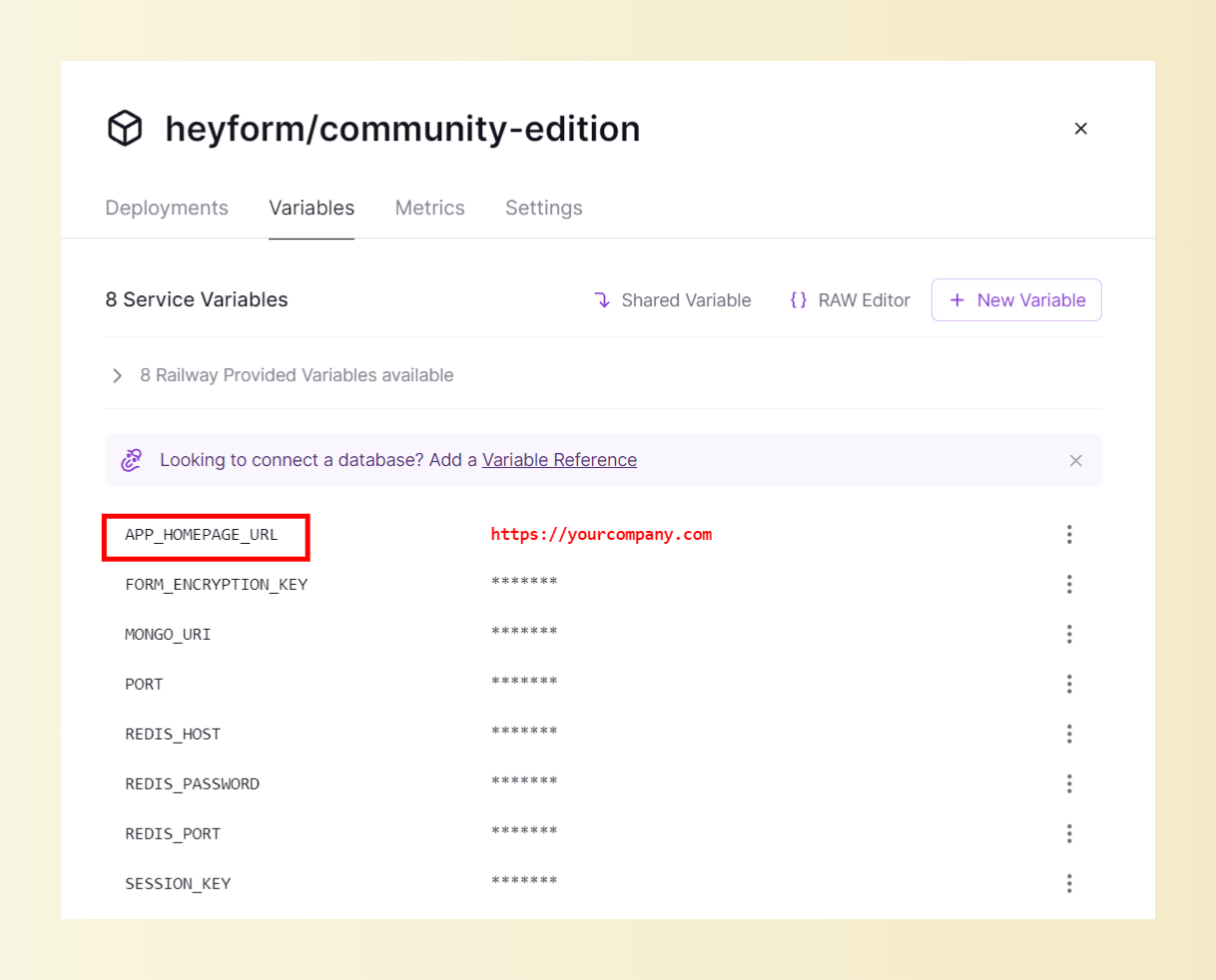
If you want to bound your own domain to Railway or Zeabur, please **replace** `APP_HOMEPAGE_URL` **with your own domain** name like this below and **redeploy the instance**:
 ::
## Deploy with Docker
### Requirements
Before you begin, ensure you have the following:
- Basic knowledge of Docker and containerization principles.
- Docker and Docker Compose are installed on your machine.
### Configuration
Using [this sample file](https://github.com/heyform/heyform/blob/main/packages/server/.env.example) as a reference create a `docker.env` file or `environment` in `docker-compose.yml` to contain the **[environment variables](https://docs.heyform.net/open-source/configuration)** for your installation.
KeyDB images are architecture-specific. The examples below use the `x86_64_v6.3.3` image for x86-64 hosts. On ARM64 hosts, replace it with `arm64_v6.3.3`; `alpine_x86_64_v6.3.3` is also available for x86-64 hosts.
### Docker Compose
#### 1. Install Docker and Docker Compose:
For macOS users, you can install them by [Homebrew](https://brew.sh/):
```bash
brew install docker docker-compose
```
For Windows users, you can install them by [Chocolatey](https://chocolatey.org/):
```bash
choco install docker-desktop docker-compose -y
```
#### 2. Create a `docker-compose.yml` file, an example configuration with all dependencies dockerized and environment variables is as follows:
Here are four different use cases. Please refer to their APP_HOMEPAGE_URL settings. Incorrect settings may result in login issues.
::card
#title
Run on your own computer
```yaml [docker-compose.yml]
networks:
keydb:
mongo:
services:
heyform:
image: heyform/community-edition:latest
restart: always
volumes:
# Persist uploaded images
- ./assets:/app/static/upload
depends_on:
- mongo
- keydb
ports:
- '9157:9157'
environment:
APP_HOMEPAGE_URL: http://127.0.0.1:9157
SESSION_KEY: key1
FORM_ENCRYPTION_KEY: key2
MONGO_URI: 'mongodb://mongo:27017/heyform'
REDIS_HOST: keydb
REDIS_PORT: 6379
mongo:
image: percona/percona-server-mongodb:latest
restart: always
volumes:
# Persist MongoDB data
- mongodb_data:/data/db
keydb:
image: eqalpha/keydb:x86_64_v6.3.3
restart: always
command: keydb-server --appendonly yes --protected-mode no
volumes:
# Persist KeyDB data
- keydb:/data
volumes:
mongodb_data:
keydb:
```
::
::card
#title
Connect MongoDB with username and password
```yaml [docker-compose.yml]
networks:
keydb:
mongo:
services:
heyform:
image: heyform/community-edition:latest
restart: always
volumes:
# Persist uploaded images
- ./assets:/app/static/upload
depends_on:
- mongo
- keydb
ports:
- '9157:9157'
environment:
APP_HOMEPAGE_URL: http://127.0.0.1:9157
SESSION_KEY: key1
FORM_ENCRYPTION_KEY: key2
MONGO_URI: 'mongodb://mongo:27017/heyform?authSource=admin'
MONGO_USER: root
MONGO_PASSWORD: passexample
REDIS_HOST: keydb
REDIS_PORT: 6379
mongo:
image: percona/percona-server-mongodb:latest
restart: always
volumes:
# Persist MongoDB data
- mongodb_data:/data/db
environment:
MONGO_INITDB_ROOT_USERNAME: root
MONGO_INITDB_ROOT_PASSWORD: passexample
keydb:
image: eqalpha/keydb:x86_64_v6.3.3
restart: always
command: keydb-server --appendonly yes --protected-mode no
volumes:
# Persist KeyDB data
- keydb:/data
volumes:
mongodb_data:
keydb:
```
::
::card
#title
Allow other computers in the local network to access
```yaml [docker-compose.yml]
version: '3'
services:
heyform:
image: heyform/community-edition:latest
restart: always
volumes:
# Persist uploaded images
- ./assets:/app/static/upload
depends_on:
- mongo
- keydb
ports:
- '9157:9157'
environment:
APP_HOMEPAGE_URL: http://192.168.1.50:9157
SESSION_KEY: key1
FORM_ENCRYPTION_KEY: key2
MONGO_URI: 'mongodb://mongo:27017/heyform'
REDIS_HOST: keydb
REDIS_PORT: 6379
mongo:
image: percona/percona-server-mongodb:latest
restart: always
volumes:
# Persist MongoDB data
- mongodb_data:/data/db
keydb:
image: eqalpha/keydb:x86_64_v6.3.3
restart: always
command: keydb-server --appendonly yes --protected-mode no
volumes:
# Persist KeyDB data
- keydb:/data
volumes:
mongodb_data:
keydb:
```
::
::card
#title
Deploy to a public server
```yaml [docker-compose.yml]
networks:
keydb:
mongo:
services:
heyform:
image: heyform/community-edition:latest
restart: always
volumes:
# Persist uploaded images
- ./assets:/app/static/upload
depends_on:
- mongo
- keydb
ports:
- '9157:9157'
environment:
APP_HOMEPAGE_URL: http://form.yourcompany.com
SESSION_KEY: key1
FORM_ENCRYPTION_KEY: key2
MONGO_URI: 'mongodb://mongo:27017/heyform'
REDIS_HOST: keydb
REDIS_PORT: 6379
mongo:
image: percona/percona-server-mongodb:latest
restart: always
volumes:
# Persist MongoDB data
- mongodb_data:/data/db
keydb:
image: eqalpha/keydb:x86_64_v6.3.3
restart: always
command: keydb-server --appendonly yes --protected-mode no
volumes:
# Persist KeyDB data
- keydb:/data
volumes:
mongodb_data:
keydb:
```
```yaml [nginx.conf]
# Nginx config
# To deploy to a public server, you will also need to configure nginx for reverse proxying the NodeJs program
server {
listen 80;
server_name form.yourcompany.com;
location / {
proxy_pass http://heyform:9157;
proxy_set_header Host $host;
proxy_set_header X-Real-IP $remote_addr;
proxy_set_header X-Forwarded-For $proxy_add_x_forwarded_for;
proxy_set_header REMOTE-HOST $remote_addr;
}
}
```
::
### Run it
Make sure you are in the same directory as `docker-compose.yml` and start HeyForm:
```bash
docker-compose up -d
```
When you run this command, by default, it does the following:
- Create a database
- Run the migrations
- Start the HeyForm web app on port 9157
You can now navigate to `http://:9157` or `http://form.yourcompany.com` and see the login screen. HeyForm itself does not perform SSL termination. It only runs on unencrypted HTTP. If you want to run on HTTPS you also need to set up a reverse proxy in front of the server.
---
# Local development
Source: https://docs.heyform.net/open-source/local-development
Local development guidelines for self-hosted HeyForm.
## Requirements
- [Node.js v22.x](https://nodejs.org/en/download/)
- [Pnpm v8.x](https://pnpm.io/installation)
- Docker and Docker Compose
For macOS users, you can install them by [Homebrew](https://brew.sh/):
```bash
brew install node@22
```
For Windows users, you can install them by [Chocolatey](https://chocolatey.org/)**:**
```bash
choco install nodejs --version=22.11.0 -y
```
Start the development services from the project root:
```bash
docker compose -f docker-compose.development.yml up
```
## Environment variables
### Server
Copy `.env.example` to `.env.local` file in `packages/server` directory. How to match .env? Refer to: [Environment Variables](https://docs.heyform.net/open-source/configuration/environment-variables)
### Webapp
Copy `.env.example` to `.env.local` file in `packages/webapp` directory. All of these environment variables are **not necessary during** `webapp` **compiling**, as the `server` will pass them when [rendering the HTML](https://github.com/heyform/heyform/blob/main/packages/server/src/controller/dashboard.controller.ts#L18).
| Name | Type | Required | Description |
| --- | --- | --- | --- |
| VITE_HOMEPAGE_URL | String | ✅ | Homepage URL (e.g. http://127.0.0.1:3000) |
| VITE_COOKIE_DOMAIN | String | ✅ | Cookie domain (e.g. 127.0.0.1) |
| VITE_STRIPE_PUBLISHABLE_KEY | String | | https://docs.stripe.com/keys |
| VITE_GEETEST_CAPTCHA_ID | String | | https://docs.geetest.com/captcha/overview/guide#Step-1-Get-your-captcha-ID-and-KEY |
| VITE_GOOGLE_RECAPTCHA_KEY | String | | https://cloud.google.com/recaptcha-enterprise/docs/create-key-website |
| VITE_DISABLE_LOGIN_WITH_GOOGLE | Boolean | | Is it allowed to log in with Google? |
| VITE_DISABLE_LOGIN_WITH_APPLE | Boolean | | Is it allowed to log in with Apple? |
| VITE_VERIFY_USER_EMAIL | Boolean | | Whether it is necessary to verify the email addresses of the new users |
## Setup
```bash
pnpm install
```
## Run dev server
The NodeJS server will run on `http://127.0.0.1:9157` and web app will run on `http://127.0.0.1:3000`.
```bash
pnpm dev
```
---
# Contribute
Source: https://docs.heyform.net/open-source/contribute
Guide on how to contribute to HeyForm.
You are considering contributing to HeyForm. We and the Open-source community thank you for this 🙏.
Any contributions you make are **greatly appreciated**. There are various ways to get involved, such as enhancing the documentation, reporting bugs or suggesting new features, or even writing code that can be integrated into HeyForm directly.
::alert{title="Notice" type="success"}
If you are considering implementing a new feature or a bug fix, please open an issue first. This will enable us to discuss the specification and determine the most effective implementation approach.
::
::alert{to="https://github.com/heyform/heyform/issues/new/choose"}
Report issues
::
::alert{to="https://discord.gg/sgT4v4GSTe"}
Engage and help others on Discord
::
---
# License
Source: https://docs.heyform.net/open-source/license
The open source license of HeyForm
HeyForm is open-source under the GNU Affero General Public License v3.0 (AGPL-3.0), You can find it **[here](https://github.com/heyform/heyform/blob/main/LICENSE)**. The goal of the AGPL-3.0 license is to:
- Provide stronger protection against patent threats.
- Clarify license compatibility.
- Ensure users can work with AGPL-3.0 covered software without concerns about patent aggression.
- Allow the use of code with certain requirements like trademark restrictions.
- Protect users' freedom to modify software on their devices.
- Prevent the practice of denying users access to modified versions of software.
- Address issues related to software patents and prevent patents from making programs effectively proprietary.
---
Here are the 3 different possible use cases:
#### You'd like to self-host HeyForm as-is without modifying the source code and you don't have the intention to commercialize your version of HeyForm.
You can host and use HeyForm without restrictions. Your contributions to improve HeyForm and fix bugs are welcome. 💙
#### You'd like to fork the project to build your own features on top of HeyForm and you don't have the intention to commercialize your version of HeyForm.
You need to open-source your modifications.
#### You'd like to commercialize your own version of HeyForm
1. You need to open-source your modifications.
2. After your users registration, you should provide a prominent mention and link to the original project (https://heyform.net). You should clearly mention that you provide a modified version of the official project, HeyForm. It would be also a good place to explain your version advantages comparing to the original project.
3. You need to provide a link to your forked repository somewhere in the landing page or the builder. This way, interested users can easily access and review the modifications you’ve made.
---
# REST API
Source: https://docs.heyform.net/open-source/rest-api
Authenticate with an account API key and use the HeyForm REST API on your self-hosted instance.
The HeyForm REST API lives at `/api/v1` on your self-hosted instance. It uses JSON and bearer authentication.
## Create an API key
1. Open **Account Settings → API Keys → Create API key**.
2. Name the key and select **All workspaces** or specific workspaces. All workspaces includes future memberships.
3. Select permissions available in every selected workspace. Choose **1 month** (the default), **1 year**, **Custom date**, or **Never expires**. A custom date includes that entire day in UTC.
4. Copy the key to your integration's secret store. The full `ak-heyform-` key appears when you create or rotate it. HeyForm stores a SHA-256 hash and short display fragments.
In **API Keys**, you can change a key's scopes and workspaces, rotate it, or delete it. Editing keeps the secret. Rotating keeps the scopes, workspaces, and expiry and immediately invalidates the old secret. Create a new key when one expires. Deleting a key immediately revokes it. Account Settings manages keys using your browser session.
Workspace owners can grant `workspaces:write` and `members:write`. Workspace membership grants `workspaces:read`, `users:read`, `members:read`, `projects:read`, and `projects:write`. Form and submission permissions require project membership. HeyForm rechecks your current membership and role on each request, and limits existing-project operations to projects you can access.
## Send requests
Set these variables before running the cURL examples.
```bash [Environment]
export HEYFORM_URL="https://forms.example.com"
export HEYFORM_API_KEY="your-account-key"
```
```bash
curl --fail-with-body \
-H "Authorization: Bearer ${HEYFORM_API_KEY}" \
"${HEYFORM_URL}/api/v1/workspaces"
```
Use the workspace `id` from the response to list its projects, then use a project `id` to list its forms. Substitute the relevant IDs for the path placeholders below. Pass query parameters in the URL.
Send body parameters as JSON with `Content-Type: application/json`.
```bash
curl --fail-with-body -X POST \
-H "Authorization: Bearer ${HEYFORM_API_KEY}" \
-H 'Content-Type: application/json' \
--data '{"name":"Customer feedback"}' \
"${HEYFORM_URL}/api/v1/projects/${PROJECT_ID}/forms"
```
Use IDs returned by your instance to replace sample IDs in JSON bodies and to set path variables such as `WORKSPACE_ID`, `PROJECT_ID`, and `FORM_ID`. Submit JSON with the `Content-Type: application/json` header.
## Endpoint reference
### Health
- `GET` [Check API health](https://docs.heyform.net/open-source/rest-api/health/check-api-health)
### Workspaces
- `GET` [List workspaces](https://docs.heyform.net/open-source/rest-api/workspaces/list-workspaces)
- `GET` [Get a workspace](https://docs.heyform.net/open-source/rest-api/workspaces/get-a-workspace)
- `PATCH` [Rename a workspace](https://docs.heyform.net/open-source/rest-api/workspaces/rename-a-workspace)
### Users
- `GET` [Get the current user](https://docs.heyform.net/open-source/rest-api/users/get-the-current-user)
- `GET` [Get a user](https://docs.heyform.net/open-source/rest-api/users/get-a-user)
### Members
- `GET` [List workspace members](https://docs.heyform.net/open-source/rest-api/members/list-workspace-members)
- `POST` [Invite workspace members](https://docs.heyform.net/open-source/rest-api/members/invite-workspace-members)
- `DELETE` [Remove a workspace member](https://docs.heyform.net/open-source/rest-api/members/remove-a-workspace-member)
### Projects
- `GET` [List projects](https://docs.heyform.net/open-source/rest-api/projects/list-projects)
- `POST` [Create a project](https://docs.heyform.net/open-source/rest-api/projects/create-a-project)
- `PATCH` [Rename a project](https://docs.heyform.net/open-source/rest-api/projects/rename-a-project)
### Forms
- `GET` [List forms](https://docs.heyform.net/open-source/rest-api/forms/list-forms)
- `POST` [Create a form](https://docs.heyform.net/open-source/rest-api/forms/create-a-form)
- `GET` [Get a form](https://docs.heyform.net/open-source/rest-api/forms/get-a-form)
- `PATCH` [Rename a form](https://docs.heyform.net/open-source/rest-api/forms/rename-a-form)
- `POST` [Duplicate a form](https://docs.heyform.net/open-source/rest-api/forms/duplicate-a-form)
- `POST` [Move a form](https://docs.heyform.net/open-source/rest-api/forms/move-a-form)
- `POST` [Trash a form](https://docs.heyform.net/open-source/rest-api/forms/trash-a-form)
- `POST` [Restore a form](https://docs.heyform.net/open-source/rest-api/forms/restore-a-form)
- `PATCH` [Save a form draft](https://docs.heyform.net/open-source/rest-api/forms/save-a-form-draft)
- `POST` [Publish a form](https://docs.heyform.net/open-source/rest-api/forms/publish-a-form)
- `POST` [Unpublish a form](https://docs.heyform.net/open-source/rest-api/forms/unpublish-a-form)
- `PATCH` [Set form availability](https://docs.heyform.net/open-source/rest-api/forms/set-form-availability)
- `PATCH` [Update form settings](https://docs.heyform.net/open-source/rest-api/forms/update-form-settings)
- `PATCH` [Update the form theme](https://docs.heyform.net/open-source/rest-api/forms/update-the-form-theme)
- `PATCH` [Replace hidden fields](https://docs.heyform.net/open-source/rest-api/forms/replace-hidden-fields)
- `PATCH` [Replace form variables](https://docs.heyform.net/open-source/rest-api/forms/replace-form-variables)
### Submissions
- `GET` [List submissions](https://docs.heyform.net/open-source/rest-api/submissions/list-submissions)
- `GET` [Get a submission](https://docs.heyform.net/open-source/rest-api/submissions/get-a-submission)
- `PATCH` [Change a submission category](https://docs.heyform.net/open-source/rest-api/submissions/change-a-submission-category)
- `PATCH` [Update a submission answer](https://docs.heyform.net/open-source/rest-api/submissions/update-a-submission-answer)
## Errors
HeyForm returns JSON for endpoint errors. A stale draft version, for example, returns HTTP `409` with this body.
```json
{
"statusCode": 409,
"message": "Invalid draft version or form status",
"error": "Conflict"
}
```
| Status | Meaning |
| --- | --- |
| `400` | A path parameter, query parameter, or JSON body is invalid. |
| `401` | The key is missing, invalid, expired, or no longer active. |
| `403` | The caller lacks a required scope, membership, or workspace access, or the operation is forbidden for that resource. |
| `404` | The resource is missing or unavailable to the caller. |
| `409` | The request conflicts with the resource's current version or state. |
| `429` | The instance's HTTP rate limit was reached. This response can be plain text. |
---
# Check API health
Source: https://docs.heyform.net/open-source/rest-api/health/check-api-health
Confirm that your bearer key works and identify the API version.
::api-reference{method="GET" path="/api/v1/health"}
## Authorization
::field{name="Authorization" type="string · header" :required="true"}
Send `Bearer ` with any valid [API key](https://docs.heyform.net/open-source/rest-api#create-an-api-key).
::
## Response
**200** · `application/json`
| Field | Type | Description |
| --- | --- | --- |
| `status` | `string` | `ok` when the API is reachable and the key is valid. |
| `version` | `string` | API version. |
#examples
```bash [cURL]
curl --fail-with-body --request GET \
--url "${HEYFORM_URL}/api/v1/health" \
--header "Authorization: Bearer ${HEYFORM_API_KEY}"
```
```json [200 response]
{
"status": "ok",
"version": "v1"
}
```
::
---
# List workspaces
Source: https://docs.heyform.net/open-source/rest-api/workspaces/list-workspaces
List workspaces accessible to the current API key.
::api-reference{method="GET" path="/api/v1/workspaces"}
## Authorization
::field{name="Authorization" type="string · header" :required="true"}
Send `Bearer ` with an [account API key](https://docs.heyform.net/open-source/rest-api#create-an-api-key) that has the `workspaces:read` scope.
::
## Response
**200** · `application/json`
Source model: [TeamModel][workspace-model].
Returns an array with the following properties on each item.
| Field | Type | Description |
| --- | --- | --- |
| `id` | `string` | ID returned by the operation. |
| `name` | `string` | Display name. |
| `ownerId` | `string` | ID of the user who owns the resource. |
#examples
```bash [cURL]
curl --fail-with-body --request GET \
--url "${HEYFORM_URL}/api/v1/workspaces" \
--header "Authorization: Bearer ${HEYFORM_API_KEY}"
```
```json [200 response]
[
{
"id": "wK4s8aP2",
"name": "Research",
"ownerId": "507f1f77bcf86cd799439012"
}
]
```
::
[workspace-model]: https://github.com/heyform/heyform/blob/e7467ed32e05d42f9cb52a4079e42fed09072fe2/packages/server/src/model/team.model.ts#L12
---
# Get a workspace
Source: https://docs.heyform.net/open-source/rest-api/workspaces/get-a-workspace
Retrieve the name and owner of a workspace.
::api-reference{method="GET" path="/api/v1/workspaces/{workspaceId}"}
## Authorization
::field{name="Authorization" type="string · header" :required="true"}
Send `Bearer ` with an [account API key](https://docs.heyform.net/open-source/rest-api#create-an-api-key) that has the `workspaces:read` scope.
::
## Path parameters
::field{name="workspaceId" type="string" :required="true"}
Workspace ID. See [TeamModel][workspace-model].
::
## Response
**200** · `application/json`
Source model: [TeamModel][workspace-model].
| Field | Type | Description |
| --- | --- | --- |
| `id` | `string` | ID returned by the operation. |
| `name` | `string` | Display name. |
| `ownerId` | `string` | ID of the user who owns the resource. |
#examples
```bash [cURL]
curl --fail-with-body --request GET \
--url "${HEYFORM_URL}/api/v1/workspaces/${WORKSPACE_ID}" \
--header "Authorization: Bearer ${HEYFORM_API_KEY}"
```
```json [200 response]
{
"id": "wK4s8aP2",
"name": "Research",
"ownerId": "507f1f77bcf86cd799439012"
}
```
::
[workspace-model]: https://github.com/heyform/heyform/blob/e7467ed32e05d42f9cb52a4079e42fed09072fe2/packages/server/src/model/team.model.ts#L12
---
# Rename a workspace
Source: https://docs.heyform.net/open-source/rest-api/workspaces/rename-a-workspace
Change the name of a workspace you own.
::api-reference{method="PATCH" path="/api/v1/workspaces/{workspaceId}"}
## Authorization
::field{name="Authorization" type="string · header" :required="true"}
Send `Bearer ` with an [account API key](https://docs.heyform.net/open-source/rest-api#create-an-api-key) that has the `workspaces:write` scope.
::
## Path parameters
::field{name="workspaceId" type="string" :required="true"}
Workspace ID. See [TeamModel][workspace-model].
::
## Request body
`application/json`
::field{name="name" type="string" :required="true"}
Display name, 1–100 characters after trimming.
::
## Response
**200** · `application/json`
Source model: [TeamModel][workspace-model].
| Field | Type | Description |
| --- | --- | --- |
| `id` | `string` | ID returned by the operation. |
| `name` | `string` | Display name. |
| `ownerId` | `string` | ID of the user who owns the resource. |
#examples
```bash [cURL]
curl --fail-with-body --request PATCH \
--url "${HEYFORM_URL}/api/v1/workspaces/${WORKSPACE_ID}" \
--header "Authorization: Bearer ${HEYFORM_API_KEY}" \
--header 'Content-Type: application/json' \
--data '{
"name": "Product research"
}'
```
```json [200 response]
{
"id": "wK4s8aP2",
"name": "Product research",
"ownerId": "507f1f77bcf86cd799439012"
}
```
::
[workspace-model]: https://github.com/heyform/heyform/blob/e7467ed32e05d42f9cb52a4079e42fed09072fe2/packages/server/src/model/team.model.ts#L12
---
# Get the current user
Source: https://docs.heyform.net/open-source/rest-api/users/get-the-current-user
Retrieve the user who owns this API key.
::api-reference{method="GET" path="/api/v1/users/me"}
## Authorization
::field{name="Authorization" type="string · header" :required="true"}
Send `Bearer ` with an [account API key](https://docs.heyform.net/open-source/rest-api#create-an-api-key). No scope is required.
::
## Response
**200** · `application/json`
Source model: [UserModel][user-model].
| Field | Type | Description |
| --- | --- | --- |
| `id` | `string` | User ID. |
| `name` | `string` | Display name. |
| `email` | `string` | Email address. |
#examples
```bash [cURL]
curl --fail-with-body --request GET \
--url "${HEYFORM_URL}/api/v1/users/me" \
--header "Authorization: Bearer ${HEYFORM_API_KEY}"
```
```json [200 response]
{
"id": "507f1f77bcf86cd799439013",
"name": "Ada Lovelace",
"email": "ada@example.com"
}
```
::
[user-model]: https://github.com/heyform/heyform/blob/e7467ed32e05d42f9cb52a4079e42fed09072fe2/packages/server/src/model/user.model.ts#L13
---
# Get a user
Source: https://docs.heyform.net/open-source/rest-api/users/get-a-user
Retrieve a user by ID. The user must belong to a workspace accessible to this key.
::api-reference{method="GET" path="/api/v1/users/{userId}"}
## Authorization
::field{name="Authorization" type="string · header" :required="true"}
Send `Bearer ` with an [account API key](https://docs.heyform.net/open-source/rest-api#create-an-api-key) that has the `users:read` scope.
::
## Path parameters
::field{name="userId" type="string" :required="true"}
User ID. See [UserModel][user-model].
::
## Response
**200** · `application/json`
Source model: [UserModel][user-model].
| Field | Type | Description |
| --- | --- | --- |
| `id` | `string` | ID returned by the operation. |
| `name` | `string` | Display name. |
| `email` | `string` | Email address. |
#examples
```bash [cURL]
curl --fail-with-body --request GET \
--url "${HEYFORM_URL}/api/v1/users/${USER_ID}" \
--header "Authorization: Bearer ${HEYFORM_API_KEY}"
```
```json [200 response]
{
"id": "507f1f77bcf86cd799439013",
"name": "Ada Lovelace",
"email": "ada@example.com"
}
```
::
[user-model]: https://github.com/heyform/heyform/blob/e7467ed32e05d42f9cb52a4079e42fed09072fe2/packages/server/src/model/user.model.ts#L13
---
# List workspace members
Source: https://docs.heyform.net/open-source/rest-api/members/list-workspace-members
List the users and their roles in a workspace.
::api-reference{method="GET" path="/api/v1/workspaces/{workspaceId}/members"}
## Authorization
::field{name="Authorization" type="string · header" :required="true"}
Send `Bearer ` with an [account API key](https://docs.heyform.net/open-source/rest-api#create-an-api-key) that has the `members:read` scope.
::
## Path parameters
::field{name="workspaceId" type="string" :required="true"}
Workspace ID. See [TeamModel][workspace-model].
::
## Response
**200** · `application/json`
Source model: [TeamMemberModel][member-model].
Returns an array with the following properties on each item.
| Field | Type | Description |
| --- | --- | --- |
| `userId` | `string` | User ID. |
| `role` | `integer` | Workspace role. `0` is owner, `1` admin, `2` collaborator, and `3` member. See [TeamRoleEnum][member-model]. |
#examples
```bash [cURL]
curl --fail-with-body --request GET \
--url "${HEYFORM_URL}/api/v1/workspaces/${WORKSPACE_ID}/members" \
--header "Authorization: Bearer ${HEYFORM_API_KEY}"
```
```json [200 response]
[
{
"userId": "507f1f77bcf86cd799439013",
"role": 2
}
]
```
::
[workspace-model]: https://github.com/heyform/heyform/blob/e7467ed32e05d42f9cb52a4079e42fed09072fe2/packages/server/src/model/team.model.ts#L12
[member-model]: https://github.com/heyform/heyform/blob/e7467ed32e05d42f9cb52a4079e42fed09072fe2/packages/server/src/model/team-member.model.ts#L4
---
# Invite workspace members
Source: https://docs.heyform.net/open-source/rest-api/members/invite-workspace-members
Email the workspace invitation link to up to 20 addresses. Only the workspace owner can invite members. Addresses that already belong to members are skipped.
::api-reference{method="POST" path="/api/v1/workspaces/{workspaceId}/invitations"}
## Authorization
::field{name="Authorization" type="string · header" :required="true"}
Send `Bearer ` with an [account API key](https://docs.heyform.net/open-source/rest-api#create-an-api-key) that has the `members:write` scope.
::
## Path parameters
::field{name="workspaceId" type="string" :required="true"}
Workspace ID. See [TeamModel][workspace-model].
::
## Request body
`application/json`
::field{name="emails" type="string[]" :required="true"}
1–20 email addresses. Invitees join the workspace when they follow the link in the email.
::
## Response
**201** · `application/json`
| Field | Type | Description |
| --- | --- | --- |
| `workspaceId` | `string` | Workspace ID. |
| `emails` | `string[]` | Lowercased addresses that were sent an invitation. |
#examples
```bash [cURL]
curl --fail-with-body --request POST \
--url "${HEYFORM_URL}/api/v1/workspaces/${WORKSPACE_ID}/invitations" \
--header "Authorization: Bearer ${HEYFORM_API_KEY}" \
--header 'Content-Type: application/json' \
--data '{
"emails": ["ada@example.com"]
}'
```
```json [201 response]
{
"workspaceId": "wK4s8aP2",
"emails": ["ada@example.com"]
}
```
::
[workspace-model]: https://github.com/heyform/heyform/blob/e7467ed32e05d42f9cb52a4079e42fed09072fe2/packages/server/src/model/team.model.ts#L12
---
# Remove a workspace member
Source: https://docs.heyform.net/open-source/rest-api/members/remove-a-workspace-member
Remove a user from the workspace and its projects. Only the workspace owner can remove members, and the owner cannot be removed.
::api-reference{method="DELETE" path="/api/v1/workspaces/{workspaceId}/members/{userId}"}
## Authorization
::field{name="Authorization" type="string · header" :required="true"}
Send `Bearer ` with an [account API key](https://docs.heyform.net/open-source/rest-api#create-an-api-key) that has the `members:write` scope.
::
## Path parameters
::field{name="workspaceId" type="string" :required="true"}
Workspace ID. See [TeamModel][workspace-model].
::
::field{name="userId" type="string" :required="true"}
User ID. See [UserModel][user-model].
::
## Response
**200** · `application/json`
Source model: [TeamMemberModel][member-model].
| Field | Type | Description |
| --- | --- | --- |
| `removed` | `boolean` | Whether the membership was removed. |
| `workspaceId` | `string` | Workspace ID. |
| `userId` | `string` | User ID. |
#examples
```bash [cURL]
curl --fail-with-body --request DELETE \
--url "${HEYFORM_URL}/api/v1/workspaces/${WORKSPACE_ID}/members/${USER_ID}" \
--header "Authorization: Bearer ${HEYFORM_API_KEY}"
```
```json [200 response]
{
"removed": true,
"workspaceId": "wK4s8aP2",
"userId": "507f1f77bcf86cd799439013"
}
```
::
[workspace-model]: https://github.com/heyform/heyform/blob/e7467ed32e05d42f9cb52a4079e42fed09072fe2/packages/server/src/model/team.model.ts#L12
[user-model]: https://github.com/heyform/heyform/blob/e7467ed32e05d42f9cb52a4079e42fed09072fe2/packages/server/src/model/user.model.ts#L13
[member-model]: https://github.com/heyform/heyform/blob/e7467ed32e05d42f9cb52a4079e42fed09072fe2/packages/server/src/model/team-member.model.ts#L4
---
# List projects
Source: https://docs.heyform.net/open-source/rest-api/projects/list-projects
List the projects you can access in a workspace.
::api-reference{method="GET" path="/api/v1/workspaces/{workspaceId}/projects"}
## Authorization
::field{name="Authorization" type="string · header" :required="true"}
Send `Bearer ` with an [account API key](https://docs.heyform.net/open-source/rest-api#create-an-api-key) that has the `projects:read` scope.
::
## Path parameters
::field{name="workspaceId" type="string" :required="true"}
Workspace ID. See [TeamModel][workspace-model].
::
## Response
**200** · `application/json`
Source model: [ProjectModel][project-model].
Returns an array with the following properties on each item.
| Field | Type | Description |
| --- | --- | --- |
| `id` | `string` | ID returned by the operation. |
| `name` | `string` | Display name. |
| `workspaceId` | `string` | Workspace ID. |
| `ownerId` | `string` | ID of the user who owns the resource. |
#examples
```bash [cURL]
curl --fail-with-body --request GET \
--url "${HEYFORM_URL}/api/v1/workspaces/${WORKSPACE_ID}/projects" \
--header "Authorization: Bearer ${HEYFORM_API_KEY}"
```
```json [200 response]
[
{
"id": "pJ5Q7dR2",
"name": "Customer surveys",
"workspaceId": "wK4s8aP2",
"ownerId": "507f1f77bcf86cd799439012"
}
]
```
::
[workspace-model]: https://github.com/heyform/heyform/blob/e7467ed32e05d42f9cb52a4079e42fed09072fe2/packages/server/src/model/team.model.ts#L12
[project-model]: https://github.com/heyform/heyform/blob/e7467ed32e05d42f9cb52a4079e42fed09072fe2/packages/server/src/model/project.model.ts#L9
---
# Create a project
Source: https://docs.heyform.net/open-source/rest-api/projects/create-a-project
Create a project in the workspace. With an account key, the key owner becomes the project owner.
::api-reference{method="POST" path="/api/v1/workspaces/{workspaceId}/projects"}
## Authorization
::field{name="Authorization" type="string · header" :required="true"}
Send `Bearer ` with an [account API key](https://docs.heyform.net/open-source/rest-api#create-an-api-key) that has the `projects:write` scope.
::
## Path parameters
::field{name="workspaceId" type="string" :required="true"}
Workspace ID. See [TeamModel][workspace-model].
::
## Request body
`application/json`
::field{name="name" type="string" :required="true"}
Display name, 1–100 characters after trimming.
::
## Response
**201** · `application/json`
Source model: [ProjectModel][project-model].
| Field | Type | Description |
| --- | --- | --- |
| `id` | `string` | ID returned by the operation. |
| `name` | `string` | Display name. |
| `workspaceId` | `string` | Workspace ID. |
| `ownerId` | `string` | ID of the user who owns the resource. |
#examples
```bash [cURL]
curl --fail-with-body --request POST \
--url "${HEYFORM_URL}/api/v1/workspaces/${WORKSPACE_ID}/projects" \
--header "Authorization: Bearer ${HEYFORM_API_KEY}" \
--header 'Content-Type: application/json' \
--data '{
"name": "Customer surveys"
}'
```
```json [201 response]
{
"id": "pJ5Q7dR2",
"name": "Customer surveys",
"workspaceId": "wK4s8aP2",
"ownerId": "507f1f77bcf86cd799439012"
}
```
::
[workspace-model]: https://github.com/heyform/heyform/blob/e7467ed32e05d42f9cb52a4079e42fed09072fe2/packages/server/src/model/team.model.ts#L12
[project-model]: https://github.com/heyform/heyform/blob/e7467ed32e05d42f9cb52a4079e42fed09072fe2/packages/server/src/model/project.model.ts#L9
---
# Rename a project
Source: https://docs.heyform.net/open-source/rest-api/projects/rename-a-project
Change the name of a project you can access.
::api-reference{method="PATCH" path="/api/v1/projects/{projectId}"}
## Authorization
::field{name="Authorization" type="string · header" :required="true"}
Send `Bearer ` with an [account API key](https://docs.heyform.net/open-source/rest-api#create-an-api-key) that has the `projects:write` scope.
::
## Path parameters
::field{name="projectId" type="string" :required="true"}
Project ID. See [ProjectModel][project-model].
::
## Request body
`application/json`
::field{name="name" type="string" :required="true"}
Display name, 1–100 characters after trimming.
::
## Response
**200** · `application/json`
Source model: [ProjectModel][project-model].
| Field | Type | Description |
| --- | --- | --- |
| `id` | `string` | ID returned by the operation. |
| `name` | `string` | Display name. |
#examples
```bash [cURL]
curl --fail-with-body --request PATCH \
--url "${HEYFORM_URL}/api/v1/projects/${PROJECT_ID}" \
--header "Authorization: Bearer ${HEYFORM_API_KEY}" \
--header 'Content-Type: application/json' \
--data '{
"name": "Feedback surveys"
}'
```
```json [200 response]
{
"id": "pJ5Q7dR2",
"name": "Feedback surveys"
}
```
::
[project-model]: https://github.com/heyform/heyform/blob/e7467ed32e05d42f9cb52a4079e42fed09072fe2/packages/server/src/model/project.model.ts#L9
---
# List forms
Source: https://docs.heyform.net/open-source/rest-api/forms/list-forms
List the forms in a project, excluding forms in the trash.
::api-reference{method="GET" path="/api/v1/projects/{projectId}/forms"}
## Authorization
::field{name="Authorization" type="string · header" :required="true"}
Send `Bearer ` with an [account API key](https://docs.heyform.net/open-source/rest-api#create-an-api-key) that has the `forms:read` scope.
::
## Path parameters
::field{name="projectId" type="string" :required="true"}
Project ID. See [ProjectModel][project-model].
::
## Response
**200** · `application/json`
Source model: [FormModel][form-model].
Returns an array with the following properties on each item.
| Field | Type | Description |
| --- | --- | --- |
| `id` | `string` | ID returned by the operation. |
| `name` | `string` | Display name. |
| `version` | `integer` | Current draft version. |
| `publishedAt` | `integer` | Time of first publication as Unix seconds. `0` means the form has never been published. |
#examples
```bash [cURL]
curl --fail-with-body --request GET \
--url "${HEYFORM_URL}/api/v1/projects/${PROJECT_ID}/forms" \
--header "Authorization: Bearer ${HEYFORM_API_KEY}"
```
```json [200 response]
[
{
"id": "fE7D2aK4",
"name": "Customer feedback",
"version": 0,
"publishedAt": 0
}
]
```
::
[project-model]: https://github.com/heyform/heyform/blob/e7467ed32e05d42f9cb52a4079e42fed09072fe2/packages/server/src/model/project.model.ts#L9
[form-model]: https://github.com/heyform/heyform/blob/e7467ed32e05d42f9cb52a4079e42fed09072fe2/packages/server/src/model/form.model.ts#L24
---
# Create a form
Source: https://docs.heyform.net/open-source/rest-api/forms/create-a-form
Create an unpublished form with a starter draft.
::api-reference{method="POST" path="/api/v1/projects/{projectId}/forms"}
## Authorization
::field{name="Authorization" type="string · header" :required="true"}
Send `Bearer ` with an [account API key](https://docs.heyform.net/open-source/rest-api#create-an-api-key) that has the `forms:write` scope.
::
## Path parameters
::field{name="projectId" type="string" :required="true"}
Project ID. See [ProjectModel][project-model].
::
## Request body
`application/json`
::field{name="name" type="string" :required="true"}
Display name, 1–100 characters after trimming.
::
## Response
**201** · `application/json`
Source model: [FormModel][form-model].
| Field | Type | Description |
| --- | --- | --- |
| `id` | `string` | ID returned by the operation. |
| `name` | `string` | Display name. |
| `projectId` | `string` | Project ID. |
| `workspaceId` | `string` | Workspace ID. |
#examples
```bash [cURL]
curl --fail-with-body --request POST \
--url "${HEYFORM_URL}/api/v1/projects/${PROJECT_ID}/forms" \
--header "Authorization: Bearer ${HEYFORM_API_KEY}" \
--header 'Content-Type: application/json' \
--data '{
"name": "Customer feedback"
}'
```
```json [201 response]
{
"id": "fE7D2aK4",
"name": "Customer feedback",
"projectId": "pJ5Q7dR2",
"workspaceId": "wK4s8aP2"
}
```
::
[project-model]: https://github.com/heyform/heyform/blob/e7467ed32e05d42f9cb52a4079e42fed09072fe2/packages/server/src/model/project.model.ts#L9
[form-model]: https://github.com/heyform/heyform/blob/e7467ed32e05d42f9cb52a4079e42fed09072fe2/packages/server/src/model/form.model.ts#L24
---
# Get a form
Source: https://docs.heyform.net/open-source/rest-api/forms/get-a-form
Retrieve the published fields, editable drafts, version, and current form state.
::api-reference{method="GET" path="/api/v1/forms/{formId}"}
## Authorization
::field{name="Authorization" type="string · header" :required="true"}
Send `Bearer ` with an [account API key](https://docs.heyform.net/open-source/rest-api#create-an-api-key) that has the `forms:read` scope.
::
## Path parameters
::field{name="formId" type="string" :required="true"}
Form ID. See [FormModel][form-model].
::
## Response
**200** · `application/json`
Source model: [FormModel][form-model].
| Field | Type | Description |
| --- | --- | --- |
| `id` | `string` | ID returned by the operation. |
| `name` | `string` | Display name. |
| `workspaceId` | `string` | Workspace ID. |
| `projectId` | `string` | Project ID. |
| `fields` | `array` | Published questions and endings. See [FormField][field-model]. |
| `drafts` | `array` | Sanitized editable questions and endings. See [FormField][field-model]. |
| `hiddenFields` | `array` | Hidden fields. See [HiddenField][hidden-field-model]. |
| `variables` | `array` | Variables associated with the resource. See [Variable][variable-model]. |
| `logics` | `array` | Published branching rules. See [Logic][logic-model]. |
| `draftLogics` | `array` | Editable branching rules, when present. See [Logic][logic-model]. |
| `themeSettings` | `object` | Theme, logo, and favicon settings, when present. See [ThemeSettings][theme-model]. |
| `status` | `integer` | `1` for a normal form and `2` for a form in the trash. See [FormStatusEnum][form-enums]. |
| `active` | `boolean` | Whether the form accepts responses. |
| `version` | `integer` | Current draft version. |
| `publishedAt` | `integer` | Time of first publication as Unix seconds. `0` means the form has never been published. |
#examples
```bash [cURL]
curl --fail-with-body --request GET \
--url "${HEYFORM_URL}/api/v1/forms/${FORM_ID}" \
--header "Authorization: Bearer ${HEYFORM_API_KEY}"
```
```json [200 response]
{
"id": "fE7D2aK4",
"name": "Customer feedback",
"workspaceId": "wK4s8aP2",
"projectId": "pJ5Q7dR2",
"fields": [],
"drafts": [
{
"id": "question1",
"kind": "short_text",
"title": [
"What should we improve?"
],
"validations": {
"required": true
}
},
{
"id": "thanks1",
"kind": "thank_you",
"title": [
"Thanks!"
]
}
],
"hiddenFields": [],
"variables": [],
"logics": [],
"draftLogics": [],
"themeSettings": {
"theme": {
"fontFamily": "sans-serif"
}
},
"status": 1,
"active": false,
"version": 0,
"publishedAt": 0
}
```
::
[form-model]: https://github.com/heyform/heyform/blob/e7467ed32e05d42f9cb52a4079e42fed09072fe2/packages/server/src/model/form.model.ts#L24
[field-model]: https://github.com/heyform/heyform/blob/e7467ed32e05d42f9cb52a4079e42fed09072fe2/packages/shared-types-enums/src/form.ts#L193
[hidden-field-model]: https://github.com/heyform/heyform/blob/e7467ed32e05d42f9cb52a4079e42fed09072fe2/packages/shared-types-enums/src/form.ts#L221
[variable-model]: https://github.com/heyform/heyform/blob/e7467ed32e05d42f9cb52a4079e42fed09072fe2/packages/shared-types-enums/src/form.ts#L349
[logic-model]: https://github.com/heyform/heyform/blob/e7467ed32e05d42f9cb52a4079e42fed09072fe2/packages/shared-types-enums/src/form.ts#L462
[theme-model]: https://github.com/heyform/heyform/blob/e7467ed32e05d42f9cb52a4079e42fed09072fe2/packages/shared-types-enums/src/form.ts#L226
[form-enums]: https://github.com/heyform/heyform/blob/e7467ed32e05d42f9cb52a4079e42fed09072fe2/packages/shared-types-enums/src/enums/form.ts#L13
---
# Rename a form
Source: https://docs.heyform.net/open-source/rest-api/forms/rename-a-form
Change the display name of a form.
::api-reference{method="PATCH" path="/api/v1/forms/{formId}"}
## Authorization
::field{name="Authorization" type="string · header" :required="true"}
Send `Bearer ` with an [account API key](https://docs.heyform.net/open-source/rest-api#create-an-api-key) that has the `forms:write` scope.
::
## Path parameters
::field{name="formId" type="string" :required="true"}
Form ID. See [FormModel][form-model].
::
## Request body
`application/json`
::field{name="name" type="string" :required="true"}
Display name, 1–100 characters after trimming.
::
## Response
**200** · `application/json`
Source model: [FormModel][form-model].
| Field | Type | Description |
| --- | --- | --- |
| `id` | `string` | ID returned by the operation. |
| `name` | `string` | Display name. |
#examples
```bash [cURL]
curl --fail-with-body --request PATCH \
--url "${HEYFORM_URL}/api/v1/forms/${FORM_ID}" \
--header "Authorization: Bearer ${HEYFORM_API_KEY}" \
--header 'Content-Type: application/json' \
--data '{
"name": "Product feedback"
}'
```
```json [200 response]
{
"id": "fE7D2aK4",
"name": "Product feedback"
}
```
::
[form-model]: https://github.com/heyform/heyform/blob/e7467ed32e05d42f9cb52a4079e42fed09072fe2/packages/server/src/model/form.model.ts#L24
---
# Duplicate a form
Source: https://docs.heyform.net/open-source/rest-api/forms/duplicate-a-form
Create an inactive copy in the source project. Submissions and the form password are excluded from the copy.
::api-reference{method="POST" path="/api/v1/forms/{formId}/duplicate"}
## Authorization
::field{name="Authorization" type="string · header" :required="true"}
Send `Bearer ` with an [account API key](https://docs.heyform.net/open-source/rest-api#create-an-api-key) that has the `forms:write` scope.
::
## Path parameters
::field{name="formId" type="string" :required="true"}
Form ID. See [FormModel][form-model].
::
## Request body
`application/json`
::field{name="name" type="string" :required="true"}
Display name, 1–100 characters after trimming.
::
## Response
**201** · `application/json`
Source model: [FormModel][form-model].
| Field | Type | Description |
| --- | --- | --- |
| `id` | `string` | ID returned by the operation. |
| `name` | `string` | Display name. |
| `projectId` | `string` | Project ID. |
| `workspaceId` | `string` | Workspace ID. |
| `active` | `boolean` | Whether the form accepts responses. |
#examples
```bash [cURL]
curl --fail-with-body --request POST \
--url "${HEYFORM_URL}/api/v1/forms/${FORM_ID}/duplicate" \
--header "Authorization: Bearer ${HEYFORM_API_KEY}" \
--header 'Content-Type: application/json' \
--data '{
"name": "Feedback copy"
}'
```
```json [201 response]
{
"id": "fC3Y8bN5",
"name": "Feedback copy",
"projectId": "pJ5Q7dR2",
"workspaceId": "wK4s8aP2",
"active": false
}
```
::
[form-model]: https://github.com/heyform/heyform/blob/e7467ed32e05d42f9cb52a4079e42fed09072fe2/packages/server/src/model/form.model.ts#L24
---
# Move a form
Source: https://docs.heyform.net/open-source/rest-api/forms/move-a-form
Move a form to another project in the same workspace. The key must have write access to both projects.
::api-reference{method="POST" path="/api/v1/forms/{formId}/move"}
## Authorization
::field{name="Authorization" type="string · header" :required="true"}
Send `Bearer ` with an [account API key](https://docs.heyform.net/open-source/rest-api#create-an-api-key) that has the `forms:write` scope.
::
## Path parameters
::field{name="formId" type="string" :required="true"}
Form ID. See [FormModel][form-model].
::
## Request body
`application/json`
::field{name="targetProjectId" type="string" :required="true"}
Destination project in the same workspace. See [ProjectModel][project-model].
::
## Response
**201** · `application/json`
Source model: [FormModel][form-model].
| Field | Type | Description |
| --- | --- | --- |
| `id` | `string` | ID returned by the operation. |
| `projectId` | `string` | Project ID. |
| `workspaceId` | `string` | Workspace ID. |
#examples
```bash [cURL]
curl --fail-with-body --request POST \
--url "${HEYFORM_URL}/api/v1/forms/${FORM_ID}/move" \
--header "Authorization: Bearer ${HEYFORM_API_KEY}" \
--header 'Content-Type: application/json' \
--data '{
"targetProjectId": "pT9L3mK1"
}'
```
```json [201 response]
{
"id": "fE7D2aK4",
"projectId": "pT9L3mK1",
"workspaceId": "wK4s8aP2"
}
```
::
[form-model]: https://github.com/heyform/heyform/blob/e7467ed32e05d42f9cb52a4079e42fed09072fe2/packages/server/src/model/form.model.ts#L24
[project-model]: https://github.com/heyform/heyform/blob/e7467ed32e05d42f9cb52a4079e42fed09072fe2/packages/server/src/model/project.model.ts#L9
---
# Trash a form
Source: https://docs.heyform.net/open-source/rest-api/forms/trash-a-form
Move a form to the trash and disable responses. You can restore it during the 30-day retention period.
::api-reference{method="POST" path="/api/v1/forms/{formId}/trash"}
## Authorization
::field{name="Authorization" type="string · header" :required="true"}
Send `Bearer ` with an [account API key](https://docs.heyform.net/open-source/rest-api#create-an-api-key) that has the `forms:write` scope.
::
## Path parameters
::field{name="formId" type="string" :required="true"}
Form ID. See [FormModel][form-model].
::
## Response
**201** · `application/json`
Source model: [FormModel][form-model].
| Field | Type | Description |
| --- | --- | --- |
| `id` | `string` | ID returned by the operation. |
| `trashed` | `boolean` | Whether the form was moved to the trash. |
#examples
```bash [cURL]
curl --fail-with-body --request POST \
--url "${HEYFORM_URL}/api/v1/forms/${FORM_ID}/trash" \
--header "Authorization: Bearer ${HEYFORM_API_KEY}"
```
```json [201 response]
{
"id": "fE7D2aK4",
"trashed": true
}
```
::
[form-model]: https://github.com/heyform/heyform/blob/e7467ed32e05d42f9cb52a4079e42fed09072fe2/packages/server/src/model/form.model.ts#L24
---
# Restore a form
Source: https://docs.heyform.net/open-source/rest-api/forms/restore-a-form
Move a form out of the trash. The restored form starts inactive.
::api-reference{method="POST" path="/api/v1/forms/{formId}/restore"}
## Authorization
::field{name="Authorization" type="string · header" :required="true"}
Send `Bearer ` with an [account API key](https://docs.heyform.net/open-source/rest-api#create-an-api-key) that has the `forms:write` scope.
::
## Path parameters
::field{name="formId" type="string" :required="true"}
Form ID. See [FormModel][form-model].
::
## Response
**201** · `application/json`
Source model: [FormModel][form-model].
| Field | Type | Description |
| --- | --- | --- |
| `id` | `string` | ID returned by the operation. |
| `restored` | `boolean` | Whether the form was restored. |
#examples
```bash [cURL]
curl --fail-with-body --request POST \
--url "${HEYFORM_URL}/api/v1/forms/${FORM_ID}/restore" \
--header "Authorization: Bearer ${HEYFORM_API_KEY}"
```
```json [201 response]
{
"id": "fE7D2aK4",
"restored": true
}
```
::
[form-model]: https://github.com/heyform/heyform/blob/e7467ed32e05d42f9cb52a4079e42fed09072fe2/packages/server/src/model/form.model.ts#L24
---
# Save a form draft
Source: https://docs.heyform.net/open-source/rest-api/forms/save-a-form-draft
Save the editable questions and branching logic. The published form is unaffected.
::api-reference{method="PATCH" path="/api/v1/forms/{formId}/drafts"}
## Authorization
::field{name="Authorization" type="string · header" :required="true"}
Send `Bearer ` with an [account API key](https://docs.heyform.net/open-source/rest-api#create-an-api-key) that has the `forms:write` scope.
::
## Path parameters
::field{name="formId" type="string" :required="true"}
Form ID. See [FormModel][form-model].
::
## Request body
`application/json`
::field{name="version" type="integer" :required="true"}
Current draft version, returned by [Get a form](https://docs.heyform.net/open-source/rest-api/forms/get-a-form) or [Save a form draft](https://docs.heyform.net/open-source/rest-api/forms/save-a-form-draft). A stale version returns `409`.
::
::field{name="drafts" type="FormField[]" :required="true"}
Complete question and ending array. See [FormField][field-model], [FieldKindEnum][field-kinds], and [navigation validation][draft-validation].
::
::field{name="logics" type="Logic[]"}
Replacement branching rules. Use `[]` to clear them. When omitted, HeyForm uses existing draft logic or falls back to published logic. See [Logic][logic-model].
::
## Response
**200** · `application/json`
Source model: [FormModel][form-model].
| Field | Type | Description |
| --- | --- | --- |
| `id` | `string` | ID returned by the operation. |
| `drafts` | `array` | Sanitized editable questions and endings. See [FormField][field-model]. |
| `version` | `integer` | Current draft version. |
#examples
```bash [cURL]
curl --fail-with-body --request PATCH \
--url "${HEYFORM_URL}/api/v1/forms/${FORM_ID}/drafts" \
--header "Authorization: Bearer ${HEYFORM_API_KEY}" \
--header 'Content-Type: application/json' \
--data '{
"version": 0,
"drafts": [
{
"id": "question1",
"kind": "short_text",
"title": [
"What should we improve?"
],
"validations": {
"required": true
}
},
{
"id": "thanks1",
"kind": "thank_you",
"title": [
"Thanks!"
]
}
],
"logics": []
}'
```
```json [200 response]
{
"id": "fE7D2aK4",
"drafts": [
{
"id": "question1",
"kind": "short_text",
"title": [
"What should we improve?"
],
"validations": {
"required": true
}
},
{
"id": "thanks1",
"kind": "thank_you",
"title": [
"Thanks!"
]
}
],
"version": 1
}
```
::
[form-model]: https://github.com/heyform/heyform/blob/e7467ed32e05d42f9cb52a4079e42fed09072fe2/packages/server/src/model/form.model.ts#L24
[field-model]: https://github.com/heyform/heyform/blob/e7467ed32e05d42f9cb52a4079e42fed09072fe2/packages/shared-types-enums/src/form.ts#L193
[field-kinds]: https://github.com/heyform/heyform/blob/e7467ed32e05d42f9cb52a4079e42fed09072fe2/packages/shared-types-enums/src/enums/form.ts#L23
[draft-validation]: https://github.com/heyform/heyform/blob/f3a77c3c6ac498e7f8db8cb008a49995793f8795/packages/server/src/utils/form-schema.ts#L159
[logic-model]: https://github.com/heyform/heyform/blob/e7467ed32e05d42f9cb52a4079e42fed09072fe2/packages/shared-types-enums/src/form.ts#L462
---
# Publish a form
Source: https://docs.heyform.net/open-source/rest-api/forms/publish-a-form
Publish the submitted questions and branching logic and enable responses.
::api-reference{method="POST" path="/api/v1/forms/{formId}/publish"}
## Authorization
::field{name="Authorization" type="string · header" :required="true"}
Send `Bearer ` with an [account API key](https://docs.heyform.net/open-source/rest-api#create-an-api-key) that has the `forms:write` scope.
::
## Path parameters
::field{name="formId" type="string" :required="true"}
Form ID. See [FormModel][form-model].
::
## Request body
`application/json`
::field{name="version" type="integer" :required="true"}
Current draft version, returned by [Get a form](https://docs.heyform.net/open-source/rest-api/forms/get-a-form) or [Save a form draft](https://docs.heyform.net/open-source/rest-api/forms/save-a-form-draft). A stale version returns `409`.
::
::field{name="drafts" type="FormField[]" :required="true"}
Complete question and ending array. See [FormField][field-model], [FieldKindEnum][field-kinds], and [navigation validation][draft-validation].
::
::field{name="logics" type="Logic[]"}
Replacement branching rules. Use `[]` to clear them. When omitted, HeyForm uses existing draft logic or falls back to published logic. See [Logic][logic-model].
::
The request keeps the supplied version. When publishing a draft you just saved, use the version and sanitized drafts returned by the save request.
## Response
**201** · `application/json`
Source model: [FormModel][form-model].
| Field | Type | Description |
| --- | --- | --- |
| `id` | `string` | ID returned by the operation. |
| `active` | `boolean` | Whether the form accepts responses. |
| `version` | `integer` | Current draft version. |
| `publishedAt` | `integer` | Time of first publication as Unix seconds. `0` means the form has never been published. |
#examples
```bash [cURL]
curl --fail-with-body --request POST \
--url "${HEYFORM_URL}/api/v1/forms/${FORM_ID}/publish" \
--header "Authorization: Bearer ${HEYFORM_API_KEY}" \
--header 'Content-Type: application/json' \
--data '{
"version": 1,
"drafts": [
{
"id": "question1",
"kind": "short_text",
"title": [
"What should we improve?"
],
"validations": {
"required": true
}
},
{
"id": "thanks1",
"kind": "thank_you",
"title": [
"Thanks!"
]
}
],
"logics": []
}'
```
```json [201 response]
{
"id": "fE7D2aK4",
"active": true,
"version": 1,
"publishedAt": 1795132800
}
```
::
[form-model]: https://github.com/heyform/heyform/blob/e7467ed32e05d42f9cb52a4079e42fed09072fe2/packages/server/src/model/form.model.ts#L24
[field-model]: https://github.com/heyform/heyform/blob/e7467ed32e05d42f9cb52a4079e42fed09072fe2/packages/shared-types-enums/src/form.ts#L193
[field-kinds]: https://github.com/heyform/heyform/blob/e7467ed32e05d42f9cb52a4079e42fed09072fe2/packages/shared-types-enums/src/enums/form.ts#L23
[draft-validation]: https://github.com/heyform/heyform/blob/f3a77c3c6ac498e7f8db8cb008a49995793f8795/packages/server/src/utils/form-schema.ts#L159
[logic-model]: https://github.com/heyform/heyform/blob/e7467ed32e05d42f9cb52a4079e42fed09072fe2/packages/shared-types-enums/src/form.ts#L462
---
# Unpublish a form
Source: https://docs.heyform.net/open-source/rest-api/forms/unpublish-a-form
Disable responses while preserving the published fields.
::api-reference{method="POST" path="/api/v1/forms/{formId}/unpublish"}
## Authorization
::field{name="Authorization" type="string · header" :required="true"}
Send `Bearer ` with an [account API key](https://docs.heyform.net/open-source/rest-api#create-an-api-key) that has the `forms:write` scope.
::
## Path parameters
::field{name="formId" type="string" :required="true"}
Form ID. See [FormModel][form-model].
::
## Response
**201** · `application/json`
Source model: [FormModel][form-model].
| Field | Type | Description |
| --- | --- | --- |
| `id` | `string` | ID returned by the operation. |
| `active` | `boolean` | Whether the form accepts responses. |
#examples
```bash [cURL]
curl --fail-with-body --request POST \
--url "${HEYFORM_URL}/api/v1/forms/${FORM_ID}/unpublish" \
--header "Authorization: Bearer ${HEYFORM_API_KEY}"
```
```json [201 response]
{
"id": "fE7D2aK4",
"active": false
}
```
::
[form-model]: https://github.com/heyform/heyform/blob/e7467ed32e05d42f9cb52a4079e42fed09072fe2/packages/server/src/model/form.model.ts#L24
---
# Set form availability
Source: https://docs.heyform.net/open-source/rest-api/forms/set-form-availability
Open or close a form for responses. The form must have been published before you can open it.
::api-reference{method="PATCH" path="/api/v1/forms/{formId}/availability"}
## Authorization
::field{name="Authorization" type="string · header" :required="true"}
Send `Bearer ` with an [account API key](https://docs.heyform.net/open-source/rest-api#create-an-api-key) that has the `forms:write` scope.
::
## Path parameters
::field{name="formId" type="string" :required="true"}
Form ID. See [FormModel][form-model].
::
## Request body
`application/json`
Send only the `active` property.
::field{name="active" type="boolean" :required="true"}
Set to `true` to accept responses or `false` to close the form.
::
## Response
**200** · `application/json`
Source model: [FormModel][form-model].
| Field | Type | Description |
| --- | --- | --- |
| `id` | `string` | ID returned by the operation. |
| `active` | `boolean` | Whether the form accepts responses. |
#examples
```bash [cURL]
curl --fail-with-body --request PATCH \
--url "${HEYFORM_URL}/api/v1/forms/${FORM_ID}/availability" \
--header "Authorization: Bearer ${HEYFORM_API_KEY}" \
--header 'Content-Type: application/json' \
--data '{
"active": true
}'
```
```json [200 response]
{
"id": "fE7D2aK4",
"active": true
}
```
::
[form-model]: https://github.com/heyform/heyform/blob/e7467ed32e05d42f9cb52a4079e42fed09072fe2/packages/server/src/model/form.model.ts#L24
---
# Update form settings
Source: https://docs.heyform.net/open-source/rest-api/forms/update-form-settings
Update one or more supported settings. Omitted settings are kept.
::api-reference{method="PATCH" path="/api/v1/forms/{formId}/settings"}
## Authorization
::field{name="Authorization" type="string · header" :required="true"}
Send `Bearer ` with an [account API key](https://docs.heyform.net/open-source/rest-api#create-an-api-key) that has the `forms:write` scope.
::
## Path parameters
::field{name="formId" type="string" :required="true"}
Form ID. See [FormModel][form-model].
::
## Request body
`application/json`
Send at least one field. See [FormSettings][settings-model] and the [REST validation rules][settings-validation].
::field{name="enableExpirationDate" type="boolean"}
Enable the form opening and closing schedule.
::
::field{name="enableTimeLimit" type="boolean"}
Enable the time limit for completing the form.
::
::field{name="filterSpam" type="boolean"}
Enable spam filtering.
::
::field{name="generatePseudonymId" type="boolean"}
Assign a pseudonym ID to submissions.
::
::field{name="enableQuotaLimit" type="boolean"}
Enable the response quota.
::
::field{name="enableIpLimit" type="boolean"}
Enable submission limits per IP address.
::
::field{name="displayIpAddress" type="boolean"}
Make submission IP addresses visible where supported.
::
::field{name="enableProgress" type="boolean"}
Show respondent progress.
::
::field{name="enableQuestionList" type="boolean"}
Show the question list.
::
::field{name="enableNavigationArrows" type="boolean"}
Show navigation arrows.
::
::field{name="openLinksInNewTab" type="boolean"}
Open links in a new tab.
::
::field{name="enableClosedMessage" type="boolean"}
Show a custom message for a closed form.
::
::field{name="allowArchive" type="boolean"}
Allow archiving submissions.
::
::field{name="requirePassword" type="boolean"}
Require a password. Supply `password` here if the form has no saved password.
::
::field{name="enableEmailNotification" type="boolean"}
Enable email notifications.
::
::field{name="redirectOnCompletion" type="boolean"}
Redirect the respondent after completion.
::
::field{name="enabledAt" type="integer ≥ 0"}
Opening time as Unix seconds.
::
::field{name="closedAt" type="integer ≥ 0"}
Closing time as Unix seconds.
::
::field{name="timeLimit" type="integer ≥ 0"}
Completion time limit in seconds.
::
::field{name="ipLimitTime" type="integer ≥ 0"}
Per-IP limit window in seconds.
::
::field{name="redirectDelay" type="integer ≥ 0"}
Delay before redirecting on completion.
::
::field{name="quotaLimit" type="integer ≥ 1"}
Maximum number of responses.
::
::field{name="ipLimitCount" type="integer ≥ 1"}
Maximum submissions per IP in the configured window.
::
::field{name="expirationTimeZone" type="string"}
Time zone for the opening and closing schedule.
::
::field{name="locale" type="string"}
Form interface locale, for example `en`.
::
::field{name="closedFormTitle" type="string"}
Heading for the closed form.
::
::field{name="closedFormDescription" type="string"}
Description for the closed form.
::
::field{name="metaTitle" type="string"}
Page title used in metadata.
::
::field{name="metaDescription" type="string"}
Page description used in metadata.
::
::field{name="redirectUrl" type="string"}
Completion redirect. Use an HTTP or HTTPS URL.
::
::field{name="metaOGImageUrl" type="string"}
Social preview image. Use an HTTP or HTTPS URL.
::
::field{name="password" type="string"}
Form password, 1–72 characters.
::
## Response
**200** · `application/json`
Source model: [FormModel][form-model].
| Field | Type | Description |
| --- | --- | --- |
| `id` | `string` | ID returned by the operation. |
| `updated` | `boolean` | Whether the update succeeded. |
#examples
```bash [cURL]
curl --fail-with-body --request PATCH \
--url "${HEYFORM_URL}/api/v1/forms/${FORM_ID}/settings" \
--header "Authorization: Bearer ${HEYFORM_API_KEY}" \
--header 'Content-Type: application/json' \
--data '{
"enableProgress": true,
"locale": "en",
"redirectOnCompletion": true,
"redirectUrl": "https://example.com/thanks"
}'
```
```json [200 response]
{
"id": "fE7D2aK4",
"updated": true
}
```
::
[form-model]: https://github.com/heyform/heyform/blob/e7467ed32e05d42f9cb52a4079e42fed09072fe2/packages/server/src/model/form.model.ts#L24
[settings-model]: https://github.com/heyform/heyform/blob/e7467ed32e05d42f9cb52a4079e42fed09072fe2/packages/shared-types-enums/src/form.ts#L14
[settings-validation]: https://github.com/heyform/heyform/blob/f3a77c3c6ac498e7f8db8cb008a49995793f8795/packages/server/src/rest-api/rest-api.module.ts#L387
---
# Update the form theme
Source: https://docs.heyform.net/open-source/rest-api/forms/update-the-form-theme
Replace the theme object and optionally update the logo or favicon.
::api-reference{method="PATCH" path="/api/v1/forms/{formId}/theme"}
## Authorization
::field{name="Authorization" type="string · header" :required="true"}
Send `Bearer ` with an [account API key](https://docs.heyform.net/open-source/rest-api#create-an-api-key) that has the `forms:write` scope.
::
## Path parameters
::field{name="formId" type="string" :required="true"}
Form ID. See [FormModel][form-model].
::
## Request body
`application/json`
::field{name="theme" type="object" :required="true"}
Replacement [theme object][theme-model]. Supported string keys are `fontFamily`, `questionTextColor`, `answerTextColor`, `buttonBackground`, `buttonTextColor`, `backgroundColor`, `backgroundImage`, and `customCSS`. `backgroundBrightness` is a number between −100 and 100. CSS values are validated.
::
::field{name="logo" type="string or null"}
Logo URL using HTTP or HTTPS. Use `null` to clear it.
::
::field{name="favicon" type="string or null"}
Favicon URL using HTTP or HTTPS. Use `null` to clear it.
::
## Response
**200** · `application/json`
Source model: [FormModel][form-model].
| Field | Type | Description |
| --- | --- | --- |
| `id` | `string` | ID returned by the operation. |
| `updated` | `boolean` | Whether the update succeeded. |
#examples
```bash [cURL]
curl --fail-with-body --request PATCH \
--url "${HEYFORM_URL}/api/v1/forms/${FORM_ID}/theme" \
--header "Authorization: Bearer ${HEYFORM_API_KEY}" \
--header 'Content-Type: application/json' \
--data '{
"theme": {
"fontFamily": "sans-serif",
"backgroundColor": "#ffffff",
"backgroundBrightness": 0
},
"logo": null
}'
```
```json [200 response]
{
"id": "fE7D2aK4",
"updated": true
}
```
::
[form-model]: https://github.com/heyform/heyform/blob/e7467ed32e05d42f9cb52a4079e42fed09072fe2/packages/server/src/model/form.model.ts#L24
[theme-model]: https://github.com/heyform/heyform/blob/e7467ed32e05d42f9cb52a4079e42fed09072fe2/packages/shared-types-enums/src/form.ts#L226
---
# Replace hidden fields
Source: https://docs.heyform.net/open-source/rest-api/forms/replace-hidden-fields
Replace the form’s hidden fields. Send an empty array to clear them.
::api-reference{method="PATCH" path="/api/v1/forms/{formId}/hidden-fields"}
## Authorization
::field{name="Authorization" type="string · header" :required="true"}
Send `Bearer ` with an [account API key](https://docs.heyform.net/open-source/rest-api#create-an-api-key) that has the `forms:write` scope.
::
## Path parameters
::field{name="formId" type="string" :required="true"}
Form ID. See [FormModel][form-model].
::
## Request body
`application/json`
::field{name="hiddenFields" type="HiddenField[]" :required="true"}
Up to 200 objects with a unique `id` and unique `name`. IDs contain 1–128 letters, digits, underscores, or hyphens. Names contain 1–100 characters after trimming. See [HiddenField][hidden-field-model].
::
## Response
**200** · `application/json`
Source model: [FormModel][form-model].
| Field | Type | Description |
| --- | --- | --- |
| `id` | `string` | ID returned by the operation. |
| `hiddenFields` | `array` | Hidden fields. See [HiddenField][hidden-field-model]. |
#examples
```bash [cURL]
curl --fail-with-body --request PATCH \
--url "${HEYFORM_URL}/api/v1/forms/${FORM_ID}/hidden-fields" \
--header "Authorization: Bearer ${HEYFORM_API_KEY}" \
--header 'Content-Type: application/json' \
--data '{
"hiddenFields": [
{
"id": "campaign1",
"name": "campaign"
}
]
}'
```
```json [200 response]
{
"id": "fE7D2aK4",
"hiddenFields": [
{
"id": "campaign1",
"name": "campaign"
}
]
}
```
::
[form-model]: https://github.com/heyform/heyform/blob/e7467ed32e05d42f9cb52a4079e42fed09072fe2/packages/server/src/model/form.model.ts#L24
[hidden-field-model]: https://github.com/heyform/heyform/blob/e7467ed32e05d42f9cb52a4079e42fed09072fe2/packages/shared-types-enums/src/form.ts#L221
---
# Replace form variables
Source: https://docs.heyform.net/open-source/rest-api/forms/replace-form-variables
Replace the form’s variables. Send an empty array to clear them.
::api-reference{method="PATCH" path="/api/v1/forms/{formId}/variables"}
## Authorization
::field{name="Authorization" type="string · header" :required="true"}
Send `Bearer ` with an [account API key](https://docs.heyform.net/open-source/rest-api#create-an-api-key) that has the `forms:write` scope.
::
## Path parameters
::field{name="formId" type="string" :required="true"}
Form ID. See [FormModel][form-model].
::
## Request body
`application/json`
::field{name="variables" type="Variable[]" :required="true"}
Up to 200 objects with `id`, `name`, `kind`, and `value`. IDs must be unique and contain 1–128 letters, digits, underscores, or hyphens. Names contain 1–100 characters after trimming. Set `kind` to `string` or `number` and supply a value of that type. See [Variable][variable-model].
::
## Response
**200** · `application/json`
Source model: [FormModel][form-model].
| Field | Type | Description |
| --- | --- | --- |
| `id` | `string` | ID returned by the operation. |
| `variables` | `array` | Variables associated with the resource. See [Variable][variable-model]. |
#examples
```bash [cURL]
curl --fail-with-body --request PATCH \
--url "${HEYFORM_URL}/api/v1/forms/${FORM_ID}/variables" \
--header "Authorization: Bearer ${HEYFORM_API_KEY}" \
--header 'Content-Type: application/json' \
--data '{
"variables": [
{
"id": "score1",
"name": "score",
"kind": "number",
"value": 0
}
]
}'
```
```json [200 response]
{
"id": "fE7D2aK4",
"variables": [
{
"id": "score1",
"name": "score",
"kind": "number",
"value": 0
}
]
}
```
::
[form-model]: https://github.com/heyform/heyform/blob/e7467ed32e05d42f9cb52a4079e42fed09072fe2/packages/server/src/model/form.model.ts#L24
[variable-model]: https://github.com/heyform/heyform/blob/e7467ed32e05d42f9cb52a4079e42fed09072fe2/packages/shared-types-enums/src/form.ts#L349
---
# List submissions
Source: https://docs.heyform.net/open-source/rest-api/submissions/list-submissions
List public submissions across all categories, newest first.
::api-reference{method="GET" path="/api/v1/forms/{formId}/submissions"}
## Authorization
::field{name="Authorization" type="string · header" :required="true"}
Send `Bearer ` with an [account API key](https://docs.heyform.net/open-source/rest-api#create-an-api-key) that has the `submissions:read` scope.
::
## Path parameters
::field{name="formId" type="string" :required="true"}
Form ID. See [FormModel][form-model].
::
## Query parameters
::field{name="page" type="integer"}
Page number from 1 to 1,000,000. Defaults to `1`.
::
::field{name="limit" type="integer"}
Page size from 1 to 100. Defaults to `30`.
::
## Response
**200** · `application/json`
Source model: [SubmissionModel][submission-model].
| Field | Type | Description |
| --- | --- | --- |
| `total` | `integer` | Total public submissions for the form. |
| `page` | `integer` | Page number of the response. |
| `limit` | `integer` | Page size used for the request. |
| `submissions` | `array` | Public submissions on this page. Each has an `id` for use with the detail and update endpoints. See [SubmissionModel][submission-model]. |
#examples
```bash [cURL]
curl --fail-with-body --request GET \
--url "${HEYFORM_URL}/api/v1/forms/${FORM_ID}/submissions?page=1&limit=30" \
--header "Authorization: Bearer ${HEYFORM_API_KEY}"
```
```json [200 response]
{
"total": 1,
"page": 1,
"limit": 30,
"submissions": [
{
"_id": "507f1f77bcf86cd799439015",
"id": "507f1f77bcf86cd799439015",
"formId": "fE7D2aK4",
"title": "Customer feedback",
"category": "inbox",
"status": 1,
"answers": [
{
"id": "question1",
"kind": "short_text",
"title": [
"What should we improve?"
],
"value": "Add keyboard shortcuts"
}
],
"hiddenFields": [],
"variables": [],
"startAt": 1795132805,
"endAt": 1795132820,
"createdAt": "2026-11-20T00:00:20.000Z",
"updatedAt": "2026-11-20T00:00:20.000Z",
"__v": 0
}
]
}
```
::
[form-model]: https://github.com/heyform/heyform/blob/e7467ed32e05d42f9cb52a4079e42fed09072fe2/packages/server/src/model/form.model.ts#L24
[submission-model]: https://github.com/heyform/heyform/blob/e7467ed32e05d42f9cb52a4079e42fed09072fe2/packages/server/src/model/submission.model.ts#L21
---
# Get a submission
Source: https://docs.heyform.net/open-source/rest-api/submissions/get-a-submission
Retrieve a public submission with its answers and captured values.
::api-reference{method="GET" path="/api/v1/forms/{formId}/submissions/{submissionId}"}
## Authorization
::field{name="Authorization" type="string · header" :required="true"}
Send `Bearer ` with an [account API key](https://docs.heyform.net/open-source/rest-api#create-an-api-key) that has the `submissions:read` scope.
::
## Path parameters
::field{name="formId" type="string" :required="true"}
Form ID. See [FormModel][form-model].
::
::field{name="submissionId" type="string" :required="true"}
The 24-character hexadecimal submission ID. See [SubmissionModel][submission-model].
::
## Response
**200** · `application/json`
Source model: [SubmissionModel][submission-model].
| Field | Type | Description |
| --- | --- | --- |
| `id` | `string` | ID returned by the operation. |
| `formId` | `string` | ID of the form. |
| `title` | `string` | Submission title. |
| `category` | `string` | Submission category. See [SubmissionCategoryEnum][submission-category]. |
| `answers` | `array` | Answers collected for the submission. See [Answer][answer-model]. |
| `hiddenFields` | `array` | Hidden field values captured for the submission. See [HiddenFieldAnswer][answer-model]. |
| `variables` | `array` | Variables associated with the resource. See [Variable][variable-model]. |
| `startAt` | `integer` | When the respondent started, as Unix seconds, if recorded. |
| `endAt` | `integer` | When the respondent completed the form, as Unix seconds, if recorded. |
| `pseudonymId` | `string` | Assigned pseudonym ID, if enabled for this submission. |
#examples
```bash [cURL]
curl --fail-with-body --request GET \
--url "${HEYFORM_URL}/api/v1/forms/${FORM_ID}/submissions/${SUBMISSION_ID}" \
--header "Authorization: Bearer ${HEYFORM_API_KEY}"
```
```json [200 response]
{
"id": "507f1f77bcf86cd799439015",
"formId": "fE7D2aK4",
"title": "Customer feedback",
"category": "inbox",
"answers": [
{
"id": "question1",
"kind": "short_text",
"title": [
"What should we improve?"
],
"value": "Add keyboard shortcuts"
}
],
"hiddenFields": [],
"variables": [],
"startAt": 1795132805,
"endAt": 1795132820
}
```
::
[form-model]: https://github.com/heyform/heyform/blob/e7467ed32e05d42f9cb52a4079e42fed09072fe2/packages/server/src/model/form.model.ts#L24
[submission-model]: https://github.com/heyform/heyform/blob/e7467ed32e05d42f9cb52a4079e42fed09072fe2/packages/server/src/model/submission.model.ts#L21
[submission-category]: https://github.com/heyform/heyform/blob/e7467ed32e05d42f9cb52a4079e42fed09072fe2/packages/shared-types-enums/src/enums/submission.ts#L1
[answer-model]: https://github.com/heyform/heyform/blob/e7467ed32e05d42f9cb52a4079e42fed09072fe2/packages/shared-types-enums/src/submission.ts#L13
[variable-model]: https://github.com/heyform/heyform/blob/e7467ed32e05d42f9cb52a4079e42fed09072fe2/packages/shared-types-enums/src/form.ts#L349
---
# Change a submission category
Source: https://docs.heyform.net/open-source/rest-api/submissions/change-a-submission-category
Move a public submission to a different category.
::api-reference{method="PATCH" path="/api/v1/forms/{formId}/submissions/{submissionId}/category"}
## Authorization
::field{name="Authorization" type="string · header" :required="true"}
Send `Bearer ` with an [account API key](https://docs.heyform.net/open-source/rest-api#create-an-api-key) that has the `submissions:write` scope.
::
## Path parameters
::field{name="formId" type="string" :required="true"}
Form ID. See [FormModel][form-model].
::
::field{name="submissionId" type="string" :required="true"}
The 24-character hexadecimal submission ID. See [SubmissionModel][submission-model].
::
## Request body
`application/json`
::field{name="category" type="string" :required="true"}
`inbox`, `spam`, `starred`, or `archive`. See [SubmissionCategoryEnum][submission-category].
::
## Response
**200** · `application/json`
Source model: [SubmissionModel][submission-model].
| Field | Type | Description |
| --- | --- | --- |
| `id` | `string` | ID returned by the operation. |
| `category` | `string` | Submission category. See [SubmissionCategoryEnum][submission-category]. |
#examples
```bash [cURL]
curl --fail-with-body --request PATCH \
--url "${HEYFORM_URL}/api/v1/forms/${FORM_ID}/submissions/${SUBMISSION_ID}/category" \
--header "Authorization: Bearer ${HEYFORM_API_KEY}" \
--header 'Content-Type: application/json' \
--data '{
"category": "archive"
}'
```
```json [200 response]
{
"id": "507f1f77bcf86cd799439015",
"category": "archive"
}
```
::
[form-model]: https://github.com/heyform/heyform/blob/e7467ed32e05d42f9cb52a4079e42fed09072fe2/packages/server/src/model/form.model.ts#L24
[submission-model]: https://github.com/heyform/heyform/blob/e7467ed32e05d42f9cb52a4079e42fed09072fe2/packages/server/src/model/submission.model.ts#L21
[submission-category]: https://github.com/heyform/heyform/blob/e7467ed32e05d42f9cb52a4079e42fed09072fe2/packages/shared-types-enums/src/enums/submission.ts#L1
---
# Update a submission answer
Source: https://docs.heyform.net/open-source/rest-api/submissions/update-a-submission-answer
Set an answer for a published question. The value must pass that question’s validation.
::api-reference{method="PATCH" path="/api/v1/forms/{formId}/submissions/{submissionId}/answer"}
## Authorization
::field{name="Authorization" type="string · header" :required="true"}
Send `Bearer ` with an [account API key](https://docs.heyform.net/open-source/rest-api#create-an-api-key) that has the `submissions:write` scope.
::
## Path parameters
::field{name="formId" type="string" :required="true"}
Form ID. See [FormModel][form-model].
::
::field{name="submissionId" type="string" :required="true"}
The 24-character hexadecimal submission ID. See [SubmissionModel][submission-model].
::
## Request body
`application/json`
::field{name="fieldId" type="string" :required="true"}
ID of a published question. See [FormField][field-model].
::
::field{name="value" type="AnswerValue" :required="true"}
The answer value for the field’s type. See [AnswerValue][answer-value-model].
::
## Response
**200** · `application/json`
Source model: [SubmissionModel][submission-model].
| Field | Type | Description |
| --- | --- | --- |
| `id` | `string` | ID returned by the operation. |
| `updated` | `boolean` | Whether the update succeeded. |
#examples
```bash [cURL]
curl --fail-with-body --request PATCH \
--url "${HEYFORM_URL}/api/v1/forms/${FORM_ID}/submissions/${SUBMISSION_ID}/answer" \
--header "Authorization: Bearer ${HEYFORM_API_KEY}" \
--header 'Content-Type: application/json' \
--data '{
"fieldId": "question1",
"value": "Add keyboard shortcuts"
}'
```
```json [200 response]
{
"id": "507f1f77bcf86cd799439015",
"updated": true
}
```
::
[form-model]: https://github.com/heyform/heyform/blob/e7467ed32e05d42f9cb52a4079e42fed09072fe2/packages/server/src/model/form.model.ts#L24
[submission-model]: https://github.com/heyform/heyform/blob/e7467ed32e05d42f9cb52a4079e42fed09072fe2/packages/server/src/model/submission.model.ts#L21
[field-model]: https://github.com/heyform/heyform/blob/e7467ed32e05d42f9cb52a4079e42fed09072fe2/packages/shared-types-enums/src/form.ts#L193
[answer-value-model]: https://github.com/heyform/heyform/blob/e7467ed32e05d42f9cb52a4079e42fed09072fe2/packages/shared-types-enums/src/form.ts#L338
---
# Terms & Conditions
Source: https://docs.heyform.net/legal/tos
The official ToS of HeyForm.
## 1. About HeyForm
HeyForm is a product of EarlyBird, Inc. located at 30 N. Gould St. Ste R, Sheridan, WY 82801, USA. During your free trial, or once you have purchased an Basic Plan, Premium Plan, or Business Plan, (collectively, “Plans”), you can use the HeyForm (“Website”) to quickly and easily build custom forms with a range of features including taking surveys, event registration and scheduling functionality, job application, contact form, integrations, and more (the “Services”).
## 2. Acceptance of these Terms
**Please read this Agreement carefully to ensure you understand each provision.**
These Terms of Use apply to all users of the HeyForm Service. Please note that if you have executed a separate written agreement with HeyForm, regarding your use of certain HeyForm Services, that agreement and not these Terms of Use apply to those HeyForm Services. For example, if you have purchased HeyForm Enterprise under the HeyForm Enterprise Terms of Use (“Software License Agreement”), then your use will remain covered by such terms.
These Terms of Service (“Terms”) govern your use of EarlyBird, Inc. (“Company”, HeyForm) website located at https://heyform.net (the “Site”) and the services that are made available through the Site (collectively, the “HeyForm Service”). Please read these Terms carefully. By using the HeyForm Service, you are stating that you have read, understood, and agreed to be bound by these Terms. If you do not agree to these Terms, you are not permitted to use the HeyForm Service.
### Arbitration Agreement
This agreement requires the use of arbitration on an individual basis to resolve disputes, rather than jury trials or class actions, and also limits the remedies available to you in the event of a dispute.
### Your Responsibilities
You agree not to use the HeyForm Service to violate any local, state, national, or international law or regulation.
### Your Account Terms
You may not access the HeyForm Service through automated methods, such as the use of robots or other computer code which calls the Service, except where explicitly allowed. Each user provides a valid email address and any other information requested in order to fully complete the signup process and create a login. You may only create a separate login for as many Users as your current HeyForm Plan allows. The sharing of your HeyForm Account login credentials is strictly prohibited. You are responsible for maintaining the security of each User’s account, username and password and you are responsible to ensure that each User associated with your HeyForm Account complies with these Terms. HeyForm is not liable for any loss or damage from your (or your Users’) failure to comply with these Terms. You are solely responsible for all Data posted to your account and all activity that occurs under your HeyForm account (even when Data is posted by others who have accounts under your Account). You may not use the HeyForm Service for any illegal or unauthorized purpose as described in the Terms of Use.
If you are a HeyForm Enterprise User, please see your Account Terms as included in the HeyForm Enterprise Terms of Use.
### Forms and Submissions
HeyForm does not claim ownership of any information, data, text, software, music, sound, photographs, graphics, video, messages, tags, or other materials you submit or make available for inclusion on or through the HeyForm Service (“Forms and Submissions”). As between HeyForm and you, you own all rights to your Forms and Submissions. When you make a Form, Submissions page, or a Report “public”, you grant HeyForm, a worldwide and fully sublicensable license to use, distribute, reproduce, modify, adapt, publish, translate, publicly perform, and publicly display your Forms and Submissions (in whole or in part) in any format or medium now known or later developed. Submissions and Reports will only be made public with your permission. HeyForm, does not pre-screen forms or submissions and you agree that you are solely responsible for all of your Forms and User Submissions.
### Automatic Renewal
Paid accounts are subscriptions. This means that you will be billed in advance on a recurring, periodic basis. Your HeyForm subscription will automatically renew at the end of each billing cycle until you cancel your HeyForm subscription by selecting the starter plan on the billing page. You can also cancel by emailing the HeyForm Support Team at [support@heyform.net](mailto:support@heyform.net). When you downgrade, your account will remain at your current plan through the end of your current billing cycle.
### Credit card details
If you have elected to pay the fees for a HeyForm subscription by credit card, you warrant that the credit card information you provide is correct and you shall promptly notify us of any changes to such credit card information. You agree that if your credit card payment cannot be processed for any reason, HeyForm may suspend or cancel your HeyForm subscription.
### Downgrades
Downgrading your HeyForm account plan may cause the loss of features or capacity of your account. To the extent permitted by applicable law, HeyForm does not accept any liability for such losses. Even when you cancel or downgrade your subscription, you will not lose any of your forms or your data.
### Scam
You agree that you will not use the HeyForm Service or any form(s) you create using the HeyForm Service for scamming purposes to attract, lure, or illegally obtain payment of any sort from others by unjustifiable means such as posting a HeyForm form as a money-making program on a classified ads site as an example of that. Any account reported or found doing so will be immediately suspended.
### Phishing
You agree that HeyForm may terminate your HeyForm Service immediately if a form’s purpose is found to be deceptively obtaining, for example: sensitive credit card information, social security numbers, user login credentials, or other sensitive personal information. All these activities are considered as Phishing and any account along with the violating forms will be suspended immediately.
### Collecting Sensitive Information
You may not use the HeyForm Service to collect certain types of sensitive information, including but not limited to, credit card information and any type of login credentials. You may collect some sensitive information such as social security numbers or driver’s license numbers, but you are required to use the best security practices of HeyForm including SSL and Encrypted Forms features. You are solely responsible for compliance with any data protection and privacy laws and rules applicable to the sensitive information.
### Copyright Infringement
HeyForm respects the intellectual property rights of others. Accordingly, HeyForm has a policy of disabling access to any Submission that violates copyright law, suspending access to the HeyForm Service to any user who uses the HeyForm Service in violation of copyright law, and/or terminating in appropriate circumstances the account of any user who uses the HeyForm Service in violation of copyright law.
### Trademarks
HeyForm is a registered trademark of EarlyBird, Inc. The HeyForm logo is a trademark of EarlyBird, Inc. You are not authorized to use any such trademarks. Ownership of all such trademarks and the goodwill associated therewith remains with HeyForm. You agree not to display or use, in any manner, any of the Trademarks or copyrighted material without the prior written consent of HeyForm. All other third-party trademarks, service marks, logos, and trade names appearing on any services which are part of the HeyForm Service are the property of their respective owners. No transfer or grant of any rights under any Trademarks is made or is to be implied by any provision of this Agreement or by any other provision contained in the HeyForm Service, and all rights in such Trademarks is reserved by HeyForm or respective holders.
### Payments
HeyForm offers payments through third-party payment processors. By accepting this agreement with HeyForm, you indicate that you have reviewed the Terms of Service and Privacy Policy of the payment processor for the country in which you are located and agree to both. All fees are exclusive of all taxes, levies, or duties imposed by taxing authorities. You shall be responsible for payment of all such taxes, levies, and duties, including any sale or value-added taxes and similar taxes and duties imposed by any governing authority in any jurisdiction in connection with your use of the HeyForm Service. We may add to the fees at the then applicable rates.
### Termination
You agree that EarlyBird, Inc. may terminate your HeyForm Service membership or suspend your access to all or part of the HeyForm Service, without notice, if EarlyBird, Inc. determines, in its sole and absolute discretion, that you have violated these Terms. Further, you agree that EarlyBird, Inc. shall not be liable to you or any third party for removing your Submissions or suspending or terminating your access to the HeyForm Service. You may discontinue your participation in and access to the HeyForm Service at any time.
Upon termination of this Agreement, for any reason, you agree to cease all use of the HeyForm Service. Any termination will not affect your obligations to us under this Agreement (including, without limitation, payments, ownership, indemnification, and limitation of liability) which are intended to survive such suspension or termination. We will be entitled to discontinue prospective hosting of Forms and Form Submission Data.
### Modifications To Terms
EarlyBird, Inc. may, in its sole and absolute discretion, change these Terms from time to time. HeyForm will post notice of such changes on the Site. If you object to any such changes, your sole recourse shall be to cease using the HeyForm Service. Continued use of the HeyForm Service following notice of any such changes shall indicate your acknowledgment of such changes and agreement to be bound by the terms and conditions of such changes.
### Modifications To HeyForm Service
Prices of all HeyForm Services, including but not limited to subscription plan fees to the HeyForm Service. HeyForm reserves the right to modify or discontinue the HeyForm Service with or without notice to you. Any subscription(s) that are pre-paid shall not be affected by this notice until the expiration of a said subscription(s). Such notice may be provided at any time by posting the changes to the HeyForm website or the HeyForm Service itself.
EarlyBird, Inc. shall not be liable to you or any third party should HeyForm exercise its right to modify or discontinue the HeyForm Service.
HeyForm shall not be liable to you or to any third party for any modification, price change, suspension or discontinuance of the Service as envisaged under Termination section.
HeyForm shall not be liable in any event for matters which arise due to circumstances beyond our reasonable control.
### Email Communications
By giving your email address to HeyForm you agree to receive administrative, announcements, newsletters, sales, and marketing emails from HeyForm You can opt-out from these emails by clicking on the “unsubscribe“ link at the end of the emails.
### Links
HeyForm provision of a link to any other website or Internet resource is for your convenience only and does not signify HeyForm endorsement of such other web site or resource or its contents. HeyForm shall have no responsibility or liability for any information, software, or materials found at any other web site or Internet resource.
HeyForm is not responsible for the content on the Internet or World Wide Web pages that are contained outside the Websites. As a convenience to our members, HeyForm provides links to resources. HeyForm makes no representations as to the quality, suitability, functionality, or legality of any websites to which HeyForm may provide links, and you hereby waive any claim you or the User may have against HeyForm with respect to any such websites. Unless you have a written agreement or a specific consent in effect with HeyForm which states otherwise, links to the Websites may be provided only in the following manner: (a) links must not suggest or otherwise create the false appearance that HeyForm is affiliated with any person or entity, or that HeyForm otherwise endorses, sponsors, or affiliated with any product or service; (b) the appearance, position and other aspects of any link to the Websites may not be such as to damage or dilute the goodwill associated with the HeyForm name and Trademarks; © all links to the Websites must “point” to the URL “heyform.net” and not to other pages within the Website; (d) all links to the Website, when activated by a user, must not display the Website within a “frame” on the linking website, or any other website.
Without limiting any of the above, HeyForm reserves the right to revoke its consent to any link to the HeyForm website, at any time in its sole discretion.
### No Resale Of HeyForm Service
You agree not to reproduce, duplicate, copy, sell, resell, or exploit for any commercial purposes any portion (except for your User Submissions, to which HeyForm agrees you retain all rights) of the HeyForm Service, use of the HeyForm Service, or access to the HeyForm Service.
### Email Delivery
When someone submits your forms, you’ll receive the results as email notification if you configured it in the dashboard. HeyForm goes to great lengths to ensure the successful delivery of emails. We do not guarantee the successful delivery of your email notifications.
### Form Availability
HeyForm makes no warranty that forms provided by HeyForm Service will be available 100% of the time and will be error-free. You will be solely responsible for any damage arising from any errors on a form or unavailability of a form.
### Disclaimer of Warranties
You understand and expressly agree that use of the HeyForm Service is at your sole risk. the HeyForm Service is provided on an “as is” and “as available” basis. HeyForm expressly disclaims all warranties of any kind, whether express or implied, with respect to the HeyForm Service (including, but not limited to, the implied warranties of merchantability, fitness for a particular use or purpose, and non-infringement). HeyForm makes no warranty that the HeyForm Service will meet your requirements, or that the HeyForm Service will be uninterrupted, timely, secure, or error-free. You understand and agree that any material and/or information downloaded or otherwise obtained through the use of HeyForm is done at your own discretion and risk and that you will be solely responsible for any damage arising therefrom. No advice or information, whether oral or written, obtained by you from HeyForm or through the HeyForm Service shall create any warranty not expressly made herein.
### Limitation of Liability
You understand and expressly agree that to the extent permitted under applicable law, in no event will HeyForm or its officers, employees, directors, shareholders, parents, subsidiaries, affiliates, agents, or licensors be liable under any theory of liability (whether in contract, tort, statutory, or otherwise) for any direct, indirect, incidental, special, consequential, or exemplary damages, including but not limited to, damages for loss of revenues, profits, goodwill, use, data, or other intangible losses (even if such parties were advised of, knew of, or should have known of the possibility of such damages), resulting from your (or anyone using your account’s) use of the HeyForm Service.
### Exclusions And Limitations
Some jurisdictions do not allow the exclusion of certain warranties or the limitation or exclusion of liability for incidental or consequential damages. Accordingly, some of the limitations and disclaimers in these Terms may not apply to you. To the extent that HeyForm may not, as a matter of applicable law, disclaim any implied warranty or limit its liabilities, the scope and duration of such warranty and the extent of HeyForm liability shall be the minimum permitted under such applicable law.
### Indemnification
You agree to indemnify, defend, and hold harmless HeyForm, its parents, subsidiaries, affiliates, officers, directors, employees, consultants, and agents from and against any and all claims, liabilities, damages, losses, costs, expenses, and fees (including reasonable attorneys. fees) that such parties may incur as a result of or arising from (a) any information (including, without limitation, your Submissions or any other content) you (or anyone using your account) submits, posts, or transmits through the HeyForm Service, (b) your (or anyone using your account’s) use of the HeyForm Service, © your (or anyone using your account’s) violation of these Terms, and (d) your (or anyone using your account’s) violation of any rights of any other person or entity.
### Miscellaneous
These Terms constitute the entire and exclusive and final statement of the agreement between you and HeyForm with respect to the subject matter hereof and supersede any prior agreements or negotiations between you and HeyForm with respect to the subject matter hereof.
### Third Party Vendors
The User may order or use services through the HeyForm Service from third parties not affiliated with HeyForm ( “Third Party Vendors”). By submitting a request of any kind, including but not exclusive to Vendor Integration Requests, Connections, and Interactions through the HeyForm Service, you are giving to consent that all requests are authorized by you and that a Vendor may, at their discretion, perform all actions deemed necessary for the performance of service including but not exclusive to implementing vendor integration services into a live production environment without any additional authorization by you.
All matters concerning such services desired from Third Party Vendors, including but not limited to purchase terms, payment terms, warranties, guarantees, license terms, maintenance, and delivery, are solely between the Third Party Vendors and the User and should be directed to such particular Third-Party Vendor. HeyForm makes no warranties or representations whatsoever with regard to any such services or merchandise provided by Third Party Vendors. The User will not consider HeyForm, nor will HeyForm be construed, as a party to, or a third party beneficiary of, such transactions, whether or not HeyForm may have received revenue or other remuneration in connection with the transaction. HeyForm will not be liable to the User for any costs or damages incurred by the User or any other person with respect to or arising out of transactions with Third-Party Vendors.
### Privacy Policy
By using HeyForm Services you indicate acceptance of these terms and agree to our Privacy Policy.
It is the policy of HeyForm to respect the privacy of all Users. Your use of the HeyForm Service as well as certain other information about you is subject to the terms and conditions of our privacy policy which is incorporated into these Terms by reference.
---
# Privacy Policy
Source: https://docs.heyform.net/legal/privacy
The official Privacy Policy of HeyForm.
This Privacy policy enunciates the privacy and data protection principles followed by EarlyBird, Inc. and its affiliates with regards to the collection, use, sharing and processing of personal information and personal data obtained in connection with the use of this website. This Privacy policy applies to the processing of personal information or personal data of visitors and existing and prospective users of HeyForm and its affiliates, Customers, Suppliers, resellers, Agents, Business Partners, and their representatives. We, EarlyBird, Inc. built HeyForm (“us”, “we”, “our”), and operate and provide the Services.
## What information do we collect and how is it used?
We collect all the information that you update when you sign up on our website or fill out your details in a form. Mostly we collect and store personal information, such as your name and email address. If you purchase HeyForm products and services, billing and credit card information may be necessary in order for us to provide a particular service. We may gather additional personal or non-personal information that you may provide to us in the future.
In contact form of our website, as appropriate, you may be asked to enter details like your name, company name, e-mail address, mailing address, or phone number (“Personal Information”).
Information about your computer hardware and software may be automatically collected by HeyForm. This information can include but not limited to: your IP address, browser type, domain names, access times and referring website addresses. We may combine this information from your browser or your mobile device with other information that we or our partners collect about you, including across devices. This information is used to prevent fraud and to keep the Services secure, operate the services, to maintain quality of the service, and to provide general statistics regarding use of the HeyForm website. We may combine the information we collect from you with information obtained from other sources to help us improve its overall accuracy and completeness, and to help us better tailor our interactions with you.
In addition, we may also collect information relating to your use of our websites through the use of various technologies, including cookies. Cookies are small text files that are stored on a user’s computer and allow websites to remember information about users, such as their geo-location. We use cookies, to customize content and advertising, to provide social media features, and to analyze traffic to the site. We also share information about your use of our site and your email address with our trusted social media, advertising, and analytics partners. We may combine the information we collect from you with information obtained from other sources to help us improve its overall accuracy and completeness, and to help us better tailor our interactions with you.
We collect your personal information directly from you when you register to use HeyForm products and services, when you sign up for a free trial of our products and services, when you contact us via our website contact form, when you submit an online support ticket, when you send us an email, when you sign-up online for our newsletter, or when you apply for a job. We may collect the following personal information from you:
- Contact data, such as name, email, phone number
- Business data, such as company name, business type, department, title, business email, business phone number, products that you use
- Payment data, such as invoice information or credit card payment information.
The personal information that we collect from you is used to:
- Provide you with products and services, and obtain payment
- Log you into your account
- Respond to your requests and questions
- Communicate upcoming HeyForm events of interest, including co-branded events, or updates to our products and services
- Improve our products and services, and innovate new products and services
- Detect, prevent, and resolve security and technical issues
- Fulfill the obligations outlined in the Services Agreement.
- Provide HeyForm with marketing analytics and insights
- Contact you regarding a job application
HeyForm allows you to log in to our website services using sign-in services, such as Facebook Connect or Google single sign-on. These services authenticate your identity and provide you with the option of sharing certain personal information, such as name and email address, to pre-populate our sign-in form.
## Third-Party Collection and Use
We purchase marketing data about our customers from third parties and combine it with information we already have about you, to create more tailored advertising and products.
If you provide us personal information about others, or if others give us your information, we will only use that information for the specific reason for which it was provided to us.
## Does HeyForm share my Personal Information?
We will not sell, rent, or share your Personal Information with third parties outside of our company without your consent. We will also not share your information with third parties for a purpose that is materially different from original purposes without your consent.
HeyForm may, however, share or disclose Personal Information under certain circumstances:
- We will share information with third parties who perform services on our behalf. For example, we share information with vendors who help us provide you with the HeyForm products and services that you request.
- We will share information with entities affiliated by HeyForm.
- We may share information if we are required by law or if we think we have to in order to protect ourselves. For example, we will share information to respond to a court order or subpoena, to meet national security requirements, or if we are investigating potential fraud.
- We may share information with any successor to all or part of our business. This may occur in the acquisition, in whole or in part, of HeyForm, or in a sale of some or all of HeyForm’s assets, a merger, a bankruptcy, or other transition of the business.
- We may disclose your Personal Information with trusted partners (service providers, sub-contractors, and other associated organizations) for the purpose of providing services to you or completing the tasks on our behalf (for ex., sending postal mails or emails, provides customer support). But, all such third parties are prohibited from using your Personal Information except to provide these services. They are obligated to maintain the same level of protection of your information that we offer to you.
- We will share information if you ask that we share your Personal Information with a third party.
- We may have to share your Personal Information when it is required to, or when we believe it is appropriate to abide by the law (e.g., due to a lawful subpoena, warrant or court order); to enforce or apply this Privacy Policy or our other policies or agreements; to safeguard our rights, property or safety; to protect from fraudulent, abusive, or unlawful use of our website or our services; to improve our services or products, or if we believe that an emergency that involves the danger of death or serious physical injury to any person requires or justifies by showing up your Personal Information.
## How do we protect your Personal Information?
We implement a variety of security measures to safeguard the safety of your Personal Information. Our website offers the use of a secure server. All of your Personal Information is transmitted via Secure Socket Layer (SSL) technology and then encrypted into our Database to be only accessed by those authorized officials with special access rights to our systems, and who are required to keep the Personal Information confidential. We have put in place procedures to deal with any suspected personal data breach and will notify you and any applicable regulator of a breach where we are legally required to do so. We take precautions to protect your information. When you submit sensitive information via the website, your information is protected both online and offline.
## Does HeyForm collect personal data from children?
Our websites and mobile applications are not created for children. We do not knowingly collect Personal Information from children under the age of 16. HeyForm does not target our website, our products or services towards children under the age of 16. If you are a parent or legal guardian and think your child under 13 has given us information, you can email us.
## Privacy for Form Creators?
When you register for an account, we collect your username, password and email address.
If you make a payment to HeyForm, we require that you provide your billing details, including name, address, email address, and financial information corresponding to your selected method of payment (e.g. a credit card number and expiration date or a bank account number). If you provide a billing address, we will regard that as the location of the account holder. Our integrations with 3rd party payment gateways are for processing only. HeyForm does not store or log any sensitive cardholder data provided by you or your form users.
We store your form data (questions and responses) for you from your end customers/users. Once the account terminates entire data will be removed and we will not save any backups.
Other data you intentionally share with us, we will store, ie we may collect your personal information or data if you submit it to us in other contexts. For example, if you provide us with a testimonial, or participate in a HeyForm contest. We will not contact your form respondents or individuals in your Address Book except in your direction. HeyForm will not sell or make available these email addresses to any third parties.
## Privacy for Form respondents?
When you respond to forms hosted by HeyForm, we collect, on behalf and upon instructions, including the ones provided in this privacy policy, of form creators, information relating to you and your use of our services from a variety of sources. These are listed below. The sections afterward describe what HeyForm does with this information.
### Form responses
HeyForm collects and stores the form responses that you submit. The form creator is responsible for this data and manages it. A form may ask you to provide personal information or data. If you have any questions about a form you are taking, please contact the form creator directly as HeyForm is not responsible for the content of that form. The form creator is usually the same person that invited you to take the form and sometimes they have their own privacy policy. HeyForm will not check all form contents created by our users, ie form creator and if you see any issues due to the form contents, you have contacted them directly to remove the content. You will need to ask the form creator as it depends on how the individual, company, or organization has chosen to configure the form(s). HeyForm provides instructions describing how a form creator can ensure collected responses are done so anonymously. However, even if a form creator has followed those steps, specific questions in the form may still ask you for your personal information or data that could be used to identify you.
### Information collected from form respondents
Our form responses are owned and managed by the form creator. HeyForm treats that information as private to the form creator, except if the form creator has made the questions and responses available via a public link. Please contact the form creator directly to understand how the individual, company, or organization uses your form responses. Some form creators may provide you with a privacy policy or notice at the time you complete its form and we encourage you to review that to understand how the form creator will handle your responses. HeyForm does not sell or make available form responses to third parties without the form creator’s permission and HeyForm does not use any contact details collected in our customers’ forms to contact form respondents. HeyForm also uses the information collected from you, including usage data, device data, referral data, and information from page tags to manage and improve our services, for research purposes, and for the various purposes described in this privacy policy.
HeyForm does not sell or make available your form responses without express permission! HeyForm will share your form responses with third parties only as described in this privacy policy.
HeyForm hosts forms created by form creators. However, form creators are actually the primary curator of form data. Anything you expressly disclose in your form responses will, naturally, be provided to them. Please contact the form creator directly to understand how they might share your form responses. Please see this privacy policy to understand what HeyForm tells form creators about how HeyForm handles form responses, and to whom HeyForm may disclose form responses.
### Right of respondents information
Contact the form creator to access and correct your responses and personal information. Because HeyForm collects form responses on behalf of form creators, you will need to contact the form creator if you have any questions about the form, or if you want to access, update, or delete anything in your responses. HeyForm provides form creators with tools to maintain the responses they collect through their forms. You may request access to and correction of the personal information we hold about you by contacting customer support, however, in most cases HeyForm cannot provide you with this access since form responses are the form creator’s private information (except if the form creator has made the questions and responses available via a public link) and giving you access may have an unreasonable impact on the privacy of other individuals. HeyForm will respond to your request for access or correction within a reasonable time and, where reasonable and practicable to do so, HeyForm will provide access to your personal information in the manner requested by you.
## Changes to this Privacy Policy
HeyForm reserves the right to review, alter, update, and/or remove portions of this Privacy Policy in the future. We may modify this Privacy Policy at any time, in our sole discretion and all modifications will be effective immediately upon our posting of the modifications on our website or notice board. Please check back from time to time to review our Privacy Policy. Changes to this Privacy Policy are effective as of the last updated date provided above. By using our Website and/or the Services, you accept the version of this Privacy Policy in place at that time.
## Third party sites
HeyForm Website may include links to third-party websites. HeyForm does not control nor does it have control over third party websites. These links are meant for your convenience only. Links to third-party websites do not constitute sponsorship or endorsement or approval of these websites. By using the HeyForm Website and Services, or by choosing to integrate the Services with third-party services, you agree and acknowledge that HeyForm is not responsible for the availability of third party websites and is not responsible and/or liable for any content, advertising, products or other materials on or available from these third party websites. You further acknowledge and agree that HeyForm shall not be responsible and/or liable, directly, or indirectly, for any damage or loss caused or alleged to be caused by or in connection with your use of or reliance on any such content, goods or services available on or through any third party website.
Please be aware that HeyForm is not responsible for the privacy practices of third party websites. HeyForm encourages its users to be aware, when they leave the Website, to read the privacy statements of each and every website that collects personally identifiable information.
---
# Report Abuse
Source: https://docs.heyform.net/legal/report-abuse
At HeyForm, we want your experience to be safe, secure, and harassment-free.
At HeyForm, we want your experience to be safe, secure, and harassment-free. In view of this, here are some Community Guidelines on our zero-tolerance policies that we'd like you to follow. If you believe these guidelines are being violated, report here.
We have categorised various kinds of abuse as shown below.
## Nudity/Sexual Content
Nudity, graphic sex activities, and other sexually explicit material are not permitted to be shared or published. Links to pornographic sites will not be accepted.
We strictly don't allow anything that encourages or promotes sexual interest toward minors to be shared or published. Law enforcement will be notified about the material and its owner, and their account will be immediately terminated.
## **Harassment, Bullying, and Threats**
Users are not permitted to distribute or post anything that encourages hate or violence against other groups on the basis of race, ethnicity, religion, disability, gender, age, sexual orientation, or gender identity. Users are not permitted to share obscene or graphically violent materials. Information that threatens, harasses, or bullies others, or encourages hazardous or unlawful behavior will be taken down.
## Malware and Similar Malicious Content
Users are not permitted to transmit malware or any content that harms or interferes with the operation of the networks, servers, end user devices, or other infrastructure. This includes the direct hosting, embedding, or transmission of malware, viruses, destructive code, or other harmful or unwanted software or similar content. This also includes content that transmits viruses, causes pop-ups, attempts to install software without the user’s consent, or otherwise impacts users with malicious code.
## Confidential Information
Users are not permitted to construct questions that request confidential information from respondents. Passwords, credit card numbers, bank account numbers, and other sensitive information are examples. Please be aware that if you do not comply, we may remove HeyForms, erase data, and/or block your account.
## Infringing Content
We react to unambiguous reports of suspected copyright infringement as a matter of policy. Please let us know if you own the rights to any item in a HeyForm.
## Report Abuse
If you believe a HeyForm falls under one or more of the aforementioned categories, please use the HeyForm below to report it to us.